

 Richard Warren
- 09 Apr, 2026
Next, Next, SYSTEM: Exploiting NSIS installer bugs to escalate privileges in Zscaler Client Connector
Exploiting NSIS installer bugs to escalate privileges in Zscaler Client Connector
Read Article
Adam Boylan David Cash
This post was originally written on 04/09/2025. After a nine month effort working with Microsoft to publish this issue we noticed that Dirk-jan Mollema has released the information in his blog post today, which now allows us to share our own version of this research.
During several recent red team assessments we observed multiple instances of Conditional Access configurations which allowed for enumeration of the Entra ID tenant information using only a compromised username and password - without the need to satisfy MFA. This tenant information is often extremely useful to an attacker, as it provides valuable reconnaissance data on a target organisation’s structure and enables further attacks, such as iterative password spraying. Whilst it is not uncommon to find a combination of client ID and user agent which falls through a gap in configured policies, in this instance we noticed the same two client IDs consistently appearing to be excluded from MFA and device compliance restrictions across all user agents.
Even more strangely, these exceptions appeared to apply only to the modern Microsoft Graph (graph.microsoft.com) resource but not the legacy Azure AD Graph APIs (graph.windows.net). Most surprising of all was that the scope of the token obtained when authenticating with these client IDs indicated that we would only be able to access information relating to our user - but we were able to successfully query endpoints not accessible with our scope and even obtain full AzureHound data despite this.
After observing the same behaviour on a client where we had been provided Global Reader access, we realised that neither of these applications had been specifically excluded from the policy enforcing MFA, so we decided to do some digging to work out what on earth was going on.
After various stages of trial and error, we were able to successfully recreate this behaviour within our Entra ID test tenant, and verify that this resulted in seemingly secure configurations being undermined by hidden exclusions for particular applications, allowing refresh and access tokens to be obtained without requiring MFA or device compliance.
We’ll start with a case study - our test tenant has the following Conditional Access policy to make sure that users always require MFA, no matter what they are trying to access, and no matter their device, location or client application.
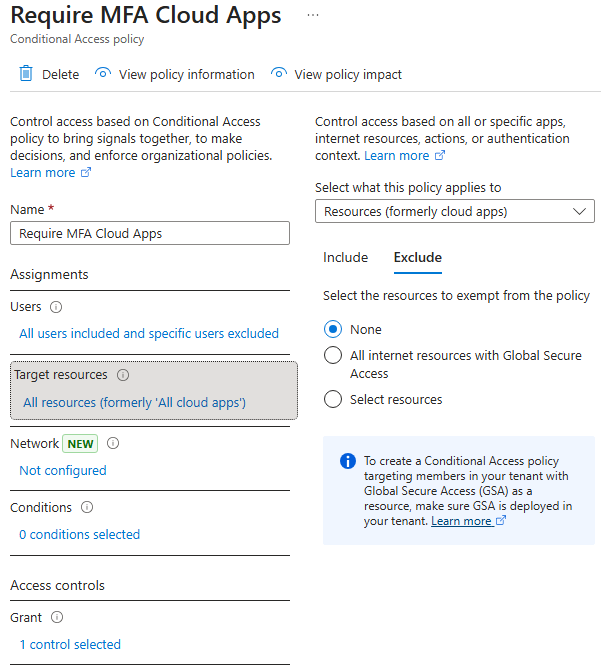
Creating an MFA policy with no exceptions
There are no exclusions defined, and if we try to get a token for the Microsoft Graph with an Edge client ID (f44b1140-bc5e-48c6-8dc0-5cf5a53c0e34) then it fails due to the policy above.
Request
POST /common/oauth2/token HTTP/2
Host: login.microsoftonline.com
User-Agent: Mozilla/5.0 (Windows NT 10.0; Win64; x64) AppleWebKit/537.36 (KHTML, like Gecko) Chrome/119.0.0.0 Safari/537.36 Edg/119.0.0.0
Accept-Encoding: gzip, deflate, br
Accept: */*
Connection: keep-alive
Content-Length: 187
Content-Type: application/x-www-form-urlencoded

client_id=f44b1140-bc5e-48c6-8dc0-5cf5a53c0e34&grant_type=password&resource=https%3A%2F%2Fgraph.microsoft.com%2F&username=adam%4tenant.onmicrosoft.com&password=[redacted]
Response
HTTP/2 400 Bad Request
Cache-Control: no-store, no-cache
Pragma: no-cache
Content-Type: application/json; charset=utf-8
Expires: -1
Strict-Transport-Security: max-age=31536000; includeSubDomains
X-Content-Type-Options: nosniff
P3p: CP="DSP CUR OTPi IND OTRi ONL FIN"
X-Ms-Request-Id: 3ca26690-8e3b-4c31-9c7c-562e73f5c901
X-Ms-Ests-Server: 2.1.21665.8 - SEC ProdSlices
Report-To: {"group":"network-errors","max_age":86400,"endpoints":[{"url":"https://identity.nel.measure.office.net/api/report?catId=GW+estsfd+dub2"}]}
Nel: {"report_to":"network-errors","max_age":86400,"success_fraction":0.001,"failure_fraction":1.0}
X-Ms-Srs: 1.P
Referrer-Policy: strict-origin-when-cross-origin
Content-Security-Policy-Report-Only: object-src 'none'; base-uri 'self'; script-src 'self' 'nonce-M3X7MWE4ghAUo_0EWtOhCg' 'unsafe-inline' 'unsafe-eval' https://*.msauth.net https://*.msftauth.net https://*.msftauthimages.net https://*.msauthimages.net https://*.msidentity.com https://*.microsoftonline-p.com https://*.microsoftazuread-sso.com https://*.azureedge.net https://*.outlook.com https://*.office.com https://*.office365.com https://*.microsoft.com https://*.bing.com 'report-sample'; report-uri https://csp.microsoft.com/report/ESTS-UX-All
X-Xss-Protection: 0
Set-Cookie: fpc=AhBYtm-5vhpEtuHyWtAy2wtdL6kWAQAAADB1S-AOAAAA; expires=Sat, 04-Oct-2025 11:55:28 GMT; path=/; secure; HttpOnly; SameSite=None
Set-Cookie: x-ms-gateway-slice=estsfd; path=/; secure; samesite=none; httponly
Set-Cookie: stsservicecookie=estsfd; path=/; secure; samesite=none; httponly
Date: Thu, 04 Sep 2025 11:55:28 GMT
Content-Length: 642

{"error":"interaction_required","error_description":"AADSTS50076: Due to a configuration change made by your administrator, or because you moved to a new location, you must use multi-factor authentication to access '00000003-0000-0000-c000-000000000000'. Trace ID: 3ca26690-8e3b-4c31-9c7c-562e73f5c901 Correlation ID: 0e0a79ef-b7ef-4261-a727-c1d8cb96f6bb Timestamp: 2025-09-04 11:55:28Z","error_codes":[50076],"timestamp":"2025-09-04 11:55:28Z","trace_id":"3ca26690-8e3b-4c31-9c7c-562e73f5c901","correlation_id":"0e0a79ef-b7ef-4261-a727-c1d8cb96f6bb","error_uri":"https://login.microsoftonline.com/error?code=50076","suberror":"basic_action"}
This can also be observed using Dirk-jan Mollema’s tool roadtx to make the request:
roadtx gettokens -ua edge -u [email protected] -c f44b1140-bc5e-48c6-8dc0-5cf5a53c0e34 -r msgraph
Password:
Requesting token for resource https://graph.microsoft.com/
Error during authentication: AADSTS50076: Due to a configuration change made by your administrator, or because you moved to a new location, you must use multi-factor authentication to access '00000003-0000-0000-c000-000000000000'. Trace ID: a31af84d-bcbb-4d3f-8731-6272e29f0001 Correlation ID: 31c58f3a-1381-4886-a58d-8e396fe73a16 Timestamp: 2025-09-03 08:31:45Z
If we check the sign-in logs for that user, then we see the policy is matched and MFA is enforced:
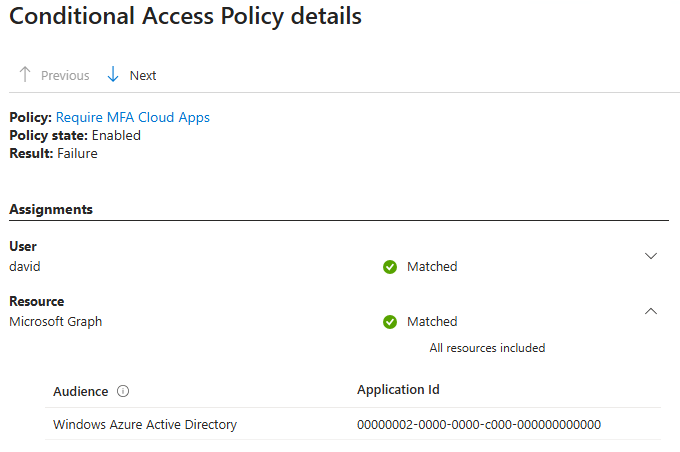
MFA enforced by the CA policy we set up
Oddly though, the resource is listed as Microsoft Graph, but the Audience is listed as Windows Azure Active Directory (00000002-0000-0000-c000-000000000000). This is a possible explanation for what comes next.
In the scenario we’re testing, the target organisation adds an exception to this policy for a particular application. It doesn’t matter which application is excluded, but for the sake of the case study we’ll use Dynamics 365 Viva Sales, which has an ID of 4787c7ff-7cea-43db-8d0d-919f15c6354b.
So now the policy looks like this:
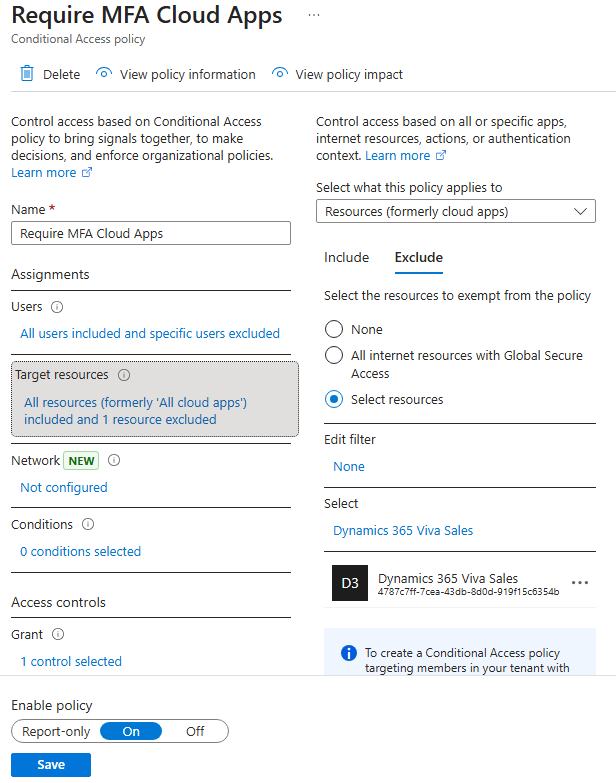
MFA policy configured with a single exception
Now this is where the oddities start. If we try again to get a token using the Edge (f44b1140-bc5e-48c6-8dc0-5cf5a53c0e34) client ID, this time it is successful, even though the Edge application has not been added as an exclusion:
Request
POST /common/oauth2/token HTTP/2
Host: login.microsoftonline.com
User-Agent: Mozilla/5.0 (Windows NT 10.0; Win64; x64) AppleWebKit/537.36 (KHTML, like Gecko) Chrome/119.0.0.0 Safari/537.36 Edg/119.0.0.0
Accept-Encoding: gzip, deflate, br
Accept: */*
Connection: keep-alive
Content-Length: 187
Content-Type: application/x-www-form-urlencoded

client_id=f44b1140-bc5e-48c6-8dc0-5cf5a53c0e34&grant_type=password&resource=https%3A%2F%2Fgraph.microsoft.com%2F&username=adam%4tenant.onmicrosoft.com&password=[REDACTED]
Response
HTTP/2 200 OK
Cache-Control: no-store, no-cache
Pragma: no-cache
Content-Type: application/json; charset=utf-8
Expires: -1
Strict-Transport-Security: max-age=31536000; includeSubDomains
X-Content-Type-Options: nosniff
P3p: CP="DSP CUR OTPi IND OTRi ONL FIN"
X-Ms-Request-Id: a302cf78-ffb1-4a0c-9aae-e88f4eed8000
X-Ms-Ests-Server: 2.1.21665.8 - SEC ProdSlices
Report-To: {"group":"network-errors","max_age":86400,"endpoints":[{"url":"https://identity.nel.measure.office.net/api/report?catId=GW+estsfd+dub2"}]}
Nel: {"report_to":"network-errors","max_age":86400,"success_fraction":0.001,"failure_fraction":1.0}
X-Ms-Srs: 1.P
Referrer-Policy: strict-origin-when-cross-origin
Content-Security-Policy-Report-Only: object-src 'none'; base-uri 'self'; script-src 'self' 'nonce-0CKagxSGQza1izwqgDboag' 'unsafe-inline' 'unsafe-eval' https://*.msauth.net https://*.msftauth.net https://*.msftauthimages.net https://*.msauthimages.net https://*.msidentity.com https://*.microsoftonline-p.com https://*.microsoftazuread-sso.com https://*.azureedge.net https://*.outlook.com https://*.office.com https://*.office365.com https://*.microsoft.com https://*.bing.com 'report-sample'; report-uri https://csp.microsoft.com/report/ESTS-UX-All
X-Xss-Protection: 0
Set-Cookie: fpc=AucD-a-ISmJAnG6VaqzTaSBdL6kWAQAAAJx8S-AOAAAA; expires=Sat, 04-Oct-2025 12:27:09 GMT; path=/; secure; HttpOnly; SameSite=None
Set-Cookie: x-ms-gateway-slice=estsfd; path=/; secure; samesite=none; httponly
Set-Cookie: stsservicecookie=estsfd; path=/; secure; samesite=none; httponly
Date: Thu, 04 Sep 2025 12:27:08 GMT
Content-Length: 3200

{"token_type":"Bearer","scope":"User.Read","expires_in":"5292","ext_expires_in":"5292","expires_on":"1756994122","not_before":"1756988529","resource":"https://graph.microsoft.com/","access_token":"[REDACTED]","refresh_token":"[REDACTED]","foci":"1"}
Again, we can confirm this behaviour in roadtx:
roadtx gettokens -ua edge -u [email protected] -c f44b1140-bc5e-48c6-8dc0-5cf5a53c0e34 -r msgraph
Password:
Requesting token for resource https://graph.microsoft.com/
Tokens were written to .roadtools_auth
Checking the sign-in logs for this successful authentication attempt shows that Windows Azure Active Directory is no longer included in the matched Audience. Instead, the Microsoft Graph resource is now shown as “App excluded”.
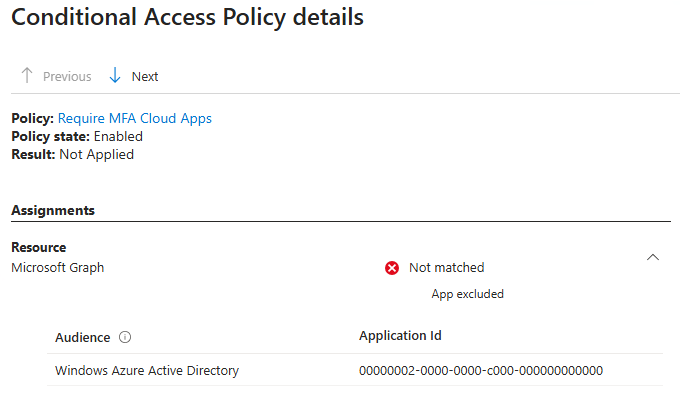
Our authentication now no longer matches the configured MFA policy
Interestingly, this change is invisible to any admin configuring similar policies as the Microsoft What If tool is unable to identify that this policy would not be applied. This is because neither the Edge application nor the Windows AAD resource audience is selectable in What If.
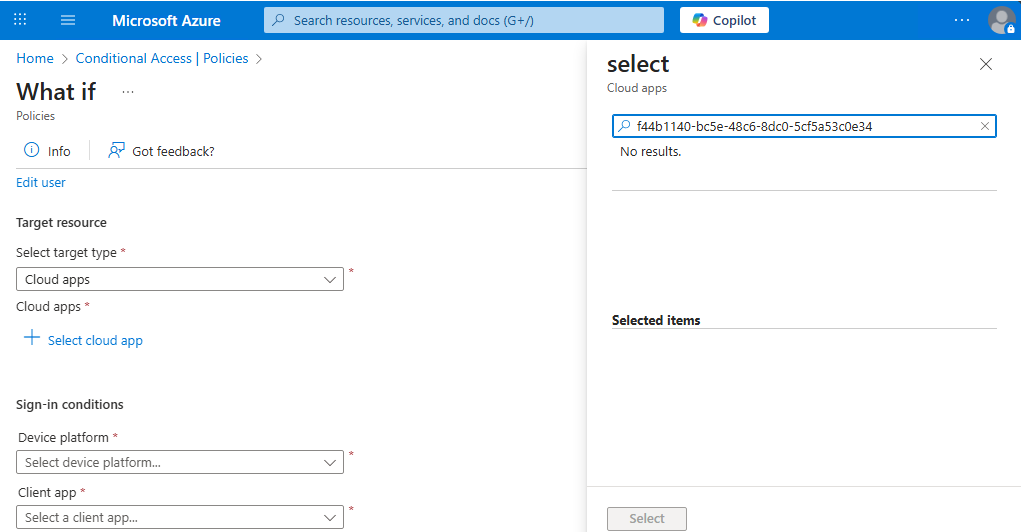
The What If tool cannot select the Edge application or Windows AAD resource
This is strange behaviour, but after some further digging and speaking to several of our colleagues it turned out to actually be documented by Microsoft here:
To summarise the article, it states that certain low privilege scopes are automatically excluded from a policy whenever any application exception is added. It explicitly states that “these low privilege scope exclusions don’t allow data access beyond basic user profile and group information”, and that:
- Native clients and Single page applications (SPAs) have access to the following low privilege scopes:
- Azure AD Graph:
offline_access,openid,profile,User.Read- Microsoft Graph:
offline_access,openid,profile,User.Read,People.Read- Confidential clients have access to the following low privilege scopes, if they’re excluded from an All resources policy:
- Azure AD Graph:
offline_access,openid,profile,User.Read,User.Read.All,User.ReadBasic.All- Microsoft Graph:
offline_access,openid,profile,User.Read,User.Read.All,User.ReadBasic.All,People.Read,People.Read.All,GroupMember.Read.All,Member.Read.Hidden
This aligns with Microsoft’s stance that Conditional Access policies apply to target resources rather than individual applications or clients - meaning that to allow the application which is explicitly excluded from the CA policy to authenticate the user, all applications must be able to get a basic token to the required resource without MFA (or whatever other constraints are configured in the policy with an exclusions enabled).
Whilst our testing of this did not behave exactly as we expected, with variations on whether applications could obtain a basic access token without MFA or not, one of the low privileged exceptions which worked reliably was the Edge application with a client ID of f44b1140-bc5e-48c6-8dc0-5cf5a53c0e34.
If we check the scope of an example token returned below, then we can see that the article is correct - the User.Read scope is provided which should only allow access to the authenticated account’s own basic profile data:
 Headers = {
  "typ": "JWT",
  "nonce": "eH4ynQda8KZp1fumPm44yawE_uthnsXpnNLzQUhQIv8",
  "alg": "RS256",
  "x5t": "JYhAcTPMZ_LX6DBlOWQ7Hn0NeXE",
  "kid": "JYhAcTPMZ_LX6DBlOWQ7Hn0NeXE"
}

Payload = {
  "aud": "[https://graph.microsoft.com/](https://graph.microsoft.com/)",
  "iss": "[https://sts.windows.net/950cc131-c442-4b99-a31e-de17da348764/](https://sts.windows.net/950cc131-c442-4b99-a31e-de17da348764/)",
  "iat": 1756888381,
  "nbf": 1756888381,
  "exp": 1756892727,
  "acct": 0,
  "acr": "1",
  "acrs": [
    "urn:user:registersecurityinfo"
  ],
  "aio": "AUQAu/8ZAAAAiFn6G/jICL2/zmKouB6DpjCsalR9Mwh3miP0A4J8GtMNLhlyGSZc8FziZ9YWLGCNyM7VSAmfhdBG1Cx4ibcfsg==",
  "amr": [
    "pwd"
  ],
  "app_displayname": "Microsoft Edge",
  "appid": "f44b1140-bc5e-48c6-8dc0-5cf5a53c0e34",
  "appidacr": "0",
  "given_name": "david",
  "idtyp": "user",
  "ipaddr": "3.9.41.113",
  "name": "david",
  "oid": "a6f83295-aa63-4ae5-b9db-f4e30af1c32f",
  "platf": "3",
  "puid": "1003200498DB5E3E",
  "rh": "1.AUEBMcEMlULEmUujHt4X2jSHZAMAAAAAAAAAwAAAAAAAAABHAcZBAQ.",
  "scp": "User.Read",
  "sid": "0089d159-a141-6be5-d2b2-3b1f5e3c2a93",
  "sub": "yd7J0nsCm3vghH6rqd0B3Z1qxu6F3tVmw0na46x2zNc",
  "tenant_region_scope": "EU",
  "tid": "",
  "unique_name": "[email protected]",
  "upn": "[email protected]",
  "uti": "JTFP1rl9P06ALhvtTfs_AQ",
  "ver": "1.0",
  "wids": [
    "58a13ea3-c632-46ae-9ee0-9c0d43cd7f3d",
    "62e90394-69f5-4237-9190-012177145e10",
    "8424c6f0-a189-499e-bbd0-26c1753c96d4",
    "b79fbf4d-3ef9-4689-8143-76b194e85509"
  ],
  "xms_ftd": "BL3WrmIcJqJlfwqtLxhClwvOyM3LPeLTaCN2G2PT_BsBZXVyb3Blbm9ydGgtZHNtcw",
  "xms_idrel": "1 10",
  "xms_tcdt": 1739926205,
  "xms_tdbr": "EU"
}
According to both the Microsoft documentation and the scope of our token this should be the end of the matter, and the hidden application exclusion would only represent a slightly confusing and non-obvious behaviour which was ultimately harmless. However, when attempting to use the token to request data from graph.microsoft.com, it becomes apparent that the access provided is far more generous than the JWT scope would suggest.
For example, making a request to the /v1.0/users endpoint returns a full list of Entra users from the tenant:
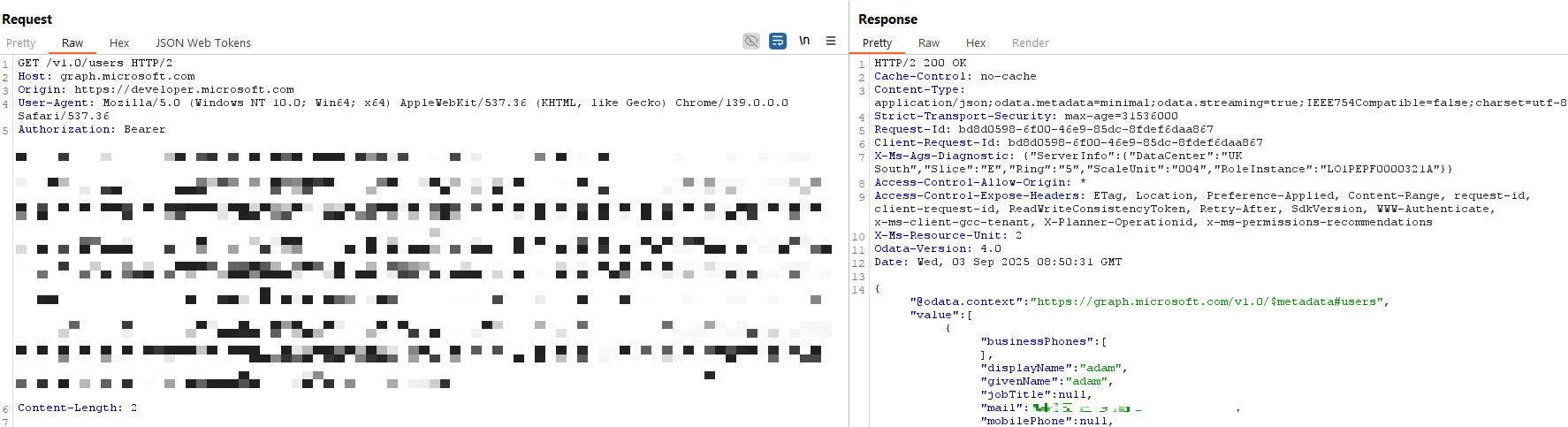
Returning a list of all users in the tenant with the previously obtained token
Testing confirmed that despite the limited User.Read scope, these tokens permit the full enumeration of almost all other Entra ID backed information for the tenant. This includes objects such as groups, devices, service principals and any other data that is commonly gathered by tools such as AzureHound.
Running the AzureHound tool on a real client tenant with this hidden exception configured provided the information shown below, despite the token containing only the User.Read scope:
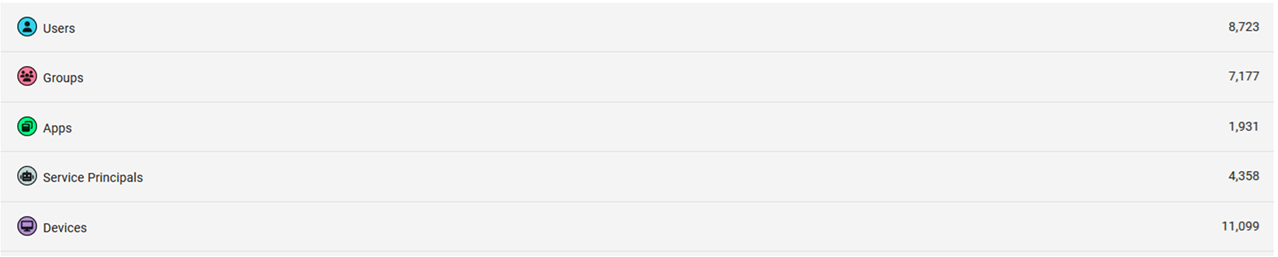
AzureHound data returned despite the limited token scope
This means that it’s possible to access data beyond the scope specified in the token, which is in contradiction to the documentation provided by Microsoft. This behaviour did not apply only to the Edge application (f44b1140-bc5e-48c6-8dc0-5cf5a53c0e34) either - the Microsoft To-Do client (22098786-6e16-43cc-a27d-191a01a1e3b5) also had hidden permissions despite being assigned only the User.Read scope.
Interestingly, tokens returned when authenticating with the To-Do application ID had access to less data via the Microsoft Graph even though there was no obvious difference in the scope from those generated using the Edge client ID. To-Do client tokens allowed for information on users, apps, and service principals to be collected - still greater than the scope suggested but less far-reaching than the Edge client ID, as illustrated by the less complete AzureHound data taken from the same client shown below:

Using a modified AzureHound client to authenticate with the To-Do client ID

Less complete AzureHound data using the To-Do client ID
In the examples discussed above the exception related to an MFA requirement, but this appeared to be applicable to other grant controls too. For example, grant controls such as device compliance exhibited the same behaviour if any exclusions were configured in otherwise blanket policies.
We believe there are two main issues here we’d like to draw attention to:
Transparency of Exclusions
Although the hidden exclusion is documented by Microsoft, the Conditional Access administrator is not made aware of the impact when adding the exclusion via the Azure portal. This is also not represented well in “What If” or other tooling used to evaluate Conditional Access policies.
Note that other client IDs are automatically excluded because of this, both public and private, but so far in our testing no others have the issue of overly permissive scope.
Overly Permissive Scope
The intended User.Read scope is not carried through when graph queries are internally brokered to retrieve Entra ID data, resulting in overly permissive access. This is in direct contradiction to the Microsoft documentation and should also be prevented by the limited scope User.Read returned in the relevant token.
We have been unable to confirm exactly why this behaviour occurs, but conversations with colleagues and inspecting the discrepancies between the Microsoft Graph resource used in these authentication requests and the Audience shown in the corresponding Entra ID Sign-in Logs has led to the following theory.
At a guess, it appears that for data which resides in Windows Azure Active Directory (also called Azure AD Graph), there is a disconnect in scope enforcement between the user’s connection to graph.microsoft.com and the brokered connection that’s used to retrieve Entra ID data. We suspect that this may look like the following illustration:
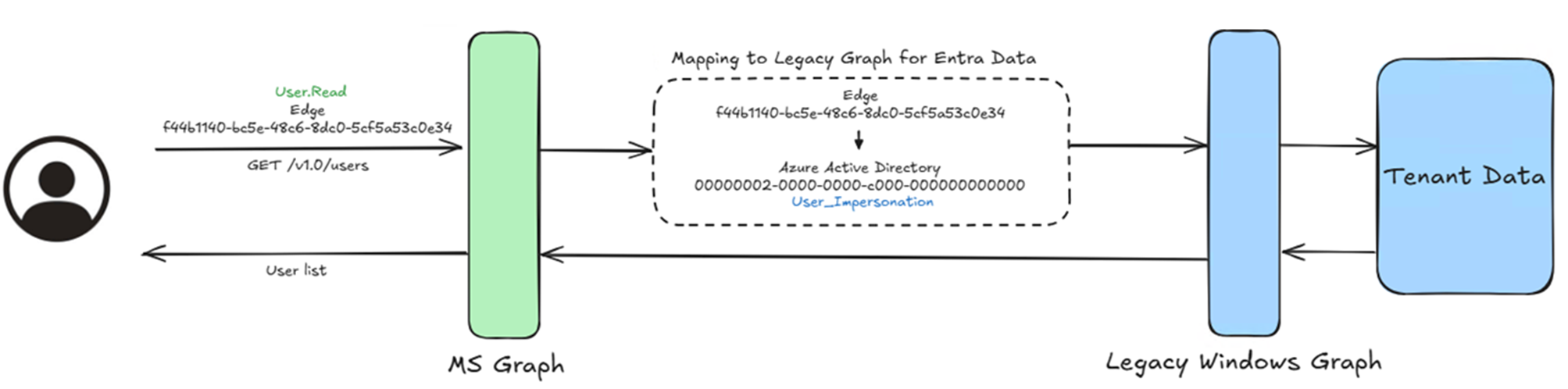
Theoretical brokered connection to the legacy AAD graph
It should be stressed that this is entirely conjecture on our part, and we have no visibility into the underlying backend of the Graph APIs to explain this nor have Microsoft provided a detailed explanation. The real reason for this behaviour may be entirely different, although our theory is reinforced by the inability to use the relevant token to access any of the user’s Office applications, for example Outlook or OneDrive, through the Microsoft Graph API.
Indeed, the only access available to tokens created from the identified client IDs appeared to be related to directory data such as users, groups, and applications. In the documentation Microsoft explicitly list this data as belonging to the Windows Azure Active Directory “resource” - 00000002-0000-0000-c000-000000000000.
This theory also lines up with Microsoft’s published documentation on target resources, which specifically calls out that Microsoft Graph functions as an umbrella resource to other underlying services. In fact, the need to use Audience Reporting to identify these services during Microsoft Graph resource sign-ins is explicitly highlighted by Microsoft here .
Admins can assign a Conditional Access policy to Microsoft cloud apps if the service principal appears in their tenant, except for Microsoft Graph. Microsoft Graph functions as an umbrella resource. Use Audience Reporting to see the underlying services and target those services in your policies. Some apps like Office 365 and Windows Azure Service Management API include multiple related child apps or services. When new Microsoft cloud applications are created, they appear in the app picker list as soon as the service principal is created in the tenant.
What is unknown, however, is exactly how the relationship between the client ID used during the authentication, the requested scope, and the backend audience is mapped by Microsoft - nor why this leads to resource access through the Microsoft Graph API which is greater than that indicated by the token’s own scope.
Unsurprisingly, whilst exploring this behaviour we also noticed other instances where client IDs, resources, and audiences appeared to be intrinsically linked when authenticating to the Microsoft Graph. Specifically, creating exceptions in a Conditional Access policy for the general Microsoft Intune resource (0000000a-0000-0000-c000-000000000000) also created a hidden exception for the Microsoft Intune Company Portal client ID (9ba1a5c7-f17a-4de9-a1f1-6178c8d51223).
Revisiting our previously used test tenant allows us to demonstrate this. Configuring our original MFA policy to remove all exclusions results in any attempts to authenticate using the password grant type and the Microsoft Intune Company Portal client ID failing - as expected.
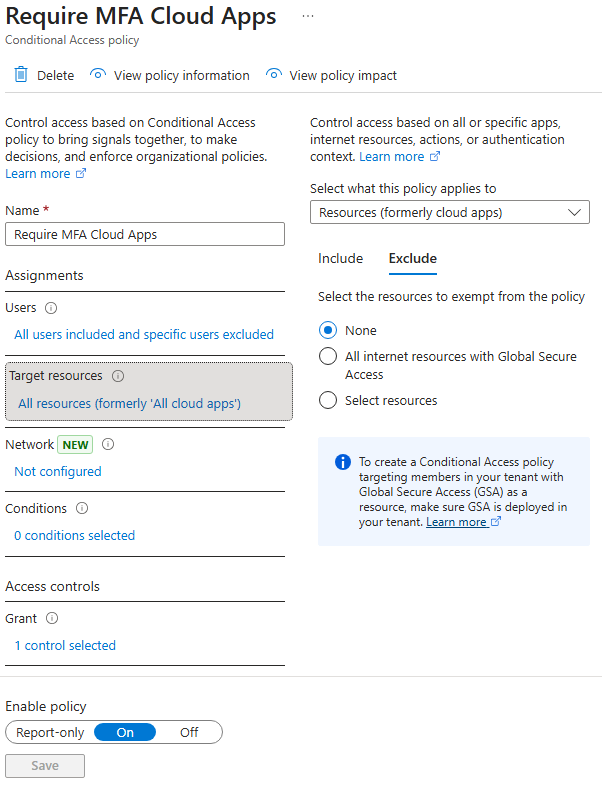
Requiring MFA with no exceptions
roadtx gettokens -ua edge -u [email protected] -c 9ba1a5c7-f17a-4de9-a1f1-6178c8d51223 -r msgraph
Password:
Requesting token for resource https://graph.microsoft.com/
Error during authentication: AADSTS50076: Due to a configuration change made by your administrator, or because you moved to a new location, you must use multi-factor authentication to access '00000003-0000-0000-c000-000000000000'. Trace ID: 6aeb5efa-1ff0-4141-8127-2c3a3fe18c01 Correlation ID: dd7733eb-adb3-4775-92cb-bf39f4746710 Timestamp: 2025-09-04 10:45:07Z
We can then add the Microsoft Intune (0000000a-0000-0000-c000-000000000000) resource as an exclusion - which is a commonly observed configuration amongst clients to support onboarding flow.
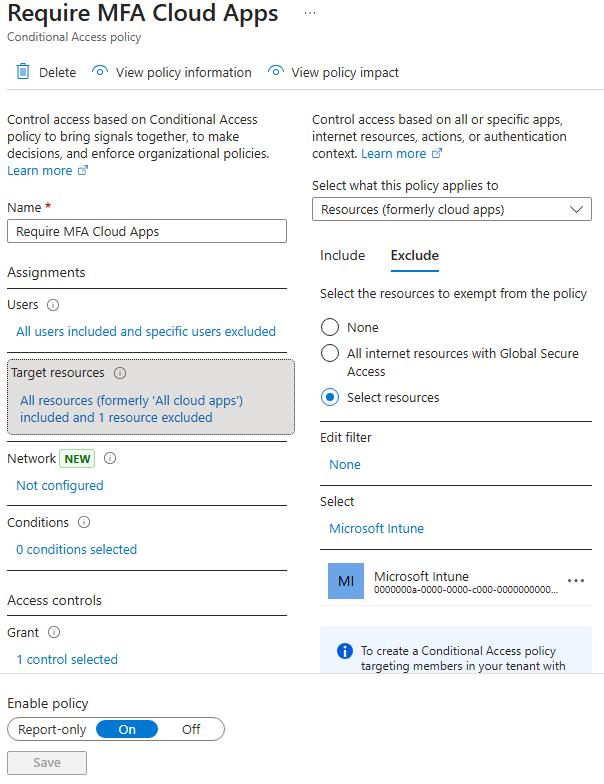
Excluding the Microsoft Intune resource from Conditional Access
Once this change is made, repeating the authentication attempt with the Intune Company Portal (9ba1a5c7-f17a-4de9-a1f1-6178c8d51223) application then returns a valid refresh and access token for the Microsoft Graph.
roadtx gettokens -ua edge -u [email protected] -c 9ba1a5c7-f17a-4de9-a1f1-6178c8d51223 -r msgraph
Password:
Requesting token for resource https://graph.microsoft.com/
Tokens were written to .roadtools_auth
Inspecting the request and response we can see that the default scope assigned to tokens requested using the Intune Company Portal client ID correspond almost entirely to Intune relevant permissions.
Request
POST /common/oauth2/token HTTP/2
Host: login.microsoftonline.com
User-Agent: Mozilla/5.0 (Windows NT 10.0; Win64; x64) AppleWebKit/537.36 (KHTML, like Gecko) Chrome/119.0.0.0 Safari/537.36 Edg/119.0.0.0
Accept-Encoding: gzip, deflate, br
Accept: */*
Connection: keep-alive
Content-Length: 187
Content-Type: application/x-www-form-urlencoded

client_id=9ba1a5c7-f17a-4de9-a1f1-6178c8d51223&grant_type=password&resource=https%3A%2F%2Fgraph.microsoft.com%2F&username=adam%4tenant.onmicrosoft.com&password=[REDACTED]
Response
HTTP/2 200 OK
Cache-Control: no-store, no-cache
Pragma: no-cache
Content-Type: application/json; charset=utf-8
Expires: -1
Strict-Transport-Security: max-age=31536000; includeSubDomains
X-Content-Type-Options: nosniff
P3p: CP="DSP CUR OTPi IND OTRi ONL FIN"
X-Ms-Request-Id: e366cdf3-7ee0-4afc-a4b5-1c2b1deb5b01
X-Ms-Ests-Server: 2.1.21665.8 - NEULR1 ProdSlices
Report-To: {"group":"network-errors","max_age":86400,"endpoints":[{"url":"https://identity.nel.measure.office.net/api/report?catId=GW+estsfd+dub2"}]}
Nel: {"report_to":"network-errors","max_age":86400,"success_fraction":0.001,"failure_fraction":1.0}
X-Ms-Srs: 1.P
Referrer-Policy: strict-origin-when-cross-origin
Content-Security-Policy-Report-Only: object-src 'none'; base-uri 'self'; script-src 'self' 'nonce-jxNlDOu6HiBKMQVmWWe-Pw' 'unsafe-inline' 'unsafe-eval' https://*.msauth.net https://*.msftauth.net https://*.msftauthimages.net https://*.msauthimages.net https://*.msidentity.com https://*.microsoftonline-p.com https://*.microsoftazuread-sso.com https://*.azureedge.net https://*.outlook.com https://*.office.com https://*.office365.com https://*.microsoft.com https://*.bing.com 'report-sample'; report-uri https://csp.microsoft.com/report/ESTS-UX-All
X-Xss-Protection: 0
Set-Cookie: fpc=AjXRcS8ygsZOgvDhzDcprRvtvqjQAQAAANuSS-AOAAAA; expires=Sat, 04-Oct-2025 14:02:03 GMT; path=/; secure; HttpOnly; SameSite=None
Set-Cookie: x-ms-gateway-slice=estsfd; path=/; secure; samesite=none; httponly
Set-Cookie: stsservicecookie=estsfd; path=/; secure; samesite=none; httponly
Date: Thu, 04 Sep 2025 14:02:02 GMT
Content-Length: 3541

{"token_type":"Bearer","scope":"Device.Read.All DeviceManagementConfiguration.Read.All DeviceManagementConfiguration.ReadWrite.All ServicePrincipalEndpoint.Read.All User.Read","expires_in":"4769","ext_expires_in":"4769","expires_on":"1756999293","not_before":"1756994223","resource":"https://graph.microsoft.com/","access_token":"[REDACTED]","refresh_token":"[REDACTED]","foci":"1"}
Reviewing this login in the Entra ID sign-in logs confirms our earlier suspicion, that the default scope for the Intune Company Portal application has resulted in several audience assignments from Microsoft, including the Microsoft Intune resource with the ID of 0000000a-0000-0000-c000-000000000000.
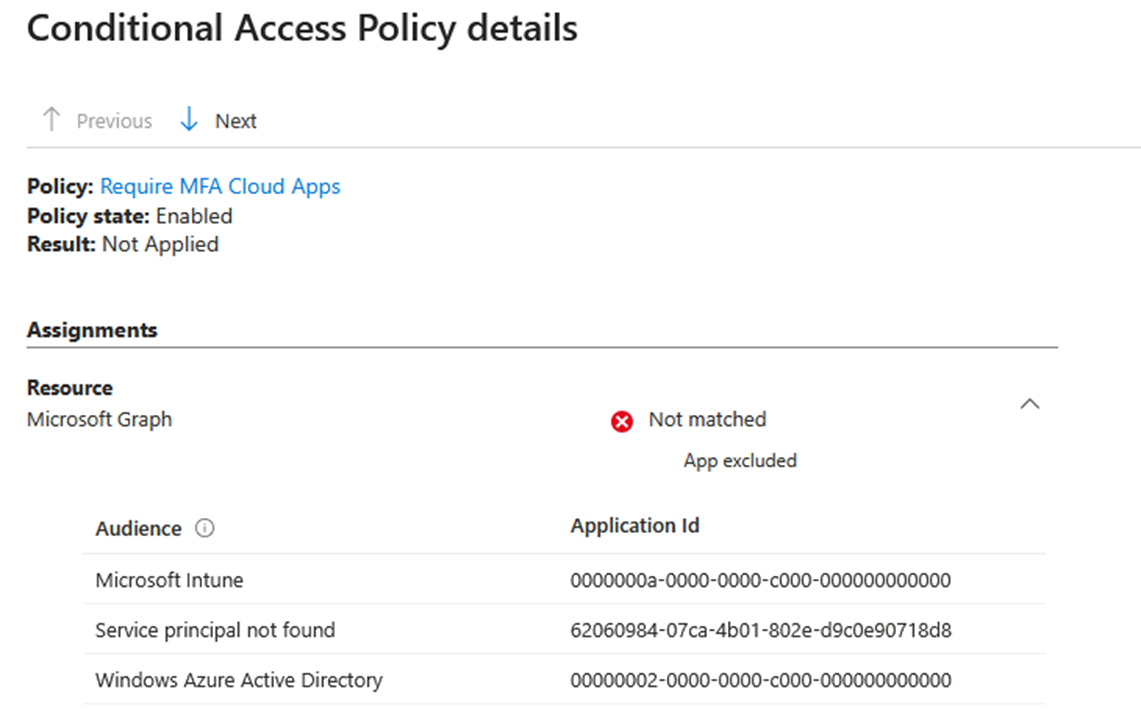
Multiple audiences associated with the sign-in
As before, we consider this behaviour to be non-obvious for administrators configuring Conditional Access policies - potentially leaving organisations exposed through exploitable misconfigurations which cannot be easily identified without manual testing. This is again exacerbated by the What If tool failing to correctly identify this exception is in place, as neither the Company Portal client ID nor the base Microsoft Intune resource ID are shown within the tool:
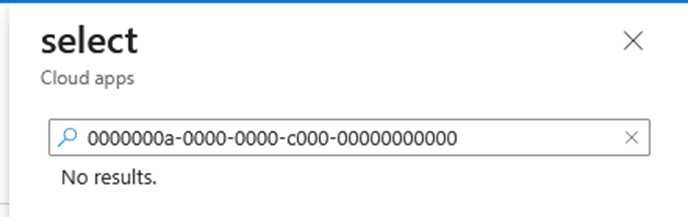
Microsoft Intune not available as a resource within What If
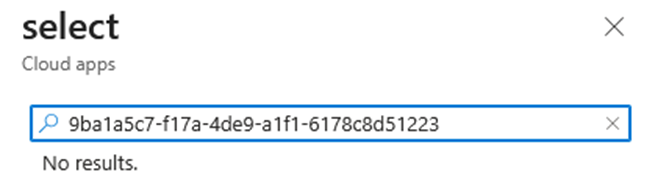
The Intune Company Portal application also unavailable
We had originally hoped to report this to Microsoft for remediation alongside the wider issue of overly permissive scopes discussed above, however conversations with the team at MSRC indicated that Microsoft consider this to be expected behaviour, and that as the Microsoft Intune Company Portal app was requesting tokens for resources that are owned by Microsoft Intune (0000000a-0000-0000-c000-000000000000) this behaviour would not be considered an issue.
They noted that:
Conditional Access policies apply to the resources requested by the public client apps and not on the client app itself. Since the policy excludes Microsoft Intune (
0000000a-0000-0000-c000-000000000000), and the client app is requesting Intune resources, the policy did not apply.
We still believe this is not sufficiently clear for Entra ID administrators, and hope for changes to be made to the Conditional Access documentation in the future to make it clearer that excepting a resource directly from a policy also includes authentication to the Microsoft Graph resource where the audience matches the excluded resource. It also automatically excludes the Windows Azure AD audience (00000002-0000-0000-c000-000000000000) from the same policy, and in the case of Intune a third unknown audience that has not been fully explored at the time of writing (62060984-07ca-4b01-802e-d9c0e90718d8).
This behaviour could also lead to some interesting edge cases where other applications can gain tokens to the Microsoft Graph with multiple audiences. Whilst the User.Read scope and the associated Windows Azure AD (00000002-0000-0000-c000-000000000000) audience returned when using the Intune Company Portal application to authenticate did not allow for access to data beyond the user’s own basic information, it us unknown if this would be the case for any other client IDs automatically excluded from CA based on a resource exception (see Future Work).
It was noted that applying restrictions to the Windows Azure Active Directory (00000002-0000-0000-c000-000000000000) resource to specifically require MFA successfully blocked requests for a Microsoft Graph token using the Intune Company Portal (9ba1a5c7-f17a-4de9-a1f1-6178c8d51223) client ID. This suggests that it is possible to add an exception only for requests to the Microsoft Intune resource type without also allowing users to obtain a Microsoft Graph access token with a wider audience - but that this must be specifically configured and is not the default behaviour (see Remediation for more details on this).
Ultimately, we believe this behaviour should be made clearer to users via updated documentation and/or a warning when application IDs such as Microsoft Intune 0000000a-0000-0000-c000-00000000000 are exempted from a CA policy about any additional client-specific exceptions this will cause by default. The ability for administrators to set more granular restrictions by allowing for Conditional Access policies (and the What If tool) to differentiate between Audience, Resource, and Application IDs would also serve to address this issue.
It is plausible that we have only scratched the surface of the interplay between application IDs, scopes, resource, and audience assignments with this testing, and that there may be the potential for other instances of misleading scope permission or non-obvious exclusions to be found going forward. Our plans for the future are to more thoroughly explore the audience assigned by Microsoft when signing into the Microsoft Graph using a variety of applications, and evaluating how changing the requested scope of the token can be used to modify these audiences.
By building a mapping of all public/native applications and their associated audiences across various requested scopes we hope to identify any other instances of access tokens which grant greater privileges against the Microsoft Graph than their scope shows, and to highlight any other resources which are commonly excluded from Conditional Access policies which may inadvertently grant applications access to the Microsoft Graph at the same time.
Update: As of 15/06/2026, Microsoft now allows baseline enforcement of Conditional Access policies against “All resources” even when a resource exclusion is configured. This can be checked or manually enabled in the Baseline scopes settings page. Further information on this change can be found here:
The original remediation advice for this issue is shown below for posterity.
Removing any configured exclusions for policies that are critical to your organisation’s security posture is the quickest and most reliable way to prevent the external enumeration of Entra ID data through compromised credentials. It is noted, however, that such exceptions are often created for legitimate reasons that are hard to work around, and removing them entirely may not be possible for all organisations in all instances.
Alternatively, the Microsoft article which discusses the creation of hidden exclusions states that:
If the recommended baseline MFA policy without app exclusions can’t be configured because of business reasons, and your organization’s security policy must include directory-related low privilege scopes, create a separate Conditional Access policy targeting Windows Azure Active Directory (
00000002-0000-0000-c000-000000000000).Windows Azure Active Directory is a resource representing data stored in the directory such as users, groups, and applications. The Windows Azure Active Directory resource is included in All resources but can be individually targeted in Conditional Access policies by using the following steps
The article goes on to provide steps to configure a custom attribute that tags the Windows Azure Active Directory application so that it can be referenced in a separate Conditional Access policy. We’ll expand on those steps below, providing some additional context and detailed screenshots.
Create an Attribute
Sign in to the Microsoft Entra admin centre as an Attribute Definition Administrator and Attribute Assignment Administrator - note that these roles are not automatically granted to Global Administrators.
Browse to Entra ID > Custom security attributes and create a new attribute set. The name of the attribute set does not need to be anything specific.

Creating an attribute set
Create an attribute within the attribute set - again the name of the attribute is not important. This attribute can then be assigned to the Windows Azure Active Directory to allow it to be referenced in a Conditional Access policy. It should include a pre-defined value that could be a string or a Boolean.
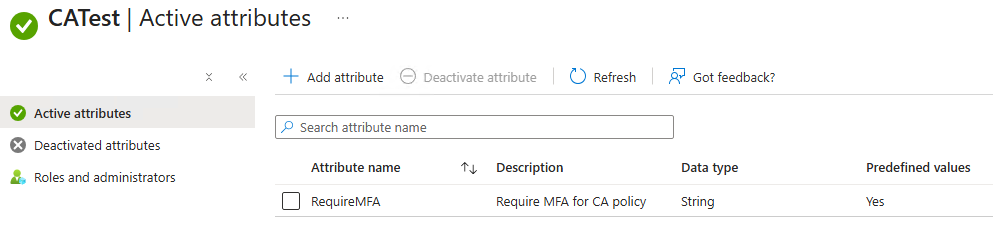
Creating an attribute within the attribute set
Assign the Attribute to Windows Azure Active Directory
00000002-0000-0000-c000-000000000000 (or Windows Azure Active Directory).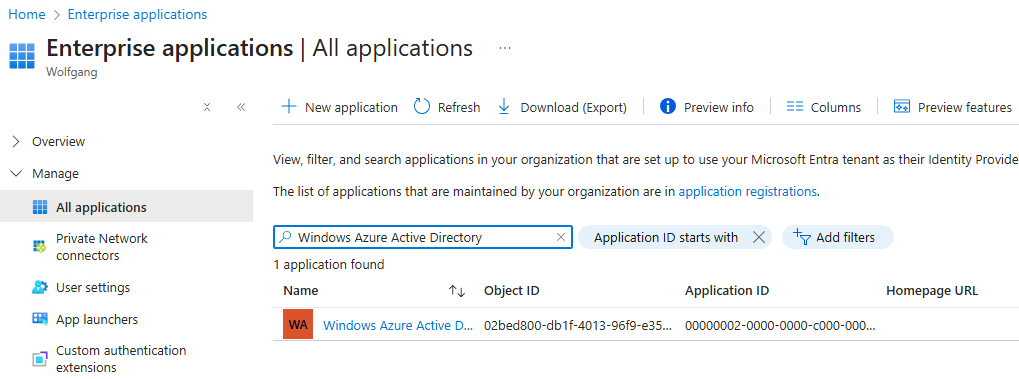
Finding the Azure Active Directory application
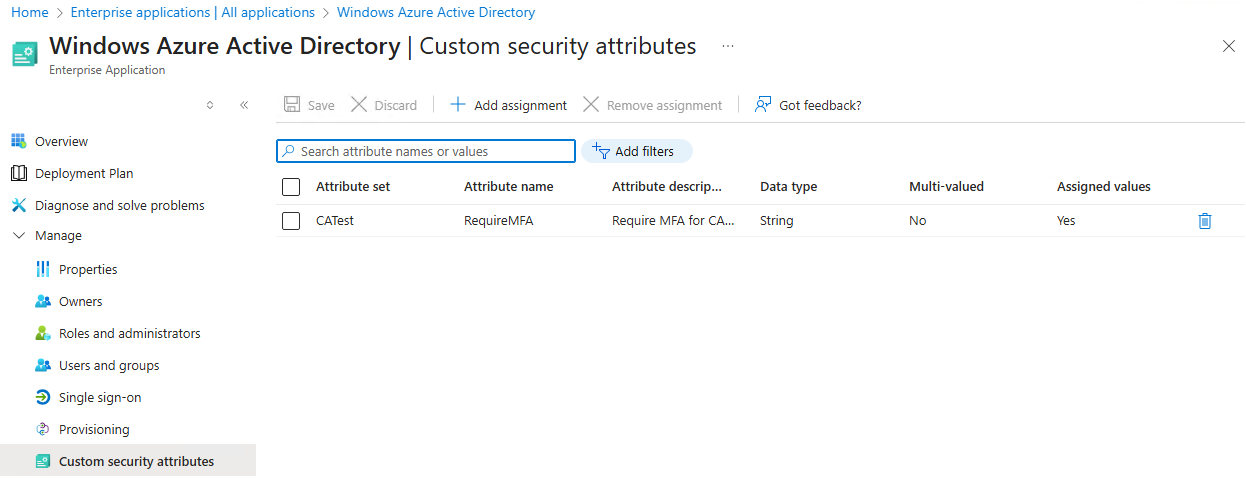
Adding the attribute to the application to ’tag’ it
Create the Conditional Access Policy
Entra ID > Conditional Access > Policies.Target resources > Resources (formerly cloud apps) > Include, select > Select resources > Edit filter.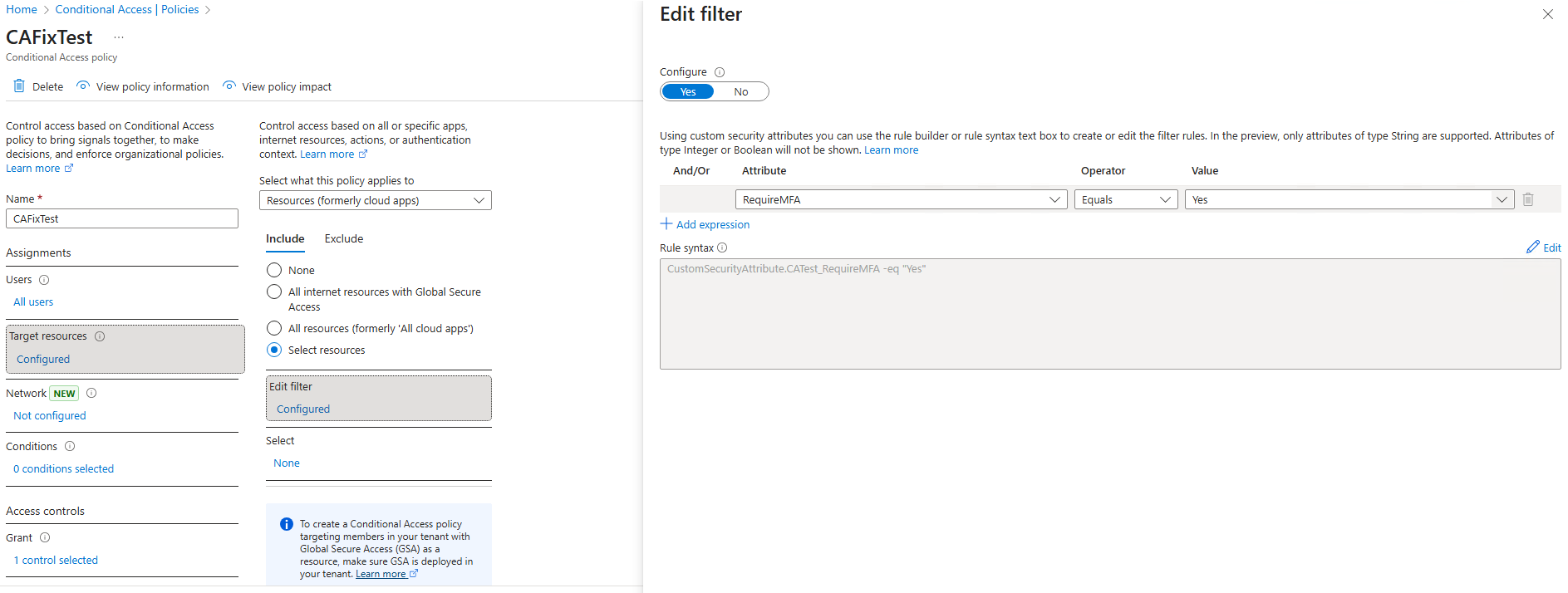
Referencing the attribute in a Conditional Access policy
The actions above result in any authentication that ultimately targets the Windows Azure Active Directory (00000002-0000-0000-c000-000000000000) resource/audience being subject to the control, catching the authentication that falls through any policies that have an exception defined for resources.
Testing confirmed that the above remediation will also apply the policy for all authentication attempts using the Intune Company Portal (9ba1a5c7-f17a-4de9-a1f1-6178c8d51223) client ID due to the Azure AD Graph being configured as a backend audience type for this application.
Depending upon the reason for the original exclusion being configured this fix may also cause the relevant application to no longer function as intended, or could otherwise undermine business critical functionality if not thoroughly tested. As such, it is advised that any such changes are made in a development or non-production environment first and monitored extensively for potential issues prior to wider rollout.
We have found disclosure of this issue a somewhat frustrating journey with MSRC. Both issues were submitted in September 2025 and quickly assigned case numbers, but progress from there was slow and communication sparse. The Intune resource exception behaviour was ultimately marked as “Low” severity and closed as intended behaviour, whilst the excessive scope within hardcoded client IDs issue was confirmed as a duplicate and folded into an existing report.
When Microsoft published a blog in January 2026 announcing a change to how hidden resource-based exclusions are created, it did not acknowledge our (or any other) vulnerability report, explain the risk currently posed to customers, or offer any guidance on mitigation. After we shared this blog with Microsoft ahead of publication, we were asked to delay disclosure until fixes were deployed for the excessive scope issue at a later date in June. When we chased in June to confirm the fix date and whether we were clear to publish, we received only a holding message stating that our query was being investigated. At no point through this process were clear timelines provided for when changes would be made, or when affected customers would be made aware of the risk.
This is most certainly not the worst case of frustration with Microsoft’s disclosure process being discussed at the moment, but it is worth noting as part of the wider conversation around the need for this process to be improved.
| Date | Action |
|---|---|
| 04/09/2025 | Both potential issues are submitted to MSRC, one focusing on the Intune resource exception behaviour and the other on the hidden excessive permissions granted by the Edge and To-Do clients. |
| 05/09/2025 | MSRC confirms both reports have been assigned case numbers and are being actively investigated for reproduction. |
| 16/09/2025 | First chase to MSRC to enquire if they need any additional details to reproduce the issues. |
| 16/09/2025 | MSRC confirms cases are still under active investigation and no further information is required. |
| 15/10/2025 | The Edge and To-Do client issue is confirmed by MSRC. |
| 16/10/2025 | The Edge and To-Do client issue is confirmed as a duplicate of an existing MSRC report marked as “Important” severity. |
| 19/11/2025 | The Intune resource exception behaviour is marked as “Low” severity and marked as won’t fix/intended behaviour. |
| 04/12/2025 | Responsible disclosure deadline passes. |
| 28/01/2026 | Microsoft publishes a blog stating the intention to fix the creation of hidden resource-based exclusions when creating individual exclusions to Conditional Access policies as of March 27, 2026. This does not acknowledge the report or explain the risk currently posed by the excessive scopes granted to some applications able to make use of these hidden exclusions, but should make this configuration much rarer in the future and prevent it from being configured accidentally. |
| 30/01/2026 | This blog shared with Microsoft prior to publication, and MSRC were asked to clarify details of when they expected to allow publication based on the intended change timeline in their previous blog. |
| 11/02/2026 | Chased MSRC for a response. |
| 12/02/2026 | Microsoft confirm that the change discussed in their blog post is intended to address this issue, and request publication is delayed until a “later date” when fixes are deployed in June, with a promise to get back in touch with more detailed feedback on this blog with any requested changes ahead of publication. |
| 05/06/2026 | Reached out to MSRC to confirm what their expected fix date in June was and whether they would be happy for the blog to be published. |
| 10/06/2026 | Holding message received from MSRC that they are “investigating our query and will get back to us with an update once they have more information”. |
| 15/06/2026 | Rollout of the enforcement model for baseline scopes in Entra ID begins. |
| 22/06/2026 | Dirk-jan publishes his blog post. |
| 23/06/2026 | Public release of this blog. |
This blog obviously makes use of the awesome ROADtools suite for part of its demonstrations, with thanks for Dirk-jan Mollema for his continued work to poke out and find interesting holes in Conditional Access policies and Entra ID scopes. With thanks also to SpectreOps for the Microsoft Graph reconnaissance tool AzureHound which we use heavily for external enumeration alongside ROADtools and which was used to demonstrate the impact of this issue.
Shout-out also to Fabian Bader who has worked extensively with Dirk-jan on issues such as this, and published a blog in November after this post was originally written which does a fantastic job of explaining the hidden resource-based exclusion behaviour, along with a whole host of other Conditional Access bypasses, which is definitely worth a read.
Thanks lastly to all of our internal colleagues at AmberWolf who listened to us ramble on about this strange behaviour, and who suggested explanations for what we saw, helped us investigate, and proofread early versions of this blog.
Richard WarrenExploiting NSIS installer bugs to escalate privileges in Zscaler Client Connector
Read Article
Richard WarrenA bypass of the CVE-2025-0309 fix allowed enrolment to a rogue server via unauthenticated Netskope reverse-proxy routes.
Read Article