 Darren McDonald
- 04 Jun, 2025
ThinOS - Unencrypted Memory Dumps (CVE-2025-32752)
Full disk encryption that wasn’t.
Read Article
Darren McDonaldCraig S. Blackie (MDSec) and Darren McDonald (AmberWolf) | 10 July 2026
A joint discovery, published in parallel on the AmberWolf and MDSec blogs.
Dell stores its BIOS administrator and user passwords as XOR-encrypted plaintext in the DVAR (Dell Variable) region of the SPI flash chip, not as a one-way hash. The scheme encrypts a 32-byte password field with a 20-byte key, and the first character is not encrypted at all. For any password up to 12 characters, the unused tail of the field leaks the entire key, so the password can be recovered directly from a flash dump with no brute force and no known plaintext. Longer passwords leave a small blind zone in a single record, which a quirk of the key derivation then closes (more below). Recovery is deterministic and completes in milliseconds. An attacker who can read the SPI flash, which is possible with a clip and a cheap programmer or by booting an operating system they control, can recover the password and gain full BIOS access. We found this jointly by chance while working on something entirely different. The affected scheme is used across a range of older Dell platforms, a large number of which are now near or past end of support, whereas newer platforms have moved to a more secure password-protection mechanism. It is not, however, limited to legacy hardware: it is confirmed on the current-generation Wyse 5070 thin client, which remains supported and unpatched, and it is implemented in the SystemPwSmm SMM driver common to Dell client platforms. Dell tracks it as CVE-2026-40639 (DSA-2026-197).
A BIOS administrator password is supposed to be a meaningful control. It stops someone changing the boot order, disabling Secure Boot, or booting from removable media, which on a well-configured machine is the last line of defence against an attacker with physical access.
It is worth recognising up front that there are already well-known ways to bypass or remove a configured Dell BIOS password. Master passwords can be derived using services such as bios-pw.org. Another method involves modifying the BIOS flash to put the device into manufacturing mode, which preserves the settings but lets you set the service and asset tag while removing any password. And in many cases you can simply clear the entirety of NVRAM, reflash the firmware, and remove all settings, including the password, entirely. What is less widely appreciated is that the way certain Dell systems store the password allows recovery of the original clear text password, not just its removal, under the conditions described below.
We did not set out to attack that password at all, and this did not begin as a planned research project. It started as two old friends having fun with chip programmers. We had been reproducing existing public research on pre-boot DMA attacks, demonstrated against an HP machine, and were curious whether the same class of weakness applied to Dell UEFI. Answering that meant understanding how Dell stores its BIOS settings on the SPI flash, which we worked out the direct way, by changing a setting, reading the chip back with a clip and a programmer, and seeing which bytes moved. The password was just one of the settings we poked at, and our interest in it was mundane: we wanted to find where it lived so we could try to zero it out and clear it.
What we found instead was the password sitting in the flash under a broken XOR cipher, with the key leaking out right next to it. This post explains how the scheme works, why it fails, and how to recover the password from a flash dump, so that other researchers and the administrators running these devices can understand their exposure. The find was joint, and this article appears on both the AmberWolf and MDSec blogs.
Getting at that pre-boot DMA question meant first understanding how Dell keeps its BIOS configuration on the SPI flash, so we set about mapping it empirically: change one setting in the BIOS, read the whole flash back over a SOIC clip with a T48 programmer, and diff against the previous read to see which bytes moved.
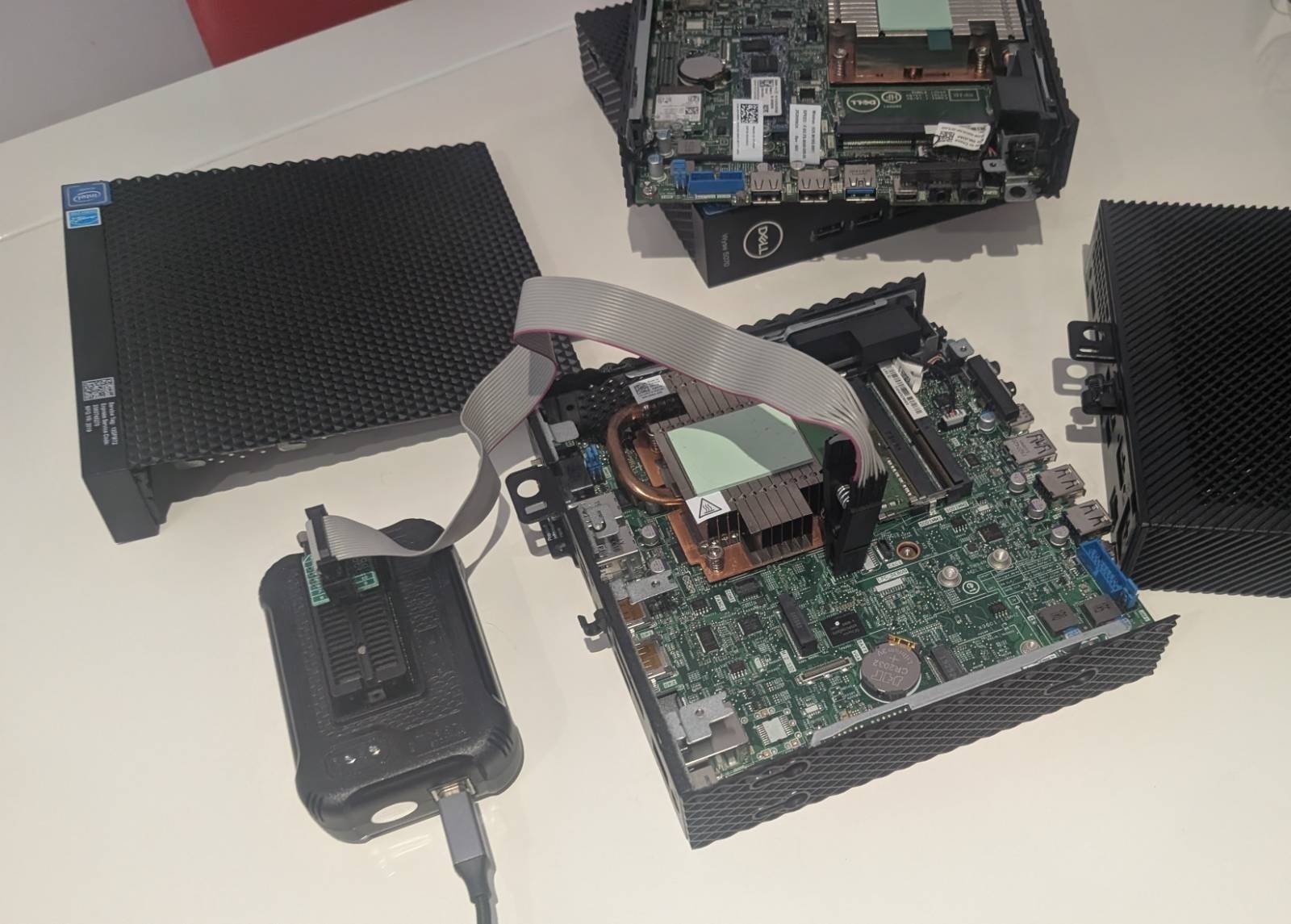
A SOIC-8 clip on the BIOS flash chip, connected to a T48 programmer. This is the whole hardware requirement: no soldering, no board removal.
The BIOS password was one of the settings we exercised this way, and our goal with it was not to read it but to delete it. If we could find the exact region that held the password, we could try to zero it out and clear the password entirely, which is a perfectly good physical-access bypass in its own right. So we changed the password, dumped, diffed, and watched where the flash changed. What stood out was that the password region did not simply overwrite in place. New records were being appended each time, which is the log-structured behaviour of Dell’s DVAR store.
It was while staring at those records that we realised what we were actually looking at, helped considerably by the password we had set: AAAAAAAA. A single repeated character made it relatively easy to spot. The short password leaves most of the 32-byte record as encrypted null-padding, which is just the key in the clear; the constant plaintext makes the remaining characters fall out by inspection; and the 20-byte key even repeats visibly within the record. The pattern was impossible to miss. The password was not hashed. It was XOR-encrypted, with the key sitting in the same record right next to the ciphertext. A cipher that leaks its own key. We then pulled the relevant SMM driver, SystemPwSmm, into Ghidra to confirm the mechanism. This showed the password is stored more or less as typed, and the routine that writes it skips the very first byte. From there it was just a matter of reading the key out and XORing the password back.
Dell BIOS passwords live in the DVAR store, a proprietary variable region on the SPI flash that the recovery tool locates automatically by its four-byte DVAR signature. Each password is held in a 32-byte record with a very simple structure.
Byte 0:      First character of the password, stored UNENCRYPTED
Bytes 1-31:  Remaining characters, XOR-encrypted with a 20-byte key
             Any unused trailing bytes are null-padded before encryption
The encryption is a repeating-key XOR:
stored[i] = password[i] XOR key[(i - 1) mod 20] for i = 1..31
The password field is null-padded out to 32 bytes. For a password of length L, positions 0 to L-1 hold the characters (position 0 in the clear, positions 1 onward encrypted), and positions L to 31 hold null bytes that are then XOR-encrypted along with everything else.
Storing the password under reversible encryption rather than a hash is already the wrong choice. Verifying a password never requires recovering it, so there is no good reason for the firmware to be able to turn the stored value back into the original. But the specific way the encryption is implemented turns “wrong choice” into “trivially recoverable”.
The key is 20 bytes. The field it encrypts is 32 bytes. That 12-byte mismatch is the whole vulnerability.
Anything XORed with zero is itself. When the firmware encrypts the null-padding that follows a short password, each of those null bytes turns into a raw key byte in the stored record:
stored[L]   = 0x00 XOR key[(L-1) mod 20] = key[(L-1) mod 20]
stored[L+1] = 0x00 XOR key[L mod 20]     = key[L mod 20]
...
stored[31]  = 0x00 XOR key[30 mod 20]    = key[10]
For an eight-character password, a common case, positions 8 to 31 are null-padding. That is 24 bytes of raw key material in a record protected by a key only 20 bytes long. The entire key is sitting in the stored record. There is no brute force, no known plaintext, and no side channel. You read the key straight out of the tail of the record and XOR the password back.
A worked example makes it concrete. This is the stored record for the password “password”, taken straight from an E7250 dump:
Stored: 70 14 92 c2 4d 1d 76 50 56 19 3a 1f 3a 2a 8a 18 78 3a a3 cf fb 75 e1 b1 3a 72 04 34 56 19 3a 1f
Key:    75 e1 b1 3a 72 04 34 56 19 3a 1f 3a 2a 8a 18 78 3a a3 cf fb
The first stored byte, 0x70, is the letter “p” in the clear. The password is eight characters, so bytes 21 to 31 of the stored record are the null region, and they hand us key bytes 0 to 10 directly: 75 e1 b1 3a 72 04 34 56 19 3a 1f. Key bytes 11 to 19 come from positions 12 to 20, which are the tail null bytes for this length. With the full 20-byte key in hand, the rest of the password falls out one XOR at a time:
stored[1] XOR key[0]  = 0x14 XOR 0x75 = 0x61 = 'a'
stored[2] XOR key[1]  = 0x92 XOR 0xe1 = 0x73 = 's'
stored[3] XOR key[2]  = 0xc2 XOR 0xb1 = 0x73 = 's'
stored[4] XOR key[3]  = 0x4d XOR 0x3a = 0x77 = 'w'
stored[5] XOR key[4]  = 0x1d XOR 0x72 = 0x6f = 'o'
stored[6] XOR key[5]  = 0x76 XOR 0x04 = 0x72 = 'r'
stored[7] XOR key[6]  = 0x50 XOR 0x34 = 0x64 = 'd'
“password”, recovered exactly, from the stored record alone.
Recovery degrades gracefully with length. The table below shows what is recoverable.
Table 1: recoverability by password length
| Password length | Key bytes leaked | Outcome |
|---|---|---|
| 1 to 12 characters | All 20, from the null region | Instant, exact recovery |
| 13 to 31 characters | Partial; key bytes 11 to 19 are each used at one position only, which now falls in the password rather than the null pad | A blind zone of 1 to 9 characters in the middle, unless the key is recovered another way (see below) |
| 32 characters | Full field, no null padding | Recoverable when the password is a single repeated character; otherwise partial |
The cutoff is 12 because key bytes 11 to 19 are each used at only one position in the record (positions 12 to 20). They leak only while that position is still null padding, which holds up to a 12-character password. Plenty of real BIOS passwords are that short, so recovery is instant and exact. Longer passwords leave a blind zone in a single record, but the password-history trick below collapses that too.
You might hope that longer passwords are safe because the null region no longer leaks the whole key. They are not, and the reason is in how the key is derived. Decompiling SystemPwSmm shows the 20-byte key is computed as:
key = modified_md5(seed[7 bytes] + GUID[16 bytes] + password_byte0[1 byte])
The seed is a fixed per-device value and the GUID is fixed for the variable. The only password-dependent input is the first byte of the password, and that byte is stored in the clear. In other words there are only 256 possible keys on a given device, one per value of the first character, and fewer once you discount non-printable first characters. The “encryption” is keyed almost entirely off device-static data plus a single plaintext byte.
The DVAR store is log-structured. When a password is changed, the old record is marked deleted but not erased; it stays readable on the flash. Across the dumps we looked at, passwords from several previous configurations were sitting there alongside the current one.
Combine that with the 256-keys-per-device property and the partial-recovery limit disappears. If any historical password on the device was 12 characters or shorter and started with the same first character as the current password, it used the identical key, and that key was fully leaked through its null region. Recover the short historical password, lift its key, and apply it to the current record for a complete, unknown-free recovery. This works for any current password past 12 characters, not just very long ones.
A example scenario:
Because DVAR entries accumulate over the life of the device and are never securely erased, the chance of a usable historical key only grows with each password change. In the worst case, rotating the password regularly with a common first character makes the current password easier to recover, not harder.
The Wyse 5070, a current-generation thin client, uses the same DVAR and XOR scheme, but its flash shows an additional behaviour: sparse, per-byte bit-flipping applied across the whole DVAR region. It is easy to spot because it affects variable names as well as data; “FactoryDefaults” reads as “Fa#toryDefau,ts” in the raw flash. Around 30 percent of byte positions in a record are affected, using a small set of masks (0x08, 0x10, 0x18, 0x20, 0x28, 0x40, 0x48), and it is re-randomised on every write. Diffing two dumps of the same device taken before and after a password change showed over 5,000 single-byte differences across the DVAR region, which confirms the flips change with each write rather than being fixed at manufacture.
Table 2: recovery accuracy against the Wyse 5070 obfuscation
| Set password | Recovered | Accuracy | Note |
|---|---|---|---|
| Fireport (8 chars) | Firehort | 7 of 8 | Position 5 ambiguous: mask 0x08 gives “h”, mask 0x10 gives the correct “p”; “h” scores higher on letter frequency, so it wins without a dictionary |
| Password1! (10 chars) | @assgord1! | 8 of 10 | First byte flipped to “@” (a valid password character, so left alone); one wrap-only byte below the correction threshold |
Dell has confirmed this bit-flipping is not related to the vulnerability or its remediation, and the cause of the behaviour is not something we can currently explain.
We wrote a recovery tool that locates the DVAR store by signature, scans it for valid password records, extracts the key from the null region, and decrypts and validates each password. It handles short and long passwords, the 32-character uniform case, historical records, and the Wyse 5070 obfuscation, and it filters false positives on key entropy, null-byte counts, and wrap-region consistency. Run against a dump, it returns every password on the device in milliseconds:
$ dell_recover_password.py dump.bin
File: dump.bin (8388608 bytes / 8192KB)
DVAR store: 0x640000 - 0x680000

Found 2 password(s):

  [1] "password"
      Offset: 0x644649
      Length: 8 characters

  [2] "password2"
      Offset: 0x648b55
      Length: 8 characters
We want to be careful about scope here. This was confirmed on a limited sample of devices, and Dell has clearly addressed it on at least some newer hardware. The table below is what we tested.
Table 3: tested devices
| Model | BIOS / scheme | Result |
|---|---|---|
| Dell Latitude E7250 (end of life) | AMI Aptio, DVAR + XOR | Vulnerable, passwords recovered |
| Dell Wyse 5070 | AMI Aptio, DVAR + XOR with per-byte bit-flipping | Vulnerable, passwords recovered |
| Dell Latitude 7490 | DVAR + XOR | Vulnerable, passwords recovered |
| Dell XPS 15 9560 (end of life) | DVAR + XOR | Vulnerable, password recovered |
| Dell OptiPlex 3000 | SIVB, SHA-256 with an encrypted vault | Not vulnerable, nothing recovered |
| Dell Latitude 5310 | Different scheme, no XOR password records | Not vulnerable |
| Dell XPS 15 9530 | Different driver architecture entirely | Not vulnerable |
On the OptiPlex 3000, Dell has replaced the DVAR and XOR scheme with a SIVB (Security Information Vault Block) store that hashes the password with SHA-256 and keeps it in an encrypted vault and is not recoverable from a flash dump. So Dell knows how to do this properly and has done so on newer models. The problem is that the fix has not reached everything still being sold and deployed. The Wyse 5070, a current, supported thin client, still ships the recoverable DVAR and XOR scheme. Two of the other confirmed-vulnerable devices, the Latitude E7250 and the XPS 15 9560, are themselves no longer supported and will not receive fixes at all, which for anyone still running them means permanent exposure rather than reassurance.
The weakness is architectural rather than tied to one model: we believe it affects any Dell BIOS that uses the DVAR XOR password store, and that store is implemented in SystemPwSmm, which is common across Dell client platforms.
Dell’s advisory is explicitly a first wave rather than the full picture. The fixed list in DSA-2026-197 covers the Edge Gateway 3000 and 5000, the Embedded PC 3000 and 5000, the Precision 3630 Tower and 3930 Rack, and a range of Rugged Latitudes. It does not include any of the devices we confirmed vulnerable, the Wyse 5070, the Latitude E7250, the XPS 15 9560, or the Latitude 7490. Dell has confirmed to us that this advisory does not cover every platform it plans to patch, and has told us the remaining affected platforms are targeted for remediation by the end of July 2026. That is a stated target rather than a shipped fix, and the full scale of the problem is not yet known. What is clear is that current, deployed hardware, the Wyse 5070 thin client included, remains vulnerable and unpatched as things stand.
Recovering the BIOS administrator password removes the control that the password is there to provide. With it, an attacker can change the boot order, disable Secure Boot, boot removable media, and reach every BIOS setting, all of which they were supposed to be locked out of.
The biggest impact is for full disk encryption. On the Dell thin clients, the BIOS password is what stands between physical access and booting an attacker-controlled OS to attack the encrypted storage. Recover the password and that step is free, which completes the chain from “I have the device” to “I have the data” without any assumption about the BIOS being misconfigured. Where a BIOS password is relied on as part of the control protecting a TPM-backed or BitLocker-protected boot chain, recovering it can remove that layer. Whether it defeats the encryption depends on how the TPM policy is bound and on which settings the platform actually measures into its PCRs. Coverage varies: a setting that is not measured, such as pre-boot DMA protection on some platforms, can be disabled with recovered BIOS access without altering the boot measurements the TPM checks, so the TPM still releases its keys.
The risk is not limited to BIOS access on the device in hand. In many organisations, particularly those with legacy operational practices, BIOS passwords are shared across an estate for ease of administration, and in some cases the same or similar passwords are reused for other services. Extracting a BIOS password from a single device could therefore provide:
If a password recovered from flash is still in use elsewhere, the impact extends far beyond the individual device.
There is a further wrinkle from the historical passwords. Corporate devices frequently enter secondary markets through asset-disposal channels and appear on platforms such as eBay. Even if the BIOS password has been removed prior to sale, residual data in flash may allow recovery of earlier passwords, so legacy hardware can present an ongoing risk even after it has left an organisation’s control. If those earlier passwords were reused elsewhere, that risk follows them.
But impact of this vulnerability is limited by the need for physical-access. It needs the device in hand and the flash read, whether in-circuit with a clip or by booting an OS the attacker controls. That is well within reach for lost, stolen, second-hand, or unattended devices, and for any device that lives in a shared or semi-public place where physical access is the norm rather than the exception. It is not a remote attack, and we would not want anyone to read it as one.
Dell published this as DSA-2026-197 (CVE-2026-40639) on 9 June 2026, describing it as a “Weak Encoding for Password” vulnerability in the Client Platform BIOS, exploitable by an unauthenticated attacker with physical access for elevation of privileges. That matches what we found. We agree on almost all of the scoring and disagree on exactly one metric.
Dell rates it CVSS 3.1 5.7 (AV:P/AC:H/PR:N/UI:N/S:U/C:H/I:H/A:N); their first assessment was 4.3, revised upward to 5.7 after we put forward 6.1. We make it 6.1 (AV:P/AC:L/PR:N/UI:N/S:U/C:H/I:H/A:N). The vectors are identical except for Attack Complexity, which Dell rates High and we rate Low.
Table 4: CVSS comparison
| Parameter | Dell | AmberWolf | Comment |
|---|---|---|---|
| Attack Vector | Physical | Physical | Agreed. The SPI flash must be read. |
| Attack Complexity | High | Low | The disagreement; see below. |
| Privileges Required | None | None | Agreed. |
| User Interaction | None | None | Agreed. |
| Scope | Unchanged | Unchanged | Agreed. |
| Confidentiality | High | High | Agreed. |
| Integrity | High | High | Agreed. |
| Availability | None | None | Agreed. |
Attack Complexity is where Dell and we disagree. Dell’s stated basis for High is that recovery depends on the password’s original length: set shorter than a certain size and the full key comes back, set longer and it does not, which they read as exploitation being condition-dependent. That length-dependence is real, and it is in fact the heart of the bug, but it does not meet the CVSS bar for High. CVSS reserves High complexity for attacks that depend on conditions outside the attacker’s control: a race to win, a mitigation to defeat, environment-specific knowledge to gather first. None of that applies. Once the flash is dumped, recovery is deterministic and repeatable, read the key out of the null region and XOR the password back, exact every time for the common case of passwords up to 12 characters, with no brute force and no special conditions. The one genuinely awkward step, obtaining the SPI dump, is already captured by the Physical attack vector; folding that difficulty into Attack Complexity as well double-counts it. On that reading the score is 6.1, and the onward impact, completing an FDE bypass on affected platforms, arguably justifies more still. Vendors and finders disagreeing on a metric like this is entirely normal; we offer our view as a counterpoint for anyone trying to gauge how exploitable this really is.
For Dell:
For defenders:
| Date | Event |
|---|---|
| 2026-02-13 | Key-wrap weakness identified during Wyse 5070 password analysis |
| 2026-03-05 | Joint disclosure sent to Dell PSIRT (Craig S. Blackie, MDSec; Darren McDonald, AmberWolf); the 90-day window placed disclosure on 3 June |
| 2026-03-23 | Follow-up sent after 18 days with no response |
| 2026-03-27 | Dell validated the findings and committed to fixing the older systems; requested a remediation target of end of July 2026 |
| 2026-03-28 | Replied asking Dell to justify the extension, noting the 90-day window expired on 3 June |
| 2026-04-08 | Agreed a limited extension to 9 June, after Dell brought the target in from end of July |
| 2026-04 | CVSS discussed: Dell scored it 4.3, then 5.7; we hold 6.1, the disagreement being Attack Complexity |
| 2026-05-18 | Dell informed of the named venues for this work (DC4420, BSides Basingstoke) |
| 2026-06-09 | Dell published DSA-2026-197 (CVE-2026-40639), patching an initial set of platforms with more to follow |
| 2026-07-07 | Craig and Darren present this research to DC4420 |
| 2026-07-10 | Publish date of this blog post |
Dell validated the issue and committed to fixing it on additional systems. That they are willing to patch end-of-life systems at all may say something about how far the scheme reaches across the range.
 Darren McDonald
Full disk encryption that wasn’t.
Read Article Adam Boylan
 David Cash
Hidden exclusions in Entra ID Conditional Access policies let attackers bypass MFA and use an overly scoped Graph token to enumerate tenant data.
Read Article