 Richard Warren
 David Cash
- 09 Aug, 2025
Advisory - Zscaler SAML Authentication Bypass (CVE-2025-54982)
Advisory - Zscaler SAML Authentication Bypass (CVE-2025-549820)
Read Article
Richard WarrenIn this post we walk through multiple vulnerabilities in both NSIS (Nullsoft Scriptable Install System) and Zscaler Client Connector for Windows, demonstrating how these can be combined to escalate privileges from a standard user to SYSTEM. We also explore how these issues extend well beyond Zscaler - given NSIS’s ubiquity, there are likely many other affected products - and share guidance for identifying them, including a YARA rule for detecting vulnerable NSIS versions.
All vulnerabilities discussed here have since been patched by both Zscaler and NSIS.
When installer vulnerabilities are raised, a common pushback is: “so what, you need to be admin to run the installer anyway.” This overlooks a critical class of bugs - where a privileged service, auto-updater, or self-service software portal triggers an installer on behalf of a low-privileged user. In this post, we demonstrate two case studies in Zscaler where NSIS installer flaws lead to privilege escalation from a standard user to SYSTEM, with no admin pre-requisite. In future posts, we will expand on this with additional techniques and case studies.
NSIS is one of the most widely used open-source installer frameworks for Windows, relied upon by thousands of software packages. In this post we cover two NSIS vulnerabilities:
CreateRestrictedDirectory return value.The first vulnerability (CVE-2023-37378) was discovered by myself in 2023 whilst researching Zscaler Client Connector. A writeup of the NSIS bug can be found here. I actually found the Zscaler trigger first, before tracing the root cause upstream to NSIS and reporting it to both parties. Despite reporting this to Zscaler, the Network Adapter installer was never upgraded to a patched version of NSIS. As such, the weak ACLs on the temporary directory remained exploitable until Zscaler stopped shipping the Network Adapter entirely in version 4.8 (30th October 2025).
The second vulnerability (CVE-2025-43715) was discovered and responsibly disclosed by Sandro Poppi. It is a race condition in the installer’s plugin directory creation logic. As there does not appear to be a public writeup of this vulnerability beyond the NSIS changelog entry, we are sharing technical details here alongside our Zscaler case studies. We demonstrate this vulnerability with two different triggers in Zscaler, including the same TAP driver trigger.
The full writeup for this vulnerability can be found in the original advisory. We cover the key points here as they are relevant to the Zscaler case studies later.
In summary, during uninstallation, the NSIS uninstaller needs to copy itself to a temporary directory before it can delete the original binary. When running as SYSTEM, this temporary directory (~nsuA.tmp) is created in C:\Windows\Temp - a location which is writable by all users. NSIS attempts to protect this directory by calling CreateRestrictedDirectory when it detects an admin context, but three problems combine to make this protection ineffective.
When the uninstaller detects it is running as admin, it calls CreateRestrictedDirectory to set up the ~nsuA.tmp temporary directory with a restrictive DACL. However, in Source/exehead/Main.c, the return value is completely ignored. The uninstaller carries on to SetCurrentDirectory, copies Un_A.exe into the folder, and launches it - regardless of whether the directory was secured or already contained attacker-controlled files:
admin ? CreateRestrictedDirectory(state_temp_dir) : CreateNormalDirectory(state_temp_dir);
SetCurrentDirectory(state_temp_dir);
The g_restrictedacl array in Source/exehead/util.c includes an ACE granting Everyone the DELETE and FILE_DELETE_CHILD rights on the directory. Any local user can remove it:
C:\Windows\System32>icacls C:\Windows\Temp\~nsuA.tmp
C:\Windows\Temp\~nsuA.tmp BUILTIN\Administrators:(OI)(CI)(F)
                          Everyone:(OI)(CI)(D,Rc,RD,DC)

Successfully processed 1 files; Failed processing 0 files
If the directory already exists, CreateRestrictedDirectory returns ERROR_ALREADY_EXISTS and just re-applies the DACL without touching the contents. Old Un_X.exe files are cleaned up, but anything else the attacker has placed there survives.
NSIS calls SetDefaultDllDirectories to harden against conventional DLL search-order hijacking, but this does not cover DotLocal redirection. Windows has a feature where, if a .local folder exists next to an executable, WinSxS assembly lookups are redirected to resolve from that folder first.
An attacker can exploit this by deleting ~nsuA.tmp (which the weak DACL permits), and recreate it under their control, building an Un_A.exe.local subdirectory with the expected SxS assembly path containing a malicious COMCTL32.dll:
~nsuA.tmp\Un_A.exe.local\amd64_microsoft.windows.common-controls_6595b64144ccf1df_6.0.19041.1110_none_60b5254171f9507e\COMCTL32.dll
When the uninstaller copies and launches Un_A.exe, Windows sees the .local folder and loads the attacker’s COMCTL32.dll instead of the system copy. Since Un_A.exe inherits the SYSTEM privileges of its parent, this gives the attacker code execution with SYSTEM privileges. This technique was confirmed working on Windows 10 22H2 at the time of reporting. The weak directory permissions were subsequently fixed in NSIS 3.09.

Procmon - COMCTL32.dll loaded from the attacker’s .local directory (Windows 10 22H2)
A separate but related issue, discovered by Sandro Poppi, existed in the installer’s plugin directory creation path (exec.c), where CreateRestrictedDirectory is also called, but the ERROR_ALREADY_EXISTS return value is not treated as a failure. This leads to a race condition. The NSIS changelog describes the issue as follows:
Retry creating restricted $PLUGINSDIR (thanks Sandro Poppi for responsibly disclosing, bug #1315)
This stops a possible privilege escalation. A malicious actor can create the temporary plugins
directory ($PLUGINSDIR) at just the right time and fill it with malicious files that the installer
might use. Installers running as SYSTEM use C:\windows\temp which is accessible by all users on the
system. Any user can use this bug to gain SYSTEM privileges by winning the race condition with an
installer that starts as SYSTEM.
An NSIS installer is built around the exehead - a stub executable that interprets compiled NSIS bytecode. When an installer script uses a plugin (such as nsExec.dll), the bytecode instructs the exehead to extract the plugin DLL to a temporary directory ($PLUGINSDIR) and then load it via LoadLibraryEx. When running under an admin context, the exehead attempts to restrict access to this temporary directory via CreateRestrictedDirectory.
The bytecode for creating the plugin directory is generated in Source/build.cpp:
  // GetTempFileName $0
  ret=add_entry_direct(EW_GETTEMPFILENAME, var_zero, add_asciistring(_T("$TEMP")));
  if (ret != PS_OK) return ret;
  // Delete $0 [simple, nothing that could clash with special temp permissions]
  ret=add_entry_direct(EW_DELETEFILE, zero_offset, DEL_SIMPLE);
  if (ret != PS_OK) return ret;
  // CreateDirectory $0 - a dir instead of that temp file
  ret=add_entry_direct(EW_CREATEDIR, zero_offset, 0, 1);
  if (ret != PS_OK) return ret;
This translates to:
The reason for this convoluted approach is that GetTempFileName both generates a unique name and creates the file on disk. The developers repurpose this API to obtain a unique directory name, but must first delete the file it creates before they can replace it with a directory. This creates a race window in between deleting and re-creating the directory.
The EW_CREATEDIR handler in Source/exehead/exec.c processes the directory creation:
    case EW_CREATEDIR: {
      TCHAR *buf1=GetStringFromParm(-0x10);
      log_printf3(_T("CreateDirectory: \"%s\" (%d)"),buf1,parm1);
      {
        TCHAR *p = skip_root(buf1), c = _T('c');
        if (p)
        {
          while (c)
          {
            DWORD ec;
            p = findchar(p, _T('\\'));
            c = *p, *p = 0;
            if (!c && parm2 && UserIsAdminGrpMember()) // Lock down the final directory?
              ec = CreateRestrictedDirectory(buf1);
            else
              ec = CreateNormalDirectory(buf1);
            if (ec)
            {
              if (ec != ERROR_ALREADY_EXISTS)
              {
                log_printf3(_T("CreateDirectory: can't create \"%s\" (err=%d)"),buf1,ec);
                exec_error++;
              }
              else if ((GetFileAttributes(buf1) & FILE_ATTRIBUTE_DIRECTORY) == 0)
              {
                log_printf2(_T("CreateDirectory: can't create \"%s\" - a file already exists"),buf1);
                exec_error++;
              }
            }
            else
            {
              log_printf2(_T("CreateDirectory: \"%s\" created"),buf1);
            }
            *p++ = c;
          }
        }
      }
The problem here is in how exec_error is handled. It is only incremented when CreateRestrictedDirectory fails and the path does not already exist as a directory. If the directory is already present, the result is ERROR_ALREADY_EXISTS with FILE_ATTRIBUTE_DIRECTORY set - and the installer silently proceeds without having applied the restrictive ACL.
An attacker who can slip a CreateDirectory call into the gap between the file deletion and the installer’s own CreateDirectory call wins the race. The attacker’s directory survives the check unmodified, and the installer goes on to extract and load plugin DLLs from it - giving the attacker a DLL hijacking opportunity.
To exploit this, we can monitor the C:\Windows\Temp directory, wait for the .tmp file to be deleted, and then immediately create a directory with the same name before the installer does. If we win the race, the installer sees ERROR_ALREADY_EXISTS with FILE_ATTRIBUTE_DIRECTORY and carries on - using our directory as the plugin folder. We can then populate it with malicious plugin DLLs (e.g. nsExec.dll) that execute our payload when loaded.
Many installer frameworks - not just NSIS - rely on randomly generated temporary file names as a form of security-through-obscurity, on the assumption that an attacker cannot predict or discover them. However, this assumption is flawed. As James Forshaw demonstrated, an attacker can call NtNotifyChangeDirectoryFile to receive notifications when files are created or deleted in a directory - even without enumerate permissions:
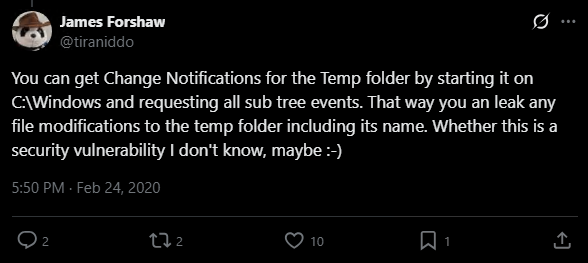
Handy trick from James Forshaw
The NSIS vulnerabilities described above are not specific to any single product; any software that ships a vulnerable NSIS installer and runs it with elevated privileges could be affected. In the following case studies, we demonstrate exploitation through Zscaler Client Connector’s IPC mechanism. First, we need to cover how the Zscaler IPC architecture works, as it is central to both attacks.
Zscaler Client Connector for Windows is composed of several co-operating processes that communicate over RPC via ALPC. Note that prior to version 3.1.0, ZSATrayManager did not exist and ZSATray communicated directly with ZSAService. The architecture described here applies to version 3.1.0 and later:
ZSATrayManager process in the current user’s session via CreateProcessAsUserW.NT AUTHORITY\SYSTEM. Receives commands from the tray process and carries out privileged operations, including launching installers and uninstallers. It exposes an ALPC port named ZSATray_talk_to_me, whose security descriptor grants the Everyone group Connect access.SYSTEM. Handles service management and configuration.SYSTEM. Operates the ZPA/ZPN tunnel and handles packet captures.The following screenshot shows the Zscaler process hierarchy, with ZSAService and ZSATrayManager running as SYSTEM and ZSATray running as the logged-on user:
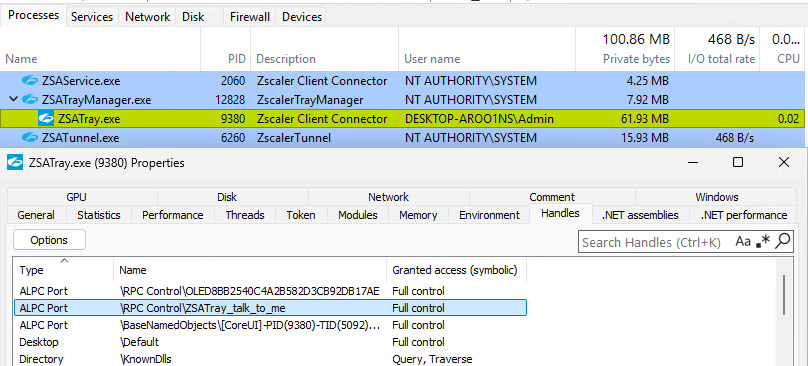
Zscaler process hierarchy and ALPC port
When a user performs a troubleshooting action through the tray UI - such as clicking “Repair App” or “Start Packet Capture” - the ZSATray process ultimately calls into ZSATrayHelper.dll to dispatch an ALPC message to ZSATrayManager. Depending on the command, ZSATrayManager either handles the operation directly or relays it to a backend service (ZSAService or ZSATunnel).
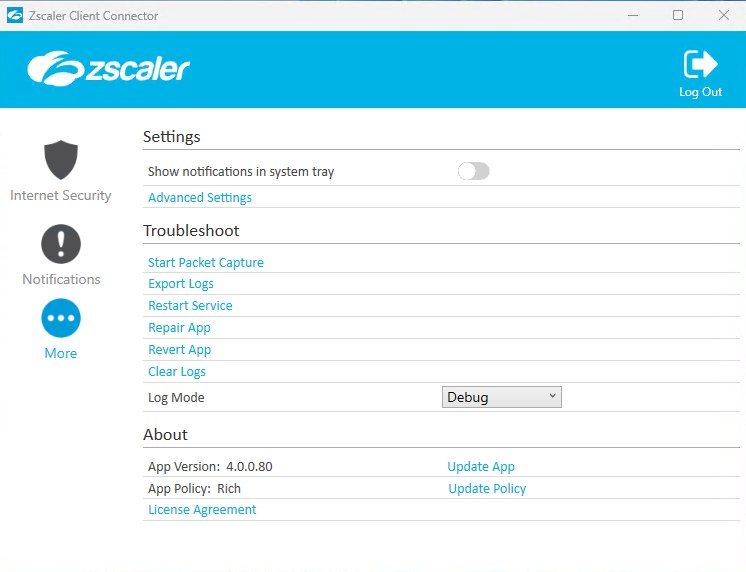
Zscaler Client Connector - Troubleshoot menu with Repair App and Start Packet Capture
To illustrate the flow: clicking “Repair App” in the GUI eventually results in a call to the sendZSATrayManagerCommand function exported by ZSATrayHelper.dll, with the PERFORM_APP_REPAIR (0x3b) command code:
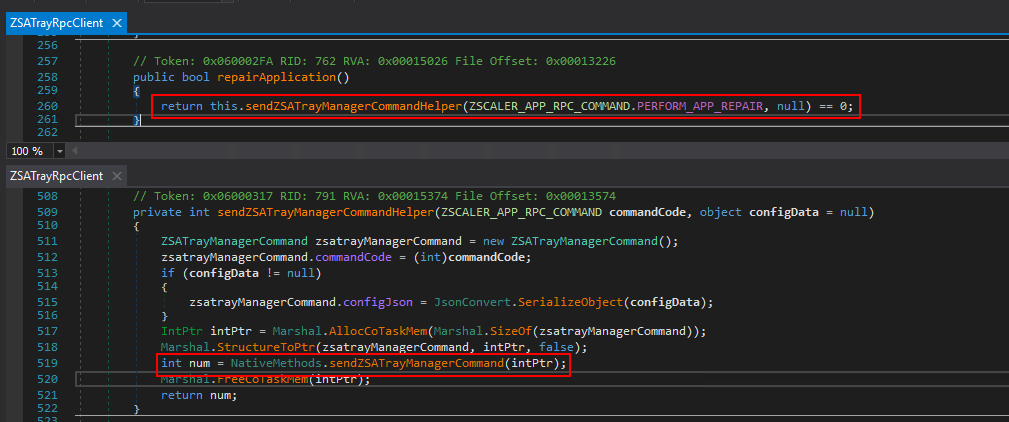
Decompiled ZSATray repairApplication function
The native side is implemented in ZSATrayHelper.dll, which exports sendZSATrayManagerCommand - a function that constructs and sends the RPC message to the ZSATrayManager endpoint.
To protect against unauthorised callers, ZSATrayManager registers a security callback via RpcServerRegisterIf2:
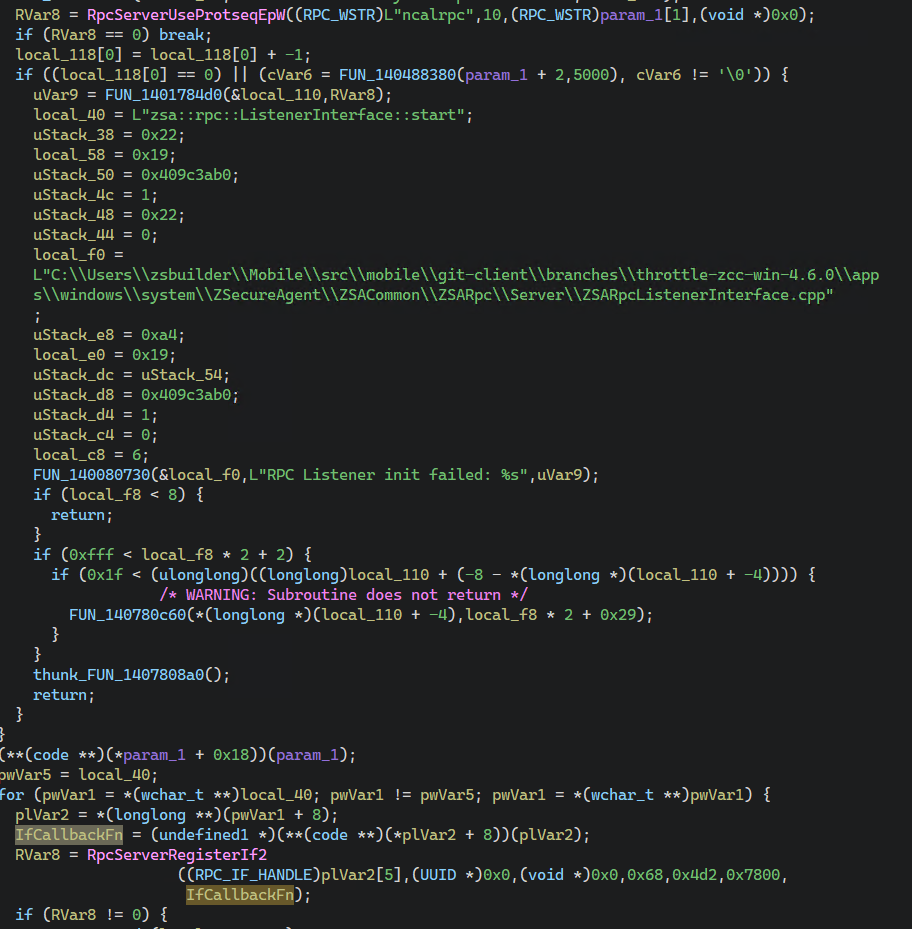
Decompiled ListenerInterface::start - RpcServerRegisterIf2 with IfCallbackFn
When an RPC call arrives, this callback retrieves the caller’s PID, opens the process, queries the image path with QueryFullProcessImageNameW, and verifies the Authenticode signature. If verification fails, the connection is rejected.
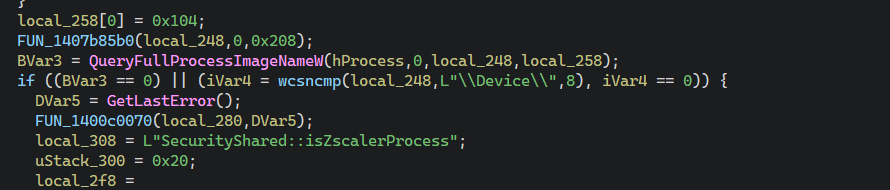
Decompiled isZscalerProcess - OpenProcess and QueryFullProcessImageNameW
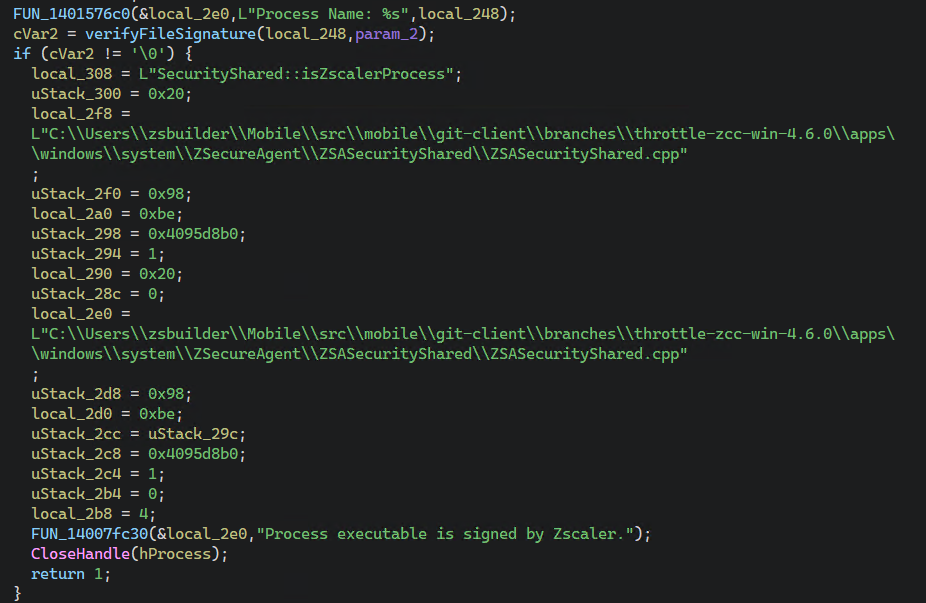
Decompiled isZscalerProcess - verifyFileSignature check
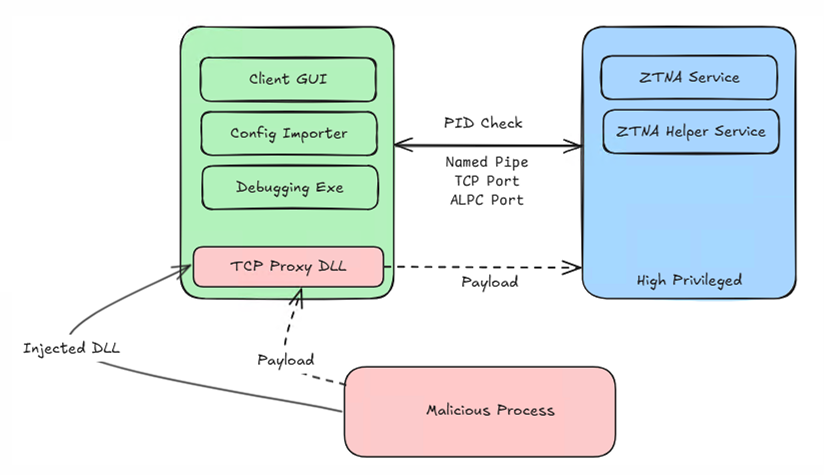
The weakness in this scheme is that the check only validates the calling process, not the calling code. By injecting into the low-privileged ZSATray.exe process, an attacker’s code inherits the trust of the host process - the RPC server sees a legitimately signed Zscaler binary making the call and allows it through.
The simplest way to exploit this is to take advantage of the fact that ZSATrayHelper.dll exports the sendZSATrayManagerCommand function, which accepts a pointer to a command structure containing the command code and an optional JSON configuration string. Since ZSATray.exe already has this DLL loaded, the attacker can resolve the function’s address via LoadLibraryEx/GetProcAddress, allocate memory in the ZSATray process for the command structure using VirtualAllocEx, write the desired command code with WriteProcessMemory, and then call CreateRemoteThread with the function address and the allocated structure as the parameter. This avoids the need to compile a full RPC client from IDL. A single CreateRemoteThread call is enough to trigger any supported RPC command.
Depending on the command, ZSATrayManager either handles the operation directly (e.g. launching the Npcap installer) or relays it to ZSAService (e.g. for application repair).
This architecture - where a low-privileged tray process communicates with a privileged backend service via RPC, with the caller validated by process signature - is common across ZTNA products including Zscaler and Netskope. The diagram below (from our DEFCON 2025 talk) illustrates the general pattern and how process injection bypasses the signature check:
The Zscaler-Network-Adapter (TAP driver) is provisioned when ZTunnel 1.0 is configured with route-based forwarding. If the driver needs to be reinstalled - for instance during an application repair - Zscaler invokes an NSIS-based uninstaller (and subsequently calls installer to re-install it).
Using the IPC bypass described above, an attacker can inject code into the ZSATray.exe process that sends the PERFORM_APP_REPAIR (0x3b) command through the ALPC channel to ZSATrayManager, which then relays it to ZSAService.
On receipt, ZSAService.exe begins the repair sequence, which includes reinstalling the Zscaler-Network-Adapter driver. It launches the NSIS-based uninstaller at C:\Program Files\Zscaler-Network-Adapter\Uninstall.exe with the /S (silent) flag, running under the SYSTEM account.

Procmon - ZSAService launching the Zscaler-Network-Adapter uninstaller as SYSTEM
Since the Network Adapter installer was never upgraded to a patched version of NSIS, the CVE-2023-37378 weak ACLs remained present across all Zscaler versions that shipped the Network Adapter - right up until it was removed in version 4.8. This gives us multiple exploitation routes.
The DotLocal/WinSxS redirection technique described in the CVE-2023-37378 section above works against the Zscaler Network Adapter trigger. We confirmed this on versions up to 4.7.0.141:
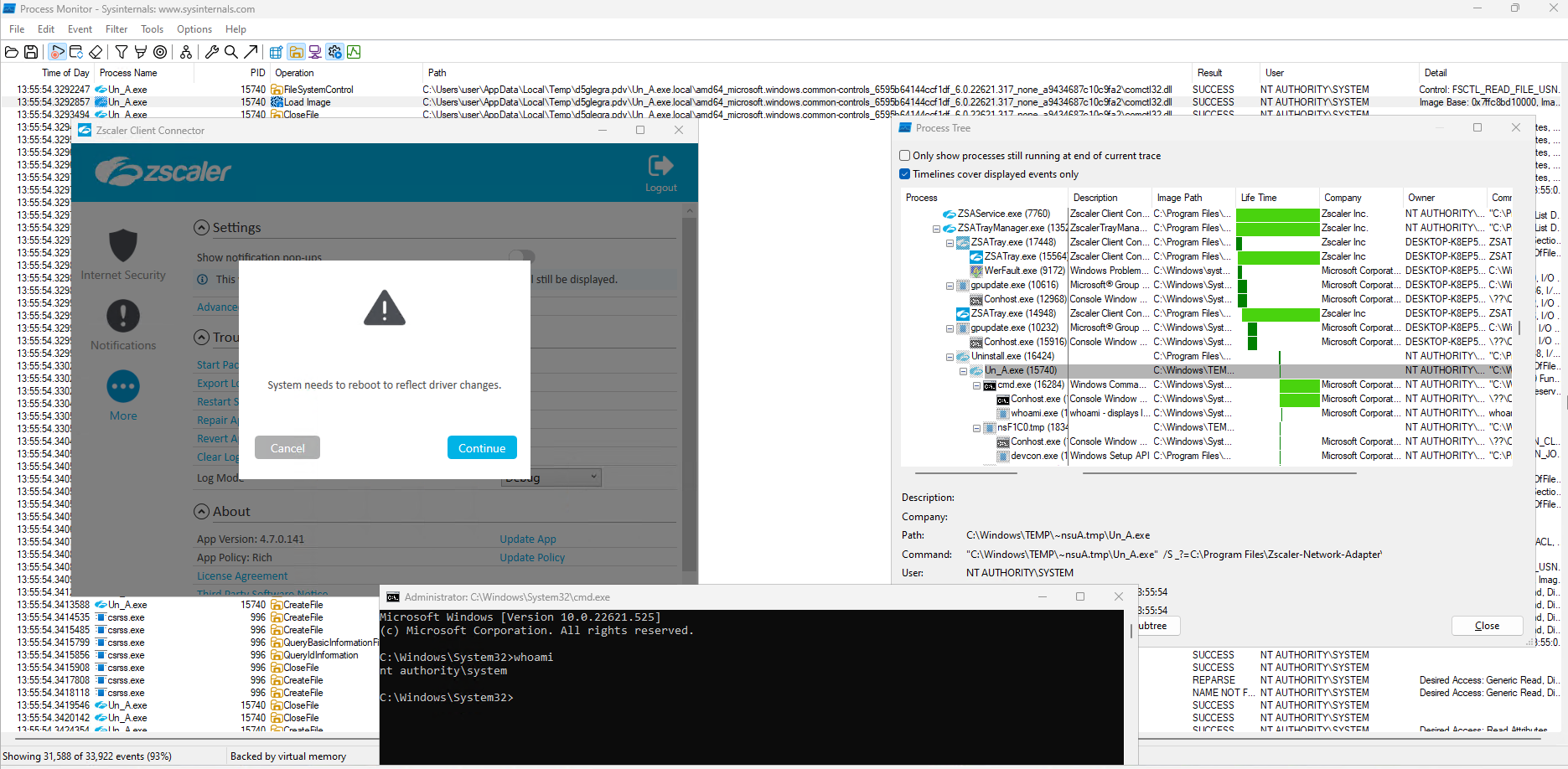
CVE-2023-37378 exploitation against Zscaler 4.7.0.141 - SYSTEM shell via DotLocal redirection
However, this technique relies on DotLocal behaviour which has been hardened in later builds of Windows 11.
An alternative approach that does not depend on DotLocal redirection is to use NTFS junctions to control where the uninstaller writes and reads Un_A.exe. As noted in the CVE-2023-37378 section, the uninstaller uses CopyFile to write Un_A.exe and then CreateProcess to launch it. If we can redirect the path between the write and the launch, we can swap in a malicious Un_A.exe.
We use junctions here because deleting a junction just removes the reparse point without needing to touch the target directory or any files inside it. This means we can swap the redirection even if handles are still open on files in the target - something that would prevent deletion of a regular directory.
The trick requires two levels of junction. We cannot swap ~nsuA.tmp itself after the uninstaller runs, because SetFileSecurity applies a restrictive DACL to it that removes write permissions - and deleting a junction requires write access. So instead, we chain two junctions and swap the second one, which remains under our control.
Since the ~nsuA.tmp directory does not exist until the uninstaller runs, and because the return value of CreateRestrictedDirectory is discarded, the attacker can pre-create it as a junction before triggering the repair:
C:\Windows\Temp\~nsuA.tmp as a junction pointing to workspace1workspace1 as a second junction pointing to workspace2 (a writeable directory under the attacker’s %TEMP%)workspace3 with a malicious Un_A.exe payload~nsuA.tmp -> workspace1 -> workspace2) and writes the real Un_A.exe to workspace2Un_A.exe appearing in workspace2 (indicating the write has completed)workspace1 junction and recreate it pointing to workspace3CreateProcess on Un_A.exe, it follows the updated chain (~nsuA.tmp -> workspace1 -> workspace3) and launches the attacker’s payload as SYSTEM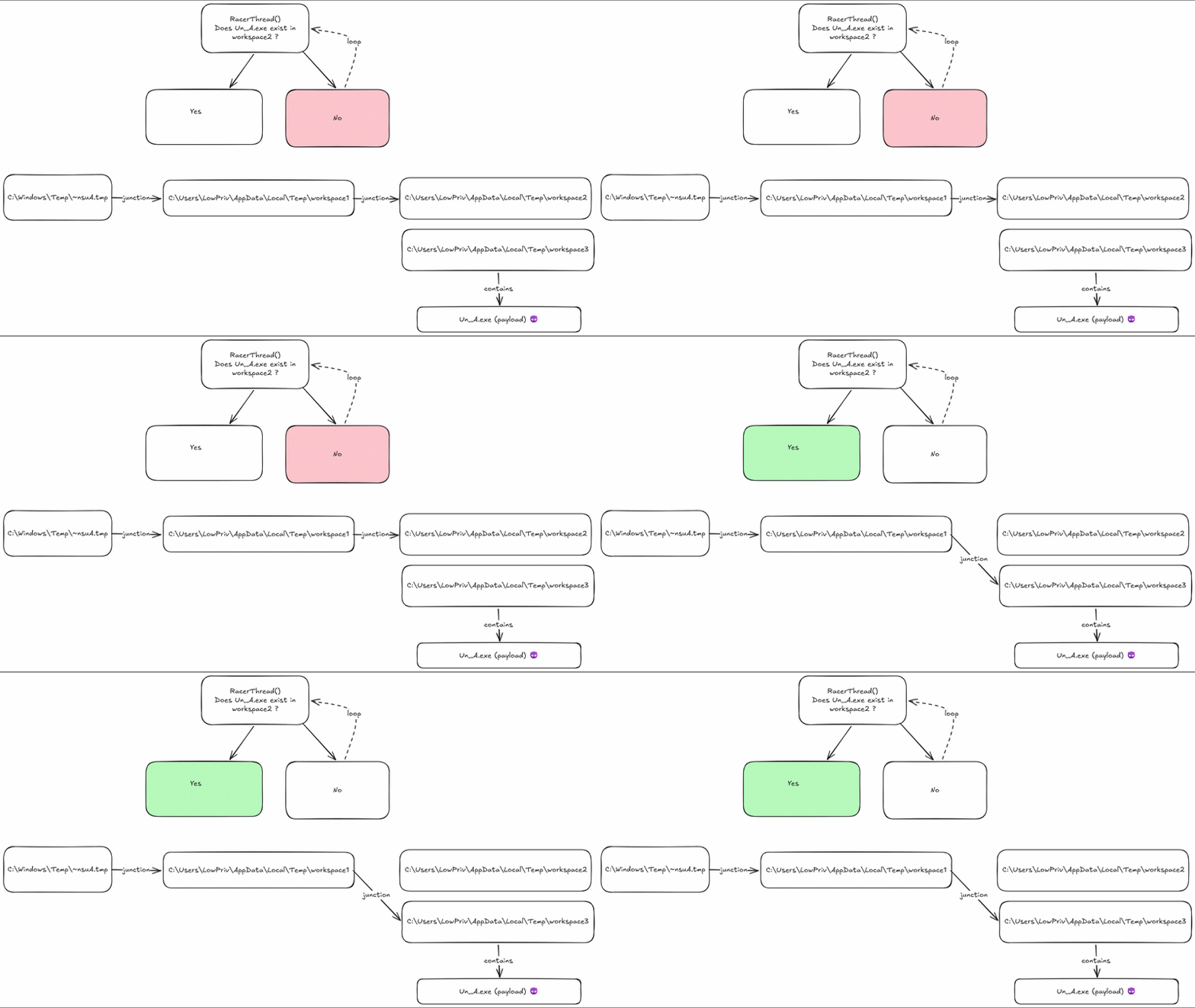
Junction swap technique - redirecting Un_A.exe between write and launch
This works on any version of Windows because it only relies on the weak DACL and standard NTFS junction behaviour.
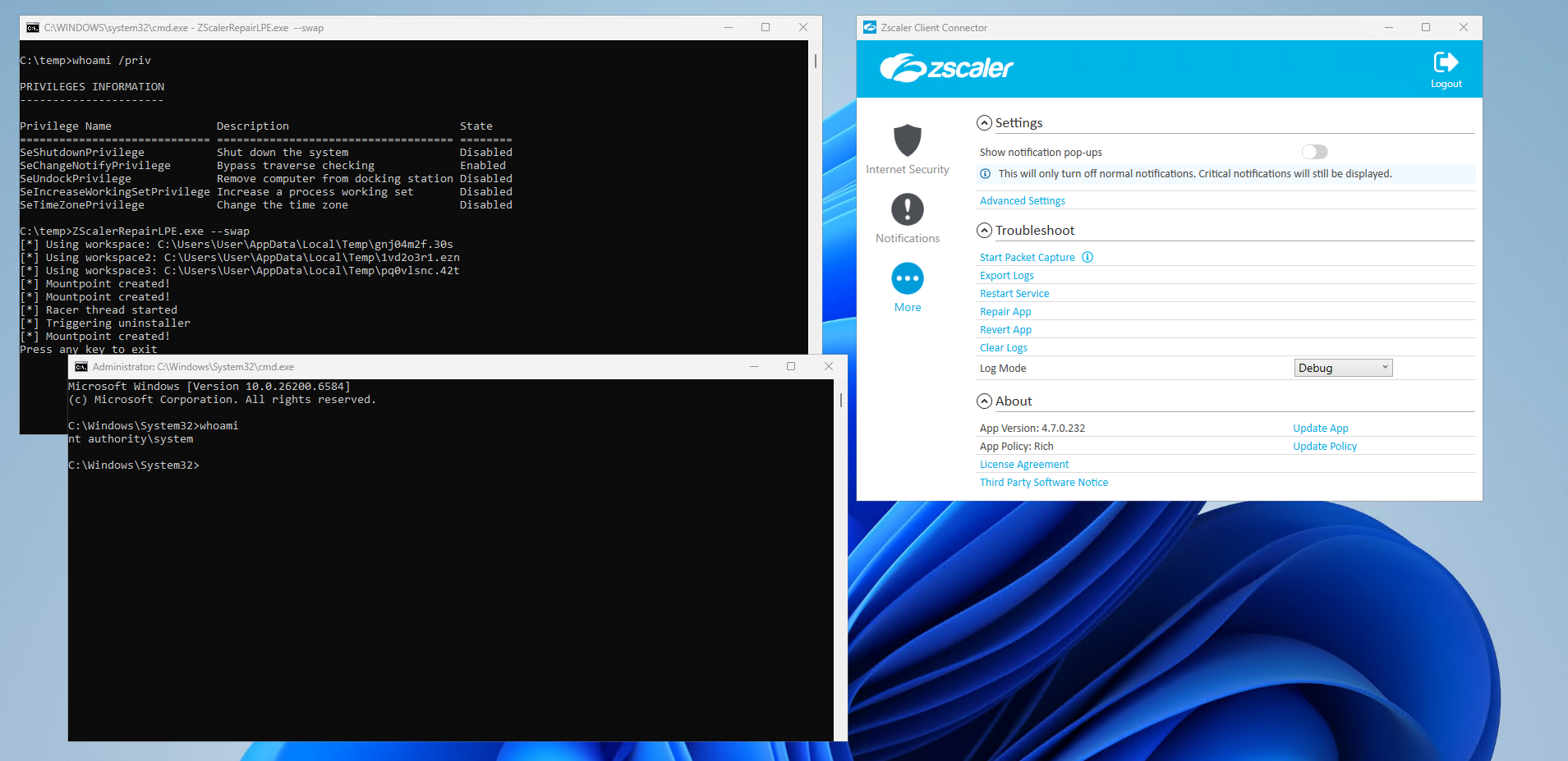
Successful exploitation of Zscaler 4.7.0.232 via junctions
The Network Adapter installer is also vulnerable to CVE-2025-43715, which provides a third exploitation route that does not depend on the weak ACLs at all. We’ll go into further detail about this later, however in summary, the attacker monitors C:\Windows\Temp for the deletion of the .tmp file and races to create a directory with the same name before the installer does. If successful, the installer finds the directory already exists, skips the restrictive ACL, and goes on to extract and load plugin DLLs (such as nsExec.dll) from the attacker-controlled folder.
Zscaler Client Connector’s packet capture feature relies on a bundled Npcap installer - itself NSIS-based. When a packet capture is started and Npcap is either missing or outdated, ZSATrayManager launches this installer with SYSTEM privileges.
This attack scenario closely mirrors another vulnerability, CVE-2020-11635, which I reported in Zscaler versions prior to 3.1.0 in 2020 (see archived Zscaler advisory). In the original finding, the Npcap installer (Npcap 0.9985, packaged with NSIS v2.51) called SetOutPath to change its working directory to C:\Windows\Temp part way through the install. It then executed several system binaries without specifying the full path, including net.exe, certutil.exe, pnputil.exe, and netsh.exe - which Windows resolved via the current working directory. Since C:\Windows\Temp is writable by all users, a low-privileged attacker could plant a malicious executable with one of those names and have it run under SYSTEM privileges.
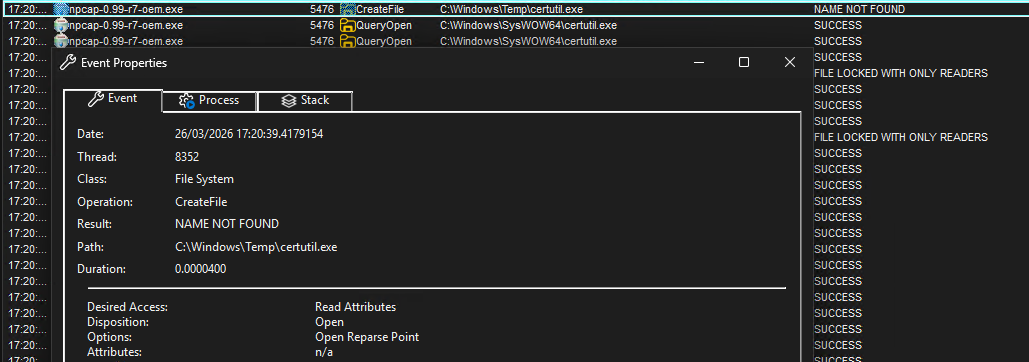
Procmon - certutil.exe launched with C:\Windows\Temp as the working directory
Zscaler addressed this by upgrading to a newer Npcap version that no longer searched the %TEMP% directory for these binaries. However, the underlying installer remained NSIS-based, and was subsequently affected by the CVE-2025-43715 race condition bug.
Using the same IPC bypass technique described in the Background section, the attacker injects code into ZSATray.exe that sends an INSTALL_NPCAP command to ZSATrayManager, which launches the Zscaler-signed Npcap installer as SYSTEM.

Procmon - ZSATrayManager launching the bundled Npcap installer as SYSTEM
Once the installer starts, it follows the previously described NSIS plugin directory creation pattern, first calling GetTempFileName to obtain a unique name in C:\Windows\Temp (e.g. nsXXXX.tmp), deleting the file, and then recreating it as a directory. To exploit this, the attacker simply needs to monitor the temp directory using NtNotifyChangeDirectoryFile, watching for file deletion events targeting files ending with .tmp.
When the deletion is detected, the exploit immediately creates a directory with the same name - beating the installer to the CreateDirectory call. Because the directory already exists when the installer tries to create it, NSIS sees ERROR_ALREADY_EXISTS with FILE_ATTRIBUTE_DIRECTORY and proceeds without applying the restrictive ACL. The attacker now controls the plugin directory.

Procmon - race condition during Npcap installer temp directory creation
With control of the plugin directory, the attacker can place arbitrary files inside it. There are two routes to code execution here:
nsExec.dll) into $PLUGINSDIR and loads them via LoadLibraryEx. If the attacker places a malicious plugin DLL in this directory, then it will be loaded instead.SetOutPath to change the working directory to $PLUGINSDIR before executing system binaries via nsExec, without specifying their full path. This is the same class of bug as CVE-2020-11635, but targeting a different writable directory. In our proof-of-concept, we place a malicious powershell.exe in the hijacked $PLUGINSDIR. When the installer script invokes powershell.exe without a full path, Windows resolves it from the current working directory first - executing our payload as SYSTEM.Proof-of-concept code for both case studies is available on GitHub:

Zscaler 4.8 release notes
Since these NSIS vulnerabilities affect far more than just Zscaler, the most useful detection approach is to identify which software in your environment ships with a vulnerable NSIS version, and baseline DLL loads/child process execution. The YARA rule below can help with this.
For the Zscaler-specific attack chain, the most practical detection opportunity is monitoring for process injection into ZSATray.exe, since this is required to bypass the RPC security callback.
The root cause of these temp directory issues is that GetTempPath returns C:\Windows\Temp for SYSTEM processes - a directory writable by all users. Starting with Windows 11 Build 22000, Microsoft introduced GetTempPath2, which returns C:\Windows\SystemTemp when called from a SYSTEM process. This directory is only accessible to SYSTEM and administrators. However, at the time of writing, this does not appear to be used by NSIS (potentially due to legacy support requirements).
Vendors launching installers from privileged services should consider setting the TEMP/TMP environment variables to a secure location (such as C:\Windows\SystemTemp) before spawning the installer process.
For end users, the preferred approach is to upgrade Zscaler Client Connector to a patched version (4.7.0.168+ for the Npcap issue, 4.8+ for the TAP driver issue). As a workaround on unpatched systems, administrators could override the TEMP and TMP environment variables for the affected service by adding them under HKLM\SYSTEM\CurrentControlSet\Services\<ServiceName>\Environment, pointing them to C:\Windows\SystemTemp instead of C:\Windows\Temp. Since GetTempPath checks TMP first then TEMP, this would cause the NSIS installer to use the restricted directory instead of the user-writable one.
The following YARA rule can be used to identify installers compiled with a vulnerable version of NSIS:
rule NSIS_vulnerable_version {
    meta:
        description = "Detects NSIS versions vulnerable to CVE-2025-43715 or CVE-2023-37378"
        author = "Rich Warren"
    strings:
        $exehead = "Nullsoft.NSIS.exehead"
        $version_mar_2022 = "<description>Nullsoft Install System v27-Jan-2022.cvs"
        $version_mar_2023 = "<description>Nullsoft Install System v30-Mar-2023.cvs"
        $version_3_10 = "<description>Nullsoft Install System v3.10"
        $version_3_0 = "<description>Nullsoft Install System v3.0"
        $version_2 = "<description>Nullsoft Install System v2."
    condition:
        $exehead and any of ($version_*)
}
The vulnerabilities in this post raise a broader question: when a security product ships a vulnerable third-party component, whose responsibility is it to tell customers?
NSIS is open source, widely used, and the CVEs are public. But the fact that a vulnerability exists in NSIS does not tell an organisation whether the copy of NSIS bundled inside their ZTNA product is actually exploitable. That requires understanding the specific context - whether the installer runs as SYSTEM, whether it can be triggered by an unprivileged user, and whether the temp directory lands somewhere writable. That analysis is not something end users should be expected to do themselves. It is the vendor’s job.
In both of the Zscaler case studies covered here, the vulnerabilities were reported directly to Zscaler and subsequently fixed. However, at the time of writing, Zscaler has not published security advisories for any of these fixes. Customers have no way of knowing, from Zscaler’s own communications, that these versions address exploitable privilege escalation bugs.
This is not a problem unique to Zscaler. Many vendors silently patch security issues in bundled components without issuing advisories, leaving customers unable to prioritise updates or assess their exposure. Security products in particular should be held to a higher standard - as we discussed in our DEFCON 2025 talk “Zero Trust, Total Bust”, the premise of Zero Trust requires you to first trust your vendor. Silent patching undermines that trust.
Thanks to Sandro Poppi for discovering and responsibly disclosing CVE-2025-43715, Jamie O’Hare for reviewing drafts of this post, and Amir Szekely for his responsiveness in addressing these issues in NSIS.
 Richard Warren
David Cash
Richard Warren
David CashAdvisory - Zscaler SAML Authentication Bypass (CVE-2025-549820)
Read Article
David Cash
Richard WarrenSummary Ok, so there’s no MSI this time but our last Delinea post was titled ‘MSI Strikes Back’ so we thought we’d stay on …
Read Article