 Iain Smart
- 17 Jan, 2025
Reproducing CVE-2024-9042: Command Injection in Windows Kubernetes Nodes
Recreating a vulnerability in log streaming via the Kubelet on Windows nodes
Read Article Darren McDonald
ThinOS writes core dumps triggered by the troubleshooting “Create Core Dump” action to an unencrypted partition. This option is accessible to unauthenticated users if permitted by the device’s configuration. An unauthenticated attacker may also be able to take advantage of previously created core dumps. These core dumps contain sensitive information and undermine the effectiveness of ThinOS’s storage encryption options. This is contrary to Dell documentation which states all partitions except the boot partition are encrypted.
Buried within Dell Security Advisory DSA-2025-225 is a single vulnerability not in a third-party component, CVE-2025-32752. There really is not a lot of detail, and I would argue the way this is presented is not entirely accurate. This blog post aims to describe how this vulnerability can be exploited to allow other cyber security experts and ThinOS administrators to understand what this vulnerability is and their potential exposure.
This vulnerability was identified when during an assessment of a Wyse terminal platform. One of my immediate objectives was to attempt to examine the storage, as this could allow me to determine the immediate impact if one of these devices was lost, stolen, or accessed by an attacker with physical access to a thin terminal.
Dell documentation states the device uses full disk encryption but does not provide any further details. The first thing I decided to do was open it up to see what kind of hardware I was dealing with. There was no SSD, NVMe, or other type of removable hard drive, but hunting around the motherboard I found an eMMC chip. This means the file system I want is on a chip mounted onto the motherboard.
So, to get the contents of the eMMC I either needed to get into the BIOS and load another OS or remove the eMMC and read it. Bypassing the BIOS seemed like the easier and less destructive choice. Reviewing the Dell documentation it mentions it is possible to reset the BIOS password by setting a jumper PIN to Service Mode which clears the BIOS password. Easy enough. It seems that it is possible to disable this reset in the BIOS, but this is disabled by default (probably to prevent devices from being effectively bricked if the password is lost).
JMP1 on the Wyse 5070 motherboard Overriding the BIOS Password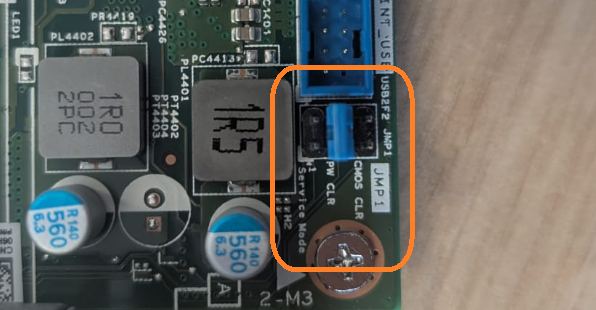
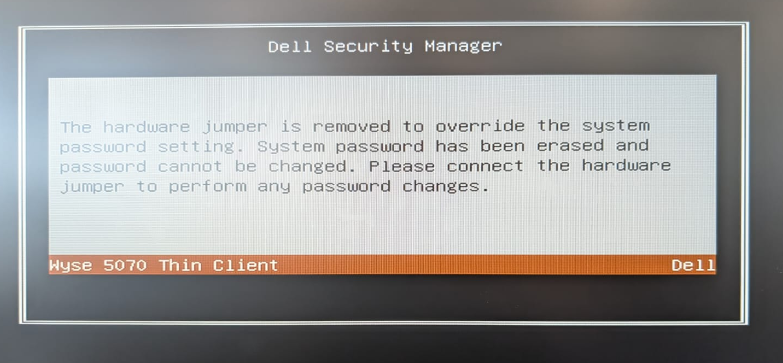
From here, secure boot can be disabled and the boot order changed through normal BIOS options. This allowed me to boot the device into a Linux operating system. From here, the data on the eMMC can be copied off to a USB stick using the Linux dd command and analysed on another machine. On this eMMC I found four partitions. There was an unencrypted boot partition, a couple of encrypted partitions for recovery and the OS, and a mystery partition labelled devdump.
Table 1: partitions present on eMMC
| Partition | Description |
|---|---|
| mmcblk0p1 | Boot partition |
| mmcblk0p2 | Geli encrypted recovery partition |
| mmcblk0p3 | Devdump |
| mmcblk0p4 | Geli encrypted OS file system |
Using binwalk, a tool for extracting files from firmware partitions and binary blobs, I was able to extract several unencrypted items, including two files compressed with zstd. These memory dumps are written to the third partition in unencrypted form.
notroot@blackbox2:~/Desktop/wyse$ binwalk -e mmcblk0p3
/home/notroot/Desktop/wyse/extractions/mmcblk0p3
---------------------------------------------------------------------------------------------------------------------------------------------
DECIMAL    HEXADECIMAL                        DESCRIPTION
---------------------------------------------------------------------------------------------------------------------------------------------
365974237  0x15D052DD  XZ compressed data, total size: 7494688 bytes
388579186  0x17293F72  gzip compressed data, operating system: Unix, timestamp: 2020-07-27 07:18:18, total size: 13612 bytes
388601579  0x172996EB  XZ compressed data, total size: 174430392 bytes
563032771  0x218F32C3  Windows PE binary, machine type: Intel x86-64
563358283  0x21942A4B  SHA256 hash constants, little endian
563370059  0x2194584B  AES S-Box
563486163  0x21961DD3  Windows PE binary, machine type: Intel x86-64
563726963  0x2199CA73  SHA256 hash constants, little endian
563730995  0x2199DA33  CRC32 polynomial table, little endian
563733731  0x2199E4E3  SHA256 hash constants, little endian
563734179  0x2199E6A3  Copyright text: "Copyright 1995-2017 Mark Adler "
563823953  0x219B4551  Windows PE binary, machine type: Intel x86-64
564148441  0x21A038D9  SHA256 hash constants, little endian
564160313  0x21A06739  AES S-Box
564267945  0x21A20BA9  Windows PE binary, machine type: Intel x86-64
564697321  0x21A898E9  Copyright text: "Copyright (C) 1994-2018 Lua.org, PUC-Rio $$LuaAuthors: R. Ierusalimschy, L. H. de Figueiredo, W. Cel"
564703137  0x21A8AFA1  SHA256 hash constants, little endian
564707137  0x21A8BF41  CRC32 polynomial table, little endian
564709873  0x21A8C9F1  SHA256 hash constants, little endian
564710321  0x21A8CBB1  Copyright text: "Copyright 1995-2017 Mark Adler "
564720897  0x21A8F501  CRC32 polynomial table, little endian
564840913  0x21AAC9D1  Windows PE binary, machine type: Intel x86-64
565166425  0x21AFC159  SHA256 hash constants, little endian
565178201  0x21AFEF59  AES S-Box
614813184  0x24A54E00  ZSTD compressed data, total size: 62822660 bytes
----------------------------------------------------------------------------------------------------------------------------------------------
[-] Extraction of xz data at offset 0x15D052DD failed!
[+] Extraction of gzip data at offset 0x17293F72 completed successfully
[-] Extraction of xz data at offset 0x172996EB failed!
[+] Extraction of zstd data at offset 0x24A54E00 completed successfully
---------------------------------Analyzed 1 file for 85 file signatures (187 magic patterns) in 11.1 seconds----------------------------------
A little further work and it becomes obvious that these zstd files contain unencrypted memory dumps, which can be triggered from the user interface. An unauthenticated attacker could trigger these crash dumps themselves if either:
"privilegeLevel":"Low" configuration option is set; or"privilegeLevel":"Customize" configuration option is set along with "PRIVILEGETroubleShoot":{"value":"yes"}However, no authentication is required to access existing memory dumps, whose contents vary depending on the device’s memory state at the time of the crash. I exploited this issue on three different devices, across two configurations, and was able to extract admin password hashes, certificates, application specific secrets, and Wi-Fi credentials.
Admin password hash
notroot@blackbox2:~/Desktop/wyse/extractions/mmcblk0p3.extracted/247B8E00$ strings zstd_247B8E00 | grep -i Admin
...
"AdminMode":{"value":"yes"},"AdminModeUsername":{"value":"REDACTED"},"AdminModePassword":{"value":"REDACTED"}
...
WiFi Passwords
notroot@blackbox2:~/Desktop/wyse/extractions/mmcblk0p3.extracted/24A54E00$ strings zstd_24A54E00 | grep "DeviceWireless" | grep -i pskpwd | head -n 6
"!DeviceWirelessIEEE8021XWpa2PskPWDo"
"!DeviceWirelessIEEE8021XWpa2PskPWDo"
"!DeviceWirelessIEEE8021XWpa2PskPWDo"
"!DeviceWirelessIEEE8021XWpa2PskPWDo"
"!DeviceWirelessIEEE8021XWpa2PskPWDo"
"[{"key":0,"value":{"DeviceWirelessSSID":"REDACTED","DeviceWirelessAlgorithm":"WPA2-PSK","DeviceWirelessIEEE8021XWpa2PskPWD":"REDACTED","DeviceWirelessIEEE8021XWpa3SaePWD":"","DeviceWirelessIEEE8021XEAPType":"EAP-PEAP","DeviceWirelessIEEE8021XLeapUN":"","DeviceWirelessIEEE8021XLeapPWD":"","DeviceWirelessIEEE8021XServerValidate":false ...
Taking a look at the information published by Dell, there are a couple of things I would disagree with.
Table 2: information publicly disclosed by Dell on CVE-2025-32752
| Proprietary Code CVEs | Description | CVSS Base Score | CVSS Vector String |
|---|---|---|---|
| CVE-2025-32752 | Dell ThinOS 2502 and prior contain a Cleartext Storage of Sensitive Information vulnerability. A high privileged attacker with physical access could potentially exploit this vulnerability, leading to Information Disclosure. | 4.9 | CVSS:3.1/AV:P/AC:H/PR:H/UI:R/S:U/C:H/I:L/A:L |
Source https://www.dell.com/support/kbdoc/en-uk/000325632/dsa-2025-225
Based on my description of how I exploited this issue, a high privileged attacker is not required, often this will be exploitable as an unauthenticated attacker. Breaking down the CVSS score, I think a more accurate representation of this vulnerability would be a AV:P/AC:L/PR:N/UI:N/S:U/C:H/I:L/A:L (5.7).
| Parameter | Dell | AmberWolf | Comment |
|---|---|---|---|
| Physical | Physical | Physical | Agreed. |
| Attack Complexity | High | Low | While the presence of a pre-existing crash dump might be beyond the user’s control, in a reasonable worst-case scenario we can assume there is one. This is the only factor outside the attacker’s control. |
| Privileges Required | High | None | In the reasonable worst case there already a crash dump present so the attacker doesn’t need to trigger one. Secure Boot/Boot order would be bypassed by setting the service jumper pin or the chip could be removed and read as this is possible in the default configuration. |
| User Interaction | Required | None | No user interaction is required, the reasonable worst-case device already has a crash dump present and so the attacker doesn’t need to trick the user into doing anything, they just need physical access. |
| Scope | Unchanged | Unchanged | Agreed. |
| Confidentiality | High | High | Agreed. |
| Integrity | Low | Low | Agreed. |
| Availability | Low | Low | Agreed. |
Of course, bug finders and vendors disagreeing on the CVSS score in this way is pretty typical. I provide my view here as a counter point for those looking to understand the exploitability of this issue.
In terms of exploitability of this issue is that the answer really is - it depends. If an unauthenticated attacker has physical access and there is no memory dump, and there are no vulnerabilities or misconfigurations which allow them to trigger one - this issue may be be unexploitable.
The sensitivity of this information can vary depending on the device configuration and what was in use or active at the time the memory dump was triggered.
Dell has released a patch, though I have not been able to retest this issue myself. I have been unable to get the Dell ThinOS image tooling working to be able to build specific versions of ThinOS. Hacking these devices is easier than using Dell-provided tooling.
If you cannot apply the patch, do not allow unauthenticated users to use the system tools and manually trigger crash dumps, as this significantly increases the exploitability of this issue. Consider the usual security practices, such as ensuring the devices are kept in a secure location, and proper disposal of the device when it has reached end-of-life. I would recommend against selling these devices if they have been used to handle sensitive data.
⭐️⭐️⭐️⭐️⭐️ Dell’s PSIRT team were straight forward to work with and provided a fast resolution. Would hack again.
Binwalk v3
DSA-2025-225
 Iain Smart
Recreating a vulnerability in log streaming via the Kubelet on Windows nodes
Read Article David Cash
 Richard Warren
The Delinea Protocol Handler suffers from a Remote Code Execution vulnerability in the sslauncher URL handler. This could be exploited by a malicious …
Read Article