 David Cash
 Richard Warren
- 26 Nov, 2024
Palo Alto GlobalProtect - RCE and Privilege Escalation via Malicious VPN Server (CVE-2024-5921)
Palo Alto GlobalProtect - RCE and Privilege Escalation via Malicious VPN Server (CVE-2024-5921)
Read Article
Richard WarrenIn Part 1 of this blog series we published an update to our NachoVPN tool, along with a write-up of a new code execution and privilege escalation technique for Ivanti Connect Secure. In this post we’ll be returning to Palo Alto GlobalProtect, and demonstrating how it’s still possible to execute arbitrary code as SYSTEM - even with the latest patches.
If you followed our original research and presentation, you’ll be familiar with the GlobalProtect attack, but to briefly summarise:

We reported this issue to Palo Alto PSIRT, and they implemented a fix in versions 6.2.6 and above, assigning CVE-2024-5921.
In the rest of this post, we’ll walk through how that patch blocks the original attack by preventing the client from installing a portal-supplied root certificate - and how we were able to bypass it using a downgrade attack, enabling arbitrary code execution and privilege escalation.
Following the release of GlobalProtect 6.2.6, a new registry setting called full-chain-cert-verify was added. In GlobalProtect versions prior to 6.2.8 and 6.3.3, this new registry setting could be set either directly in the registry or via the FULLCHAINCERTVERIFY=yes MSI argument during install. From versions 6.2.8 and 6.3.3, there is also a new setting called Enable Strict Certificate Check.
In terms of functionality, both of these settings work in largely the same way. The server-side Enable Strict Certificate Check setting simply applies the full-chain-cert-verify setting on first connection to the Portal.
So what does full-chain-cert-verify actually do? Well, it breaks our original attack-path, because now the PanGPS service will refuse to install the attacker-supplied CA certificate into the machine’s root store when connecting to the malicious Portal. This has the result of preventing the attacker-supplied MSI from being installed, since the attacker’s code-signing certificate would no longer be trusted by the user’s machine.
This means that to successfully exploit this path a root certificate must already be installed on the user’s machine. For legitimate deployments, any CA certificates required for GlobalProtect usage would be typically be pre-deployed via an MDM policy or other configuration management solution (e.g. InTune or SCCM). However, for an attacker - satisfying this prerequisite would not be possible, thus the exploit would be prevented.
A failed attack attempt with the full-chain-cert-verify setting enabled is shown in the log extract below. The client connects to the Portal and receives the configuration, but refuses to install the attacker-supplied root CA:
(P5504-T9208)Debug(12032): 08/04/25 17:52:05:806 Skip importing trusted root CA to store because portal's server certificate is not verified
Interestingly, despite the invalid certificate, the client still connects to the VPN and establishes a tunnel successfully. However, the MSI upgrade attack fails, as the MSI file is not signed with a code-signing certificate from a trusted CA:
(P5504-T9208)Debug(  39): 08/04/25 18:07:04:459 try verify file C:\Users\lowpriv\AppData\Local\Temp\_temp4912.msi
(P5504-T9208)Error( 224): 08/04/25 18:07:04:625 winverify Error is: 800b010a4c974a98.
(P5504-T9208)Error( 888): 08/04/25 18:07:04:625 file did not signed by us, return now
We can see this in Windows explorer if we check the Digital Signature properties on the downloaded MSI file:
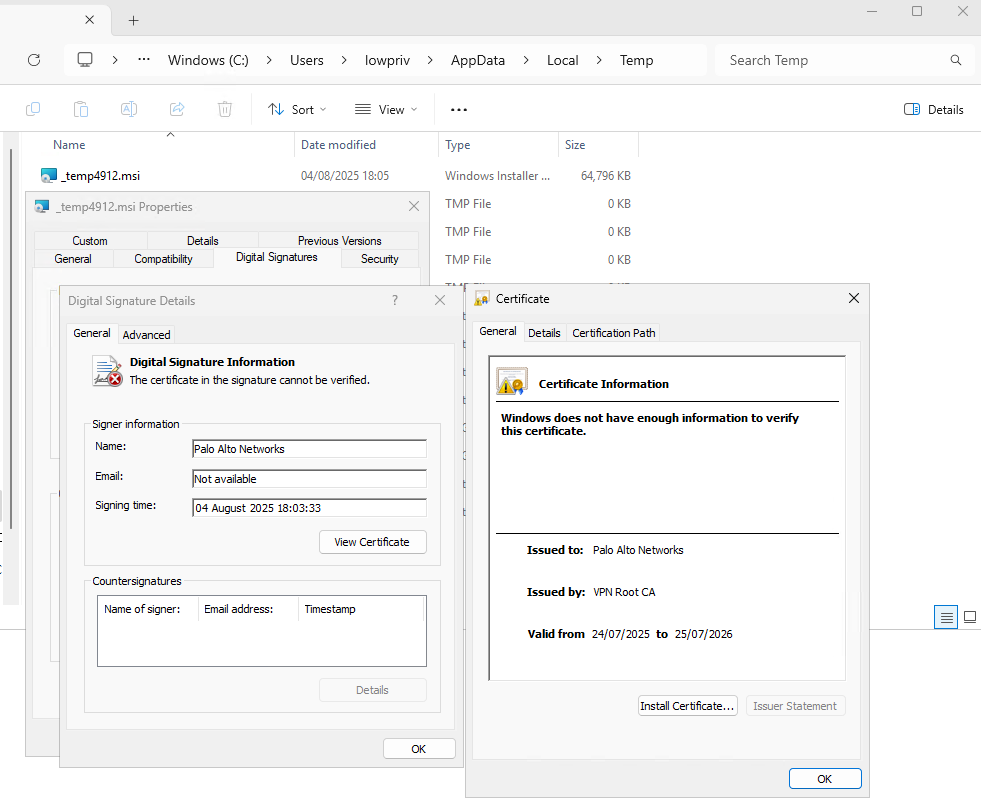
MSI with Invalid Signature
Ok - but what about downgrade attacks?
We actually discussed the potential for a downgrade-based bypass in our SANS HackFest Hollywood talk, prior to the release of the 6.2.6 patch. The relevant section is available here. At the time, we hadn’t confirmed whether the client would allow a downgrade-attack - but once the patch dropped, we decided to test it.
Since the client still connects to the Portal - and it’s the Portal that sets the required version (via the <version> configuration element) - we explored whether we could get the client to downgrade itself to a version prior to the patch for CVE-2024-5921. To help explain this, let’s take a look at what a malicious Portal configuration might look like.
When the user enters the malicious server name into the GlobalProtect client, the client connects to the Portal and fetches the configuration via a request to /global-protect/getconfig.esp. The response might look something like this:
<?xml version="1.0" encoding="UTF-8"?>
<policy>
  <portal-name>GP-portal</portal-name>
  <portal-config-version>4100</portal-config-version>
  <version>6.3.3</version>
  ..
    <root-ca>
    <entry name="GlobalProtectCA">
      <cert>
		MII<!-- Attacker's root CA goes here -->
	  </cert>
      <install-in-cert-store>yes</install-in-cert-store>
    </entry>
  </root-ca>
  ...
If this version is higher than the currently installed version of the GlobalProtect client, then the client will download the newer version from the server, which as we mentioned earlier (on older versions), could be backdoored and re-signed using the rogue CA also included in the Portal configuration response.
But what about if we specify a lower version?
(P5544-T16252)Debug(1235): 08/04/25 13:45:07:978 CSessionPage::ProcessClientRole - Transparent update flag. Upgrade only, downgrade won't happen.
..
(P5544-T16252)Debug( 405): 08/04/25 14:12:13:348 CPanClient::startUpgradeProcess - Downgrade won't continue if it is not from manually check-update.
As shown in the above log extract, the client refuses to downgrade to the lower version specified in the Portal config.
However, if we specify a higher version in the Portal config, but then actually serve a lower (unpatched) version of the MSI when the client downloads it from the server, we could trick the client into downgrading.
Now our Portal config might look something like:
<?xml version="1.0" encoding="UTF-8"?>
<policy>
  <portal-name>GP-portal</portal-name>
  <portal-config-version>4100</portal-config-version>
  <version>6.3.4-d30d4aca92150d2a</version>
  ..
When the client sees this higher version returned via the Portal configuration, we get a different response:
(P5916-T3732)Info ( 732): 08/04/25 19:54:57:798 #### updater started, command is C:\Users\lowpriv\AppData\Local\Temp\_temp12652.msi
(P5916-T3732)Debug(  39): 08/04/25 19:56:57:798 try verify file C:\Users\lowpriv\AppData\Local\Temp\_temp12652.msi
(P5916-T3732)Debug( 144): 08/04/25 19:56:57:948 the file C:\Users\lowpriv\AppData\Local\Temp\_temp12652.msi is signed and the signature was verified.
(P5916-T3732)Debug( 524): 08/04/25 19:56:57:948 Subject Name: Palo Alto Networks
Importantly, the MSI served here is not malicious - it’s the original, signed installer for GlobalProtect 6.2.5, which does not contain the full-chain-cert-verify check, but will pass the signature check.
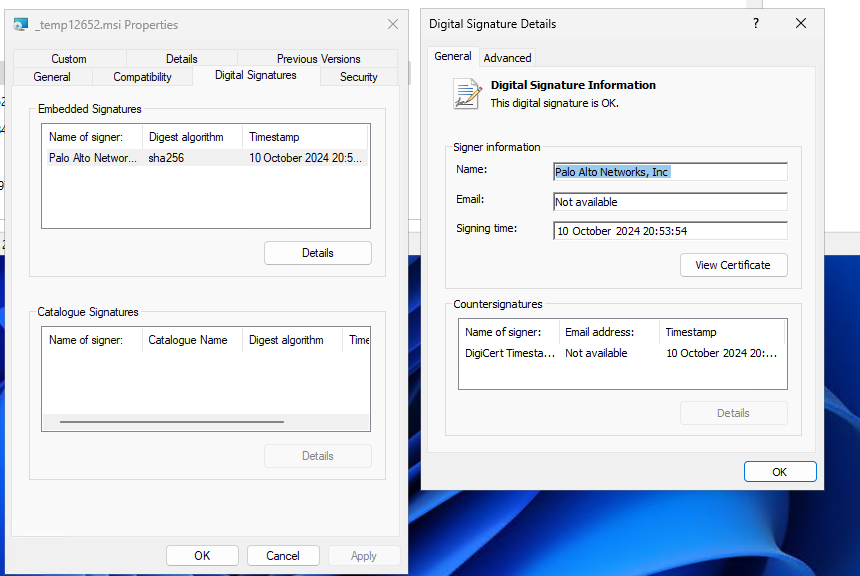
Original, Unmodified MSI Installer for 6.2.5 is Served
This is then installed by the PanGPS service, and the client is rolled back to the vulnerable version.
When the client re-connects to the malicious server, the attacker can simply exploit the original GlobalProtect client upgrade attack, as per the CVE-2024-5921 exploit-path - serving a malicious MSI, signed with the CA certificate which is now dutifully installed by the vulnerable PanGPS service.
The demo below shows the downgrade attack in action. Playback has been sped up for brevity, but you’ll see that:
cmd.exe prompt running as SYSTEM is launched on the user’s desktop - demonstrating arbitrary privileged code execution.We disclosed this issue to the Palo Alto PSIRT team on 2024-11-28. Whilst we received an acknowledgement that the issue was being investigated, the issue was not resolved within the 90-day disclosure window as outlined in our Vulnerability Disclosure Policy, and we are currently still able to reproduce the issue in the latest version of GlobalProtect (6.3.3-650 at the time of writing). Therefore, we have taken the decision to disclose this issue publicly, so that organisations can take the necessary steps to mitigate the downgrade attack described in this blog post.
Furthermore, we’ve updated our NachoVPN tool to demonstrate the downgrade attack, so that security teams can demonstrate and test the effectiveness of these mitigations.
As per the advice given in our previous blog post(s) and the NachoVPN GitHub repo, the following mitigations still apply:
full-chain-cert-verify (or Enable Strict Certificate Check), and FIPS-CC Certificate Validation).no in order to prevent users from connecting to non-approved VPN endpoints.HKEY_CURRENT_USER\SOFTWARE\Palo Alto Networks\GlobalProtect\Settings\<VPN ENDPOINT>\Configurations2 registry setting, either through the use of SACLs or using an EDR solution. This may help to detect attempts at bypassing the “Allow User to Change Portal Address” setting. David Cash
Richard Warren
David Cash
Richard WarrenPalo Alto GlobalProtect - RCE and Privilege Escalation via Malicious VPN Server (CVE-2024-5921)
Read Article
Richard WarrenWhat’s better than logon scripts? SYSTEM shells. NachoVPN now abuses Ivanti remediation logic to load rogue DLLs over SMB and hijack Wow64 …
Read Article