 Richard Warren
 David Cash
- 09 Aug, 2025
Advisory - Zscaler SAML Authentication Bypass (CVE-2025-54982)
Advisory - Zscaler SAML Authentication Bypass (CVE-2025-549820)
Read Article
Richard Warren
David CashIt was possible to bypass the “Secure Enrollment” feature in Netskope and enrol arbitrary users, without authentication or knowledge of the enrolment token for the target organisation - as long as an enrolment token for another, unrelated organisation is known.
The impact of this issue is that a malicious actor from one organisation (or an attacker who has compromised an organisation), can bypass authentication and enrol new users with Netskope Private Access (NPA) in another organisation that uses Secure Enrollment. Exploitation of this issue would provide the attacker with the same network access afforded to the user they choose to impersonate.
The Secure Enrollment feature works by adding an extra piece of secret authentication material that is required in order for a user to enrol into an organisation that is using the Secure Enrollment feature. This extra information is referred to as the enrolment token. The Secure Enrollment feature was added in response to CVE-2024-7401, which allowed an attacker to enrol with knowledge of only the OrgKey for an organization - which could be trivially leaked (see - Leaking the OrgKey section later in this post).
To combat this, Netskope introduced Secure Enrollment mode, which uses an additional token which needs to be deployed to the user’s machine before they can be enrolled in a Netskope tenant. The intended purpose here is that even if an attacker can discover the OrgKey, they would still not be able to enrol in the Netskope tenant without knowledge of the enrolment token.
There are several problems with this, however:
On a technical level, the enrolment token works by adding a new HTTP request during enrolment, which looks like the following:

As shown in the above screenshot. The client makes an HTTP request to the /v1/branding/tenant/<OrgKey> endpoint. The request contains a JWT token which is used for authentication, and contains the following parameters (when decoded):
{
  "Iss": "client",
  "OrgKey": "RyhXFIvurpsqjZPvnAly",
  "UPN": "user%40example.com",
  "UTCEpoch": 1741602516,
  "exp": 1741606092,
  "nbf": 1741602515
}
This JWT uses the HS256 signing algorithm and is signed with the enrolment token. The server then performs a check to ensure that the JWT is signed correctly with a valid enrolment token, and raises an error if the token is not signed properly. For example, if we attempt to modify the token and re-sign it with an invalid key, or using the none signing algorithm, we get the following error:
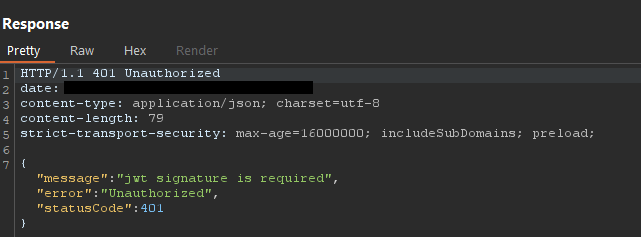
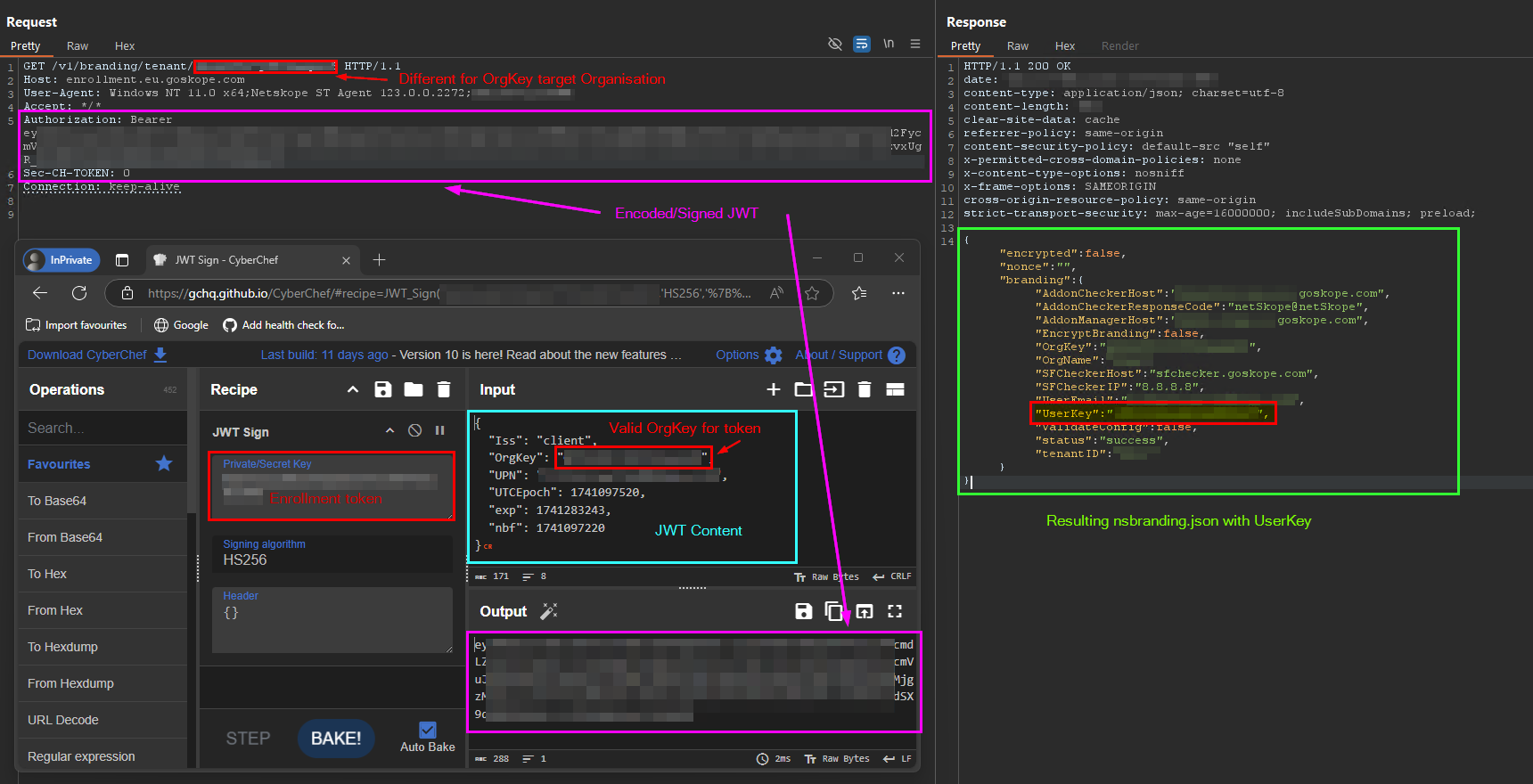
As shown above, the client sends the OrgKey in both the URL of the HTTP request, and JWT content. However, upon testing it was revealed that the server only checks the enrolment token is valid for the OrgKey value specified within the JWT. Whereas the enrolment request in fact uses the OrgKey from the URL in order to generate the response. What this means is that an attacker could supply a JWT signed validly with a known enrolment token for one organisation (specified the correct OrgKey in the JWT), but then specify a different OrgKey in the HTTP URL. When processing this crafted request, the server would validate that the JWT was signed correctly, but would result in the user being enrolled in the organisation specified in the URL.

The following screenshot demonstrates exploitation of this issue. As shown, in the foreground, the CyberChef tool is used to sign a JWT with a known enrolment token for organisation A, specifying the correct OrgKey in the JWT content. Then, the OrgKey is changed in the HTTP request URL to specify organisation B’s OrgKey. This results in the server validating the JWT and issuing the nsbranding.json file for organisation B. This response contains the UserKey value, which is all that is needed to complete enrolment and gain access to NPA for the target organisation.
Note: Netskope recommends that device checks are used to help mitigate the risk from rogue device registration, however as demonstrated in our DEFCON 33 talk, these device checks can be bypassed/spoofed.
As mentioned earlier, there are two ways to leak the OrgKey. The first way has been publicly documented and relies upon the OrgKey being leaked in the IdP authentication flow.
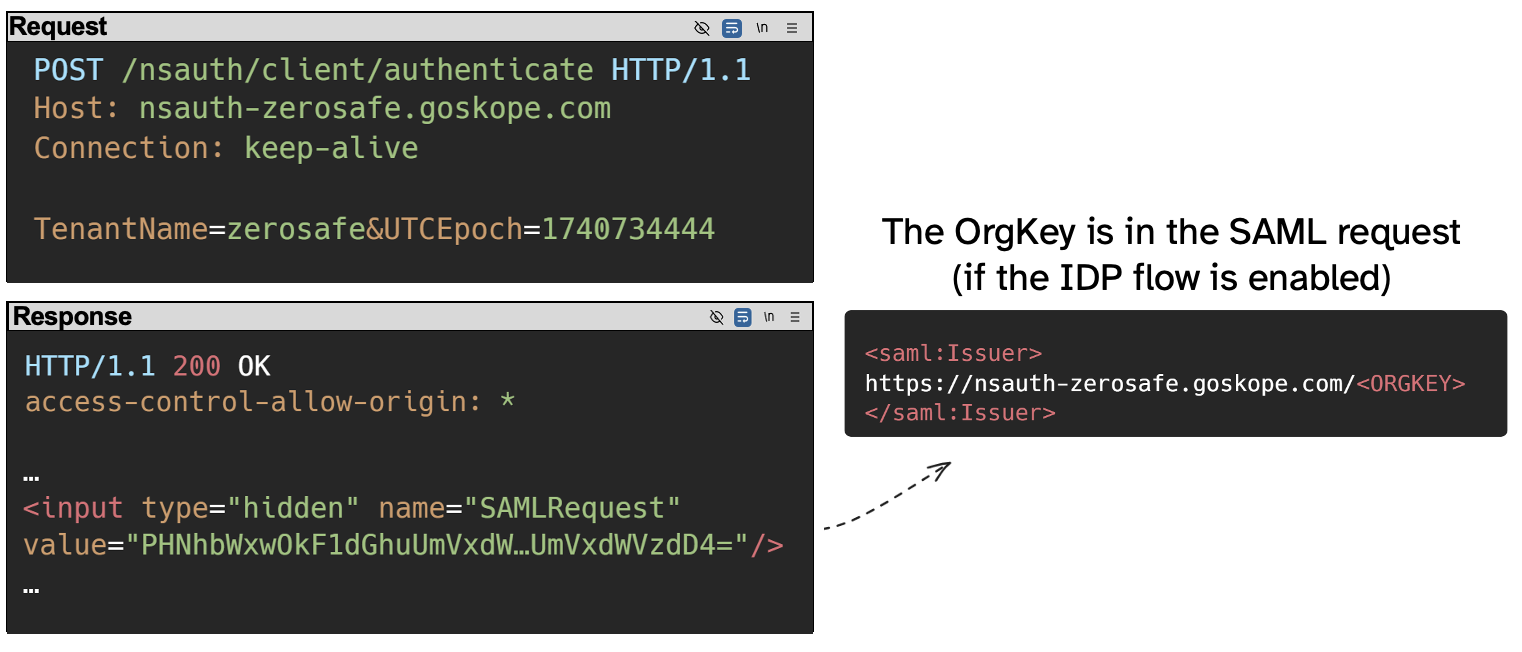
If the tenant is configured with the IdP enrolment method, the client makes a POST request to the /nsauth/client/authenticate endpoint, providing the TenantName and UTCEpoch parameters. The server then responds with a HTML form which contains an input field with the SAMLRequest parameter. When decoded from base64, this contains the <saml:Issuer> element, which itself contains the OrgKey in the format: https://nsauth-tenant.goskope.com/$ORGKEY. This is shown in the following diagram:
If the tenant is not configured with the IdP enrolment method, the OrgKey may still be leaked via the admin panel IdP authentication flow.
Whilst not all tenants use an IdP provider for enrolment (for example they may use Secure Enrollment with UPN for enrolment), it is commonplace for IdP to be used for authentication to the admin panel, e.g. <tenant>.goskope.com. In this scenario, when visiting the admin URL for a tenant configured to use an IdP for admin authentication, the server will respond with a 302 redirect to the tenant’s configured identity provider. The redirected URL contains a SAMLRequest which, when decoded, also contains a <saml:Issuer> parameter which leaks the OrgKey for the tenant. During our testing, we found that this configuration is typically more common than Method 1 for leaking the OrgKey value, and many such instances can be found passively using online services such as urlscan.io.

The following video demonstrates the cross-org authentication bypass.
First, the attacker runs the exploit script providing the target tenant details (UPN and OrgKey - remember this can be leaked from an unauthenticated perspective). The attacker provides the target tenant OrgKey and Secure Enrollment token for the source tenant.
The server responds with a UserKey and usercert.p12 file which can be used to register a new machine with Netskope.
On the attacker’s machine, they import the certificate and the branding file. After restarting Netskope, they are now enrolled in Netskope and are connected to NPA.
We reported this vulnerability to Netskope’s PSIRT team on 2025-03-14
The issue was fixed server-side by Netskope in version 126.0.0, which was released on 2025-05-12. The server now validates that the OrgKey within the JWT matches the OrgKey specified in the HTTP GET parameter
No CVE was issued for the vulnerability, however some details can be found in the release notes published here, which states:
“Netskope fixed a security gap involving the validation of secure enrollment token(s), in which the token(s) could potentially have been abused from one tenant to impersonate a user from another tenant.”

 Richard Warren
David Cash
Richard Warren
David CashAdvisory - Zscaler SAML Authentication Bypass (CVE-2025-549820)
Read Article
Gavin HoltUncovering critical flaws in ZTNA solutions, allowing attackers to escalate privileges on end user devices and to completely bypass authentication, …
Read Article